PixVerse: AI Video Generator


PixVerse: AI Video Generator Summary
PixVerse: AI Video Generator is a free, ad-supported, with in-app purchases Android app in Photo And Video by PixVerse. Released in Sep 2024 (2 years ago). It has about 76.6M+ installs and 4.5M ratings with a 4.55★ (excellent) average. Based on AppGoblin estimates, it reaches roughly 1.1M monthly active users and generates around $100K+ monthly revenue (76% IAP / 24% ads). Store last updated Sep 28, 2026
Recent activity: 195K installs this week (1.1M over 4 weeks) showing below average growth , and 8.6K new ratings this week View trends →
SDK intelligence: AppGoblin detected 10 development tools(e.g. Google), 6 ad networks, 2 mediation, 2 analytics: product, 2 business tools,and 1 analytics: attribution integrated into PixVerse: AI Video Generator. View full SDK list →
Data tracking: The app's network data flows (API traffic to/from the app and its SDKs) were last crawled on Jun 16, 2025.
PixVerse: AI Video Generator SDKs Summary
PixVerse: AI Video Generator was last scanned for SDKs on 2026-09-22. Below is the overview of third-party companies detected in the app. The full list of SDKs, permissions and unknowns is available here.
PixVerse: AI Video Generator has 6 Ad Networks SDKs
 Google
 Facebook
 AppLovin
 ByteDance
PixVerse: AI Video Generator has 10 Development Tools SDKs
 Square
 Flutter
 Kotlin
PixVerse: AI Video Generator has 1 Analytics: Attribution SDKs
 AppsFlyer
PixVerse: AI Video Generator has 2 Mediation SDKs
 AdMob
AdMobPixVerse: AI Video Generator has 2 Analytics: Product SDKs
 Firebase
 SensorsData
PixVerse: AI Video Generator has 2 Business Tools SDKs
 Tencent
 Keepsafe
4.55★
Ratings: 4.5M
Screenshots


App Description
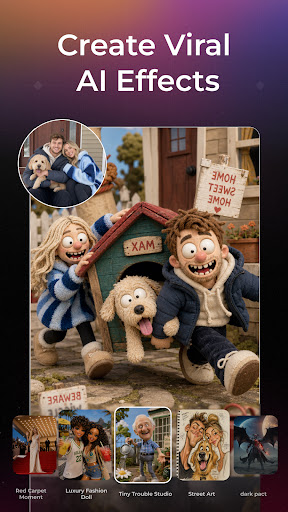
Create viral videos with fun AI effects! Simple way to animate and edit AI video
PixVerse is an all-in-one AI creation app powered by PixVerse V6, with access to a range of leading external models to support more creative needs.
Create AI images and videos from text or photos, explore trending effects, make talking avatars, enhance visuals, generate music videos, add sound effects, and more.
🚀 AI Video and Image Creation Tools
• Text-to-Image: Create high-quality AI images from text prompts, including characters, scenes, styles, products, and creative concepts.
• Text-to-Video: Turn prompts into cinematic videos in different styles with PixVerse V6 and other advanced AI models.
• Image-to-Video: Animate photos and transform still images into dynamic videos.
• AI Templates: Start fast with trending templates for dance, transformations, product promos, social media videos, and more.
• Modify Video: Edit selected parts of a video using references such as images, clips, or modes.
• Upscale: Enhance images and videos to clearer, higher-resolution quality, with video upscaling support up to 4K Ultra HD.
• Motion Control: Upload a character image and a reference motion video to guide character movement.
• Transition: Connect the first and last frames of a video with a smooth AI-generated transition.
• Endless Video Extension: Continue your video by describing the next scene.
• Reference: Upload multiple reference images to guide video generation for characters, objects, scenes, and styles.
🎵 AI Audio and Avatar Tools
• Lip-Sync: Upload a character, type dialogue or upload an audio file, and create a talking AI avatar with natural lip-sync.
• Vibe MV: Upload music to create an AI music video with a custom character, style, lip-sync, and optional subtitles.
• Sound Effect Generator: Upload a video and describe the sound effect you want to blend into the scene.
🖼 AI Image Editing Tools
• Image Edit: Upgrade your photos with powerful AI editing. Upscale images for ultra-clear quality, erase unwanted areas with a brush, remove passersby or backgrounds in one tap, replace backgrounds instantly, and enhance colors and lighting for a more polished, professional look.
🔥 Trending AI Video Effects & Templates
• AI Dance: Create AI dance videos with trending dance styles, viral moves, and classic choreography.
• Transformation Series: Turn photos into dramatic new scenes and identities, including muscle looks, mech suits, red carpet moments, and luxury car shots.
• Beauty and Glamour Series: Create beauty, fashion, and portrait looks with runway styles, angel wings, cinematic rain or mist, and black-and-white portraits.
• Miniature World Series: Turn photos into tiny characters and playful miniature scenes.
• Style Transfer: Redraw photos in different art styles, including fashion illustration, anime-inspired looks, sketches, comics, watercolor, and more.
✅ Supported Models
PixVerse supports PixVerse V6 and selected third-party models for image and video creation. Available models include Qwen-Image, GPT Image 2, Nano Banana, Seedream, Kling, Seedance 2.0, Grok Image, Happy Horse, Veo, and Sora. Model availability may vary by feature, region, and app version.
✨ Why Choose PixVerse?
• Fast Creation: Generate HD results in seconds.
• Realistic Motion: Create expressive movement and cinematic visual effects.
• Easy to Use: No technical skills required.
• All-in-One Workflow: Create images, videos, AI templates, talking avatars, music MVs, sound effects, and image edits in one app.
Join millions of creators worldwide and redefine storytelling with PixVerse.
Download now – where imagination becomes reality!
Continue your creative journey with PixVerse across platforms:
🛠 Official Hub: https://app.pixverse.ai
💡 API Integration: https://platform.pixverse.ai