Product Scan: 대한상공회의소 상품 스캐너


Product Scan: 대한상공회의소 상품 스캐너 Summary
Product Scan: 대한상공회의소 상품 스캐너 is a mobile Android app in Productivity by 대한상공회의소. Released in Dec 2019 (6 years ago). It has about 4.1K+ installs Based on AppGoblin estimates, it reaches roughly 217 monthly active users . Store metadata: updated Feb 28, 2025.
Recent activity: 14 installs this week (46 over 4 weeks) showing steady growth View trends →
Store info: Last updated on Google Play on Feb 28, 2025 .
0★
Ratings: 0
Screenshots



App Description
We support users to check and manage accurate product information by utilizing the “Distribution Product Standard DB” of the Korea Chamber of Commerce and Industry.
Product Scan
This service is provided for product information inquiry and data quality management registered in the'Distribution Product Knowledge Bank' operated by the Korea Chamber of Commerce and Industry (Distribution and Logistics Promotion Agency).
If the product information cannot be searched or an error in the registered product information is found, [Register a new product] or [Request for correction] is immediately possible.
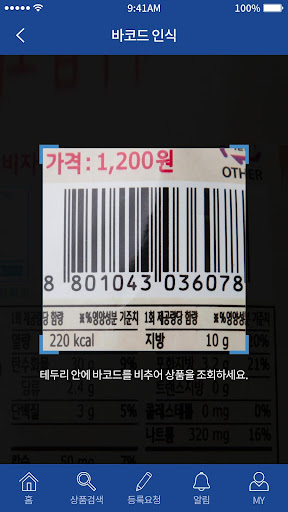
Products can be searched by simple barcode scan or manufacturer/product name.
Depending on the user's authority, basic information for each product, country of origin, nutrition, raw materials, and other additional information can be viewed.
[Manufacturer user]
Inquiry about company product information, check whether the standard database for distribution products is registered in the Korea Chamber of Commerce and Industry
Product information error correction, missing product and new product information registration request, etc.
[Distributor User]
Check handling products, check whether illegal barcodes are attached, etc.
[General User]
Purchased product inquiry, product information error report, etc.
Select access rights guide
Camera: Use the function to scan barcodes.
Photo Book: Use the photo import function.
*If you do not agree to the above access, you will not be able to use some functions of the service.