Attendance Register (students/


Attendance Register (students/ Summary
Attendance Register (students/ is a ad-supported, with in-app purchases Android app in Education by Rudra Nirvan. Released in Jan 2014 (12 years ago). It has about 1.2M+ installs and 9.1K ratings with a 4.31★ (good) average. Based on AppGoblin estimates, it reaches roughly 89.7K monthly active users and generates around $<10K monthly revenue (55% IAP / 45% ads). Store metadata: updated Dec 6, 2024.
Recent activity: 1.2K installs this week (6.6K over 4 weeks) showing steady growth , and 6.00 new ratings this week View trends →
Store info: Last updated on Google Play on Dec 6, 2024 .
4.31★
Ratings: 9.1K
Screenshots



App Description
Easily track your daily attendance with this neatly built Attendance Register
***NEW: More than one (as well as partial) attendance can now be marked for each day. Also, Google Drive cloud backup.***
Attendance Register provides a simple and efficient way for students or anyone who wants to keep track of their daily attendance in various subjects/activities/jobs. Managing attendance is made easy with the help of a user-friendly calendar.
Key features of Attendance Register are:
◆ A swipeable calendar for each subject in which the dates are colour coded according to the attendance
◆ Add notes for each day in the calendar
◆ Simple and smooth UI
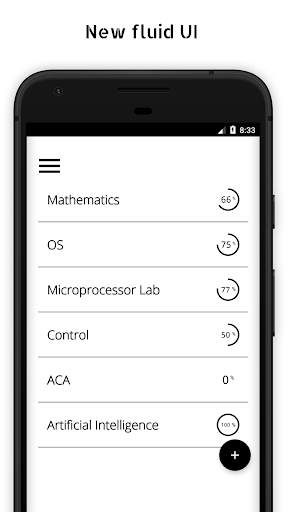
◆ Statistics are displayed on the homepage
◆ Rename the subjects whenever you like
◆ Easy reordering of the homepage subjects' list
◆ Attendance Percentage is calculated and displayed underneath the calendar
◆ PIN protect/Fingerprint protect the app
Start using the app by simply adding the subjects for which attendance have to be tracked. The subjects are displayed in a clean and simple list on the home page (along with attendance statistics: present, absent, total, percentage). To mark attendance, all one needs to do is to select any subject (which opens that subject's calendar) and tap on the date for which attendance has to be marked.
Clicking any date gives the following four options:
• Present
• Absent
• Holiday
• Note
The last option, i.e., "Note", provides a way to add notes for a particular day in the calendar
★★ Swipe any subject on the homepage to get more options ★★
The following statistics are displayed for each subject:
• Present - the number of days/attendance marked as "Present"
• Absent - the number of days/attendance marked as "Absent"
• Total - the sum of number of present and absent
• Percentage - the percentage of classes attended [ calculated using: (present/total) x 100 ]
In short, it is a neatly built attendance register/attendance tracker/attendance calculator which can be used by students as well as anyone who wants to track/calculate their attendance in a particular activity/job.