Saverr: All Video Downloader


Saverr: All Video Downloader Summary
Saverr: All Video Downloader is a ad-supported Android app in Tools by Vitality AI. Store metadata: updated May 21, 2025.
Store info: Last updated on Google Play on May 21, 2025 .
0★
Ratings:
Screenshots



App Description
Download videos and save statuses effortlessly with Saverr.
Saverr is your ultimate solution for effortlessly downloading videos and music directly from the internet onto your device. It supports all formats and is 100% free!
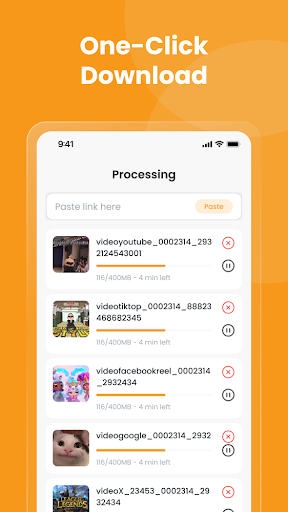
Our video downloader automatically detects videos, allowing you to download them with just a single click. The powerful download manager provides complete control, letting you pause, resume, and manage downloads efficiently. You can download files in the background and even handle multiple downloads simultaneously. Preview videos before downloading for a fast download and enjoy them offline with the built-in player.
Key Features:
• Integrated Browser: Easily browse the web and find videos with the built-in browser.
• Offline Playback: Play downloaded videos seamlessly offline using the built-in player.
• Wide Format Support: Download all popular video and audio formats, including mp3, m4a, mp4, m4v, mov, avi, wmv, and even document types like doc, xls, pdf, txt.
• Automatic Detection: Videos are auto-detected for quick and easy downloading.
• Full-Featured Download Manager: Pause, resume, and remove downloads with a robust manager.
• Multiple Downloads: Download several files concurrently.
• Private Folder: Secure your downloaded files in a password-protected folder.
• Background Downloading: Continue downloading even when the app is in the background.
• Resume Failed Downloads: Never lose progress on interrupted downloads.
• Fast Download Speed: Experience rapid download performance.
• Progress Tracker: Monitor download progress easily in the download bar.
• HD & Large File Support: Download high-definition videos and large files without issues.
• Versatile Downloads: Download video, music, and pictures.
• Bookmarks: Save your favorite websites for quick access.
How to Use:
• Browse the desired website using the built-in browser.
• Videos will be auto-detected; tap the download button.
• Choose the video you wish to download.
• Done!
Why Choose Saverr?
• Powerful: A highly capable video downloader and download manager.
• Private: The built-in browser and password protection keep your downloads secure.
• Fast: Enjoy one of the fastest download speeds available.
• Simple: Download videos with just one clic