Moodpress Rainbow Watch Face
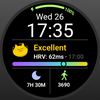

Moodpress Rainbow Watch Face
Developer: Mood Tracker App
Category: Lifestyle
2K installs
Ratings not yet available
+41 weekly installs
trend steady
+122 monthly installs
trend steady
Moodpress Rainbow Watch Face icon

ASO Keyword Dashboard

Tracking 80 keywords for Moodpress Rainbow Watch Face in Google Play

Developer: Mood Tracker App Category: lifestyle

Moodpress Rainbow Watch Face tracks 80 keywords (no keywords rank yet; 80 need traction). Key metrics: opportunity 69.3, difficulty 54.7.

Discover the Moodpress Special watch face for Wear OS 5+

Tracked keywords

80

0  ranked •  80  not ranking yet

Top 10 coverage

Best rank — • Latest leader —

Avg opportunity

69.3

Top keyword: steps

Avg difficulty

54.7

Lower scores indicate easier wins

Opportunity leaders

  • steps

    Opportunity: 73.0 • Difficulty: 46.7 • Rank —

    Competitors: 1,066

    68.5
  • wear

    Opportunity: 72.0 • Difficulty: 79.5 • Rank —

    Competitors: 839

    65.9
  • swipe

    Opportunity: 72.0 • Difficulty: 55.2 • Rank —

    Competitors: 1,546

    69.1
  • galaxy

    Opportunity: 72.0 • Difficulty: 65.3 • Rank —

    Competitors: 656

    65.0
  • stress

    Opportunity: 72.0 • Difficulty: 47.9 • Rank —

    Competitors: 1,099

    67.0

Unranked opportunities

  • steps

    Opportunity: 73.0 • Difficulty: 46.7 • Competitors: 1,066

  • wear

    Opportunity: 72.0 • Difficulty: 79.5 • Competitors: 839

  • swipe

    Opportunity: 72.0 • Difficulty: 55.2 • Competitors: 1,546

  • galaxy

    Opportunity: 72.0 • Difficulty: 65.3 • Competitors: 656

  • stress

    Opportunity: 72.0 • Difficulty: 47.9 • Competitors: 1,099

High competition keywords

  • new

    Total apps: 193,474 • Major competitors: 25,823

    Latest rank: — • Difficulty: 65.7

  • time

    Total apps: 170,577 • Major competitors: 19,592

    Latest rank: — • Difficulty: 64.6

  • find

    Total apps: 143,808 • Major competitors: 16,874

    Latest rank: — • Difficulty: 65.1

  • experience

    Total apps: 118,077 • Major competitors: 15,561

    Latest rank: — • Difficulty: 62.8

  • information

    Total apps: 101,893 • Major competitors: 7,805

    Latest rank: — • Difficulty: 58.6

All tracked keywords

Includes opportunity, difficulty, rankings and competitor benchmarks

Major Competitors
new641006690

193,474 competing apps

Median installs: 42,470

Avg rating: 3.0

25,823

major competitor apps

health701005275

23,713 competing apps

Median installs: 25,526

Avg rating: 2.7

1,845

major competitor apps

order681005579

44,242 competing apps

Median installs: 25,117

Avg rating: 2.7

4,188

major competitor apps

users671006082

59,104 competing apps

Median installs: 30,976

Avg rating: 2.8

6,026

major competitor apps

exclusive691006277

34,168 competing apps

Median installs: 36,550

Avg rating: 3.0

4,554

major competitor apps

experience651006387

118,077 competing apps

Median installs: 39,819

Avg rating: 2.9

15,561

major competitor apps

wear721008066

7,173 competing apps

Median installs: 24,222

Avg rating: 3.2

839

major competitor apps

wear os711007660

3,443 competing apps

Median installs: 13,088

Avg rating: 3.5

279

major competitor apps

information661005986

101,893 competing apps

Median installs: 23,675

Avg rating: 2.6

7,805

major competitor apps

find651006588

143,808 competing apps

Median installs: 36,002

Avg rating: 3.0

16,874

major competitor apps

time641006589

170,577 competing apps

Median installs: 33,133

Avg rating: 2.9

19,592

major competitor apps

connect681006379

44,719 competing apps

Median installs: 25,534

Avg rating: 2.8

4,584

major competitor apps

swipe721005569

11,012 competing apps

Median installs: 44,184

Avg rating: 3.3

1,546

major competitor apps

install701005276

28,821 competing apps

Median installs: 36,035

Avg rating: 3.0

2,729

major competitor apps

special681005880

49,271 competing apps

Median installs: 42,767

Avg rating: 3.0

6,785

major competitor apps

watch691006978

38,532 competing apps

Median installs: 39,176

Avg rating: 3.0

5,315

major competitor apps

update701006674

22,777 competing apps

Median installs: 36,732

Avg rating: 3.0

2,519

major competitor apps

discover681006381

52,912 competing apps

Median installs: 37,326

Avg rating: 3.0

6,947

major competitor apps

directly681005880

50,750 competing apps

Median installs: 28,866

Avg rating: 2.8

5,021

major competitor apps

galaxy721006565

6,329 competing apps

Median installs: 34,132

Avg rating: 3.5

656

major competitor apps

test681005579

41,781 competing apps

Median installs: 34,406

Avg rating: 2.9

4,928

major competitor apps

view671006282

63,400 competing apps

Median installs: 25,686

Avg rating: 2.8

5,690

major competitor apps

face701005575

24,650 competing apps

Median installs: 46,450

Avg rating: 3.1

3,493

major competitor apps

current691005478

37,523 competing apps

Median installs: 28,093

Avg rating: 2.8

3,434

major competitor apps

together711005574

20,460 competing apps

Median installs: 38,864

Avg rating: 2.9

2,694

major competitor apps

80 keywords
1 of 4

App Description

Discover the Moodpress Special watch face for Wear OS 5+

This Watch Face is exclusive to Moodpress app users and requires use with the Moodpress Android app and Moodpress Watch app.

Compatible with Google Pixel Watch 3, Samsung Galaxy Watch 7 and Ultra.

📱Use with Moodpress: https://play.google.com/store/apps/details?id=com.selfcare.diary.mood.tracker.moodpress

NOTE: Please read the "How To" section!

ⓘ Features:

- Battery level.
- Time and date.
- Different cartoon emoticons to indicate current stress status.
- Today's sleep duration.
- Today's walking steps.

How to use

- To show/view the HRV (stress status), you need to use with Moodpress Watch app and test your current stress level.
- To show/view your sleep duration and steps for today, you need to use with the Moodpress Android App and connect your Moodpress to Health Connect on your phone.

IMPORTANT - The Watch app requires to use together with Moodpress Android App and Moodpress Watch App to get the information shown on the Watch Face.

How to apply the Watch face after installation

In order to apply a watch face after installing the watch face app, press and hold your current watch face and swipe left to find it. If you don't see it, tap on the "+" sign at the end (Add a new watch face) and find our watch face there.

How to update data after installation

If you install the watch face app first and then install the Android app and the Watch app, the data may not be updated automatically.
If this happens, please remove the Rainbow watch face from your current watch faces and add it again to check if the data is updated.

📨 FEEDBACK
If you experience any issues or are dissatisfied with the Moodpress app and watch faces, please send feedback directly to moodpressapp@gmail.com