Proximity Flashlight: Just Tap


Proximity Flashlight: Just Tap Summary
Proximity Flashlight: Just Tap is a ad-supported Android app in Tools by Rocky Das. Released in Oct 2018 (7 years ago). It has about 23.5K+ installs and 129 ratings with a 3.85★ (average) average. Based on AppGoblin estimates, it reaches roughly 114 monthly active users and generates around $<10K monthly revenue (0% IAP / 100% ads). Store metadata: updated Jul 7, 2020.
Recent activity: 1.00 installs this week (7.00 over 4 weeks) showing steady growth View trends →
Store info: Last updated on Google Play on Jul 7, 2020 .
3.85★
Ratings: 129
Screenshots

App Description
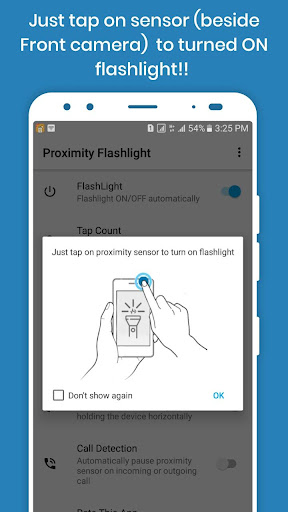
Turn on or off flashlight (by using proximity sensor) without press any button
Proximity Flashlight application is a simple utility to automatically On or Off camera LED flashlight using proximity sensor, instead of having to press any button manually. Proximity Flashlight is free, intuitive and easy to use torch app for Android. Our app uses the built-in camera LED flash and provides the brightest light as possible.
Proximity Flashlight is a helpful app at home and work. This torch is the brightest and the most useful flashlight you will ever have. Avoid using the old candle and use the new Proximity Flashlight app 2020. In new update, we can added some special feature. In below shortly described:
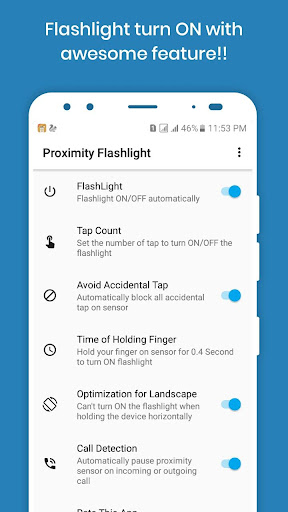
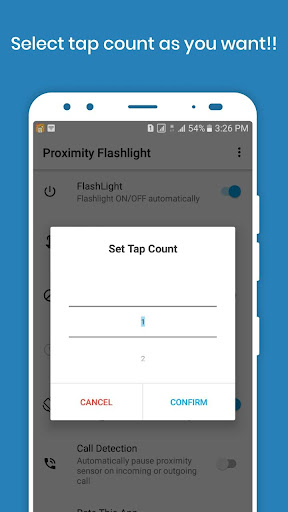
Tap Count
Set the number of times you have to tap finger on the proximity sensor to turn On or Off the flashlight. Default tap count is 1. This feature is useful to avoid accidentally flashlight On or Off.
Landscape mode
Don't turn On the flashlight when the screen rotates horizontally. This mode will prevent to turn On the flashlight when you are taking photos or watching movies in landscape.
Call detecting mode
This mode will detect which call is incoming or outgoing. After detecting a call, it will help to pause proximity sensor (wave mode) to prevent flashlight On by accident.
Main Features of Proximity Flashlight
- Easy-to-Use Operation and Clear Design.
- Clean interface with just one button to switch On or Off the service.
- Once started, we can turn On or Off flashlight while using other apps.
- For quick access to turn On or Off flashlight you can use the status bar buttons (available in the notification area).
- Turn ON or OFF flashlight without press any button.
- Don't turn ON the flashlight when the screen rotates horizontally.
- You can set separate delays when the flashlight to avoid accidentally turn ON.
- Don't turn ON the flashlight when put the phone into the pocket.
- Works perfectly even on non-root devices.
- Low battery consumption.
- the app is optimized to use the battery wisely.
- Very bright and powerful flashlight.
- Improve the best performance.
- Fast startup and quick response!
Use this application to:
- Walking in a dark place
- Read a Book at Night with the powerful and bright flashlight.
- Light your way
- During the night
- Use the Torchlight in Darkness
- Change the Bubble or Repair Car at night.
- Light Your Room During a Power Outage
- Find Your Keys in the Dark
Permissions Notice
• Camera, Flashlight: Camera flash, LED light, the Camera view
• Internet, Access network state: Ads
• Read phone state: Detect incoming or outgoing call
• Vibrate: For vibrate device when turn On or Off the flashlight
Why do we need camera permission?
Unfortunately, LED (flash) is a hardware part of the camera and for switching On/Off - we need this permission.
Proximity Flashlight is the best-led light in the world. Don’t miss the best power light widget for Android! Download this Flashlight Free now!
If you like it, give 5 stars and leave comments or suggest us any features.
Contact Us
Email: rockydas47@gmail.com