Stock Management System


Stock Management System Summary
Stock Management System is a ad-supported, with in-app purchases Android app in Finance by SFV Infotech. Released in Mar 2017 (9 years ago). It has about 141.3K+ installs and 750 ratings with a 4.00★ (good) average. Based on AppGoblin estimates, it reaches roughly 22.2K monthly active users and generates around $<10K monthly revenue (28% IAP / 72% ads). Store metadata: updated Jun 13, 2025, version 37.
Recent activity: 32 installs this week (143 over 4 weeks) showing steady growth View trends →
Data tracking: SDKs and third-party integrations were last analyzed on May 29, 2026. The app's network data flows (API traffic to/from the app and its SDKs) were last crawled on Jan 5, 2026.
Store info: Last updated on Google Play on Jun 13, 2025 (version 37).
SDKs, Trackers & Permissions
Stock Management System was last scanned for SDKs 2026-05-29. Below is the overview of third party companies detected in the app. The full list of raw SDKs, app permissions and unknown SDKs is available here.
 Square
 Google
 Kotlin
 Firebase
 AdMob
AdMob Facebook
App Details
App Store
Ads & App-Ads.txt
AppGoblin SDK Scans
4★
Ratings: 750
Screenshots
App Description
Smart, secure stock & inventory manager for retailers, wholesalers & shops.
📦 Inventory Management System – Smart Stock Manager App
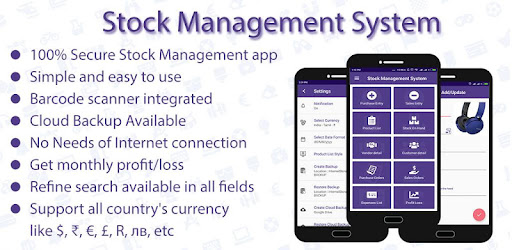
Manage your products, purchases, sales, vendors, and customers easily with the Inventory Management System App — a complete stock and inventory management solution for retailers, wholesalers, and distributors.
Track every item, monitor stock levels, and keep your data 100 % secure.
🔄 Simple Workflow
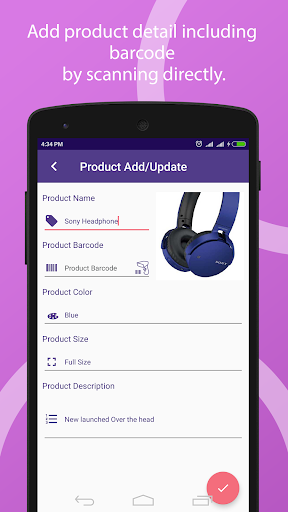
1️⃣ Add your product details
2️⃣ Add vendor details
3️⃣ Create purchase entries
4️⃣ Add customer details
5️⃣ Create sales entries
Your inventory is automatically updated and synced with each entry.
🌟 Main Features
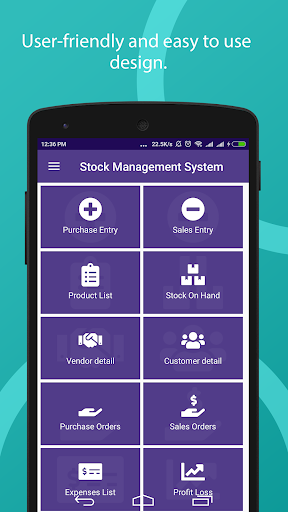
🧭 Easy & User-Friendly Interface
Clean design and smooth navigation help you manage stock effortlessly.
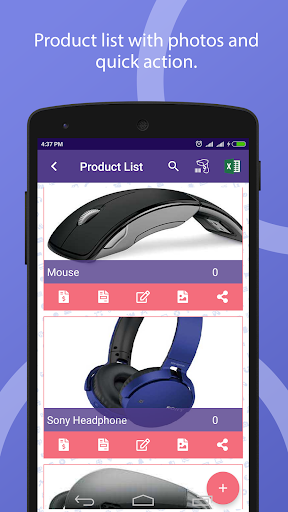
Choose from multiple product list styles and custom theme colors to suit your preference.
💱 Multi-Currency & Date Format Support
Select your currency and date format according to your region.
Supports ₹, $, €, £, R, ₪, лв, and many more — perfect for international users.
🔒 100 % Data Security
Your business data remains on your device, never stored on our servers.
Cloud backups are safely stored on Google Drive, accessible only through your Google login.
⚠️ Low Stock Alerts
Get instant notifications when any product reaches its minimum quantity.
Set different stock limits for each product to avoid shortages.
📷 Barcode Scanning
Use your phone camera as a barcode scanner to search or add products instantly.
No need to type product names manually during purchase or sales entry.
🧾 Multiple Product List Styles
Choose your preferred layout:
• Big image + Quick Action Bar
• Big image only
• Small image + Quick Action Bar
• No image (compact view)
💾 Local Backup & Restore
Create unlimited backups stored in your phone’s internal memory.
Backups are saved in the “STOCKMGMT” folder for quick restore or transfer.
☁️ Google Drive Cloud Backup
Back up and restore your inventory data on any device with one click — ideal when changing phones or resetting devices.
📊 Export Data to Excel
Export your product, purchase, and sales data into .XLS format for reports, records, or sharing.
⚙️ Advanced Inventory Tools
Manage products, vendors, customers, sales, purchases, and expenses
Add product images and full descriptions
Integrated barcode scanner
View monthly stock-on-hand and profit/loss summaries
Filter and sort by product, date, vendor, or customer
Manage expenses by title, date, or description
Simple tutorials and in-app help for new users
💼 Perfect For
Retailers | Wholesalers | Distributors | Shop Owners | Small Businesses | Inventory Managers
🚀 Why Choose the Inventory Management System App?
Because it’s a secure, lightweight, and powerful inventory tracker that helps you:
✔️ Save time and reduce manual work
✔️ Protect your data with local + cloud backup
✔️ Track purchases and sales anytime, anywhere
✔️ Stay organised with accurate stock reports