ShadowShot : parental control


ShadowShot : parental control Summary
ShadowShot : parental control is a free Android app in Family by Shadowshot. Released in Mar 2025 (1 year ago). Store last updated Mar 16, 2025
ShadowShot : parental control SDKs Summary
App not yet scanned for SDKs.
0★
Ratings:
Screenshots



App Description
ShadowShot — Smart parental control with GPS location & screen monitoring.
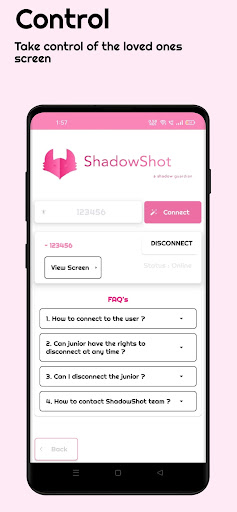
ShadowShot is a powerful screen capture tool designed for seamless collaboration between Seniors and Juniors. With ShadowShot, Seniors can capture and view Junior screens in real-time, while Juniors stay informed about which screenshots were last viewed. Perfect for teams, educators, and remote workers, ShadowShot makes screen sharing and monitoring simple, secure, and efficient.
Key Features:
Real-Time Screen Capture: Seniors can capture Junior screens with a single command.
Live Screen Viewing: Seniors can view Junior screens in real-time after initiating a capture.
Screenshot Tracking: Juniors receive notifications about which screenshots were last viewed by the Senior.
Secure Sharing: All screenshots are securely uploaded to Firebase Storage for easy access and sharing.
Role-Based Access: Join as a Senior to monitor and capture screens or as a Junior to share your screen and track viewed screenshots.
User-Friendly Interface: Clean, modern design with intuitive controls for a smooth experience.
How It Works:
Choose Your Role: Join as a Senior or Junior.
Capture Screens: Seniors can initiate screen captures and view Junior screens in real-time.
Track Viewed Screenshots: Juniors receive notifications about which screenshots were last viewed by the Senior.
Share Securely: Screenshots are automatically uploaded to Firebase Storage for easy access and collaboration.
Why ShadowShot?
Enhanced Collaboration: Perfect for teams, educators, and remote workers who need to monitor and share screens.
Real-Time Monitoring: Seniors can view Junior screens instantly after capturing.
Transparency: Juniors stay informed about which screenshots were last viewed.
Security: Your data is protected with Firebase's robust security and encryption.
Quick Start Guide
1. Install and launch ShadowShot on both devices.
2. Enter the userid that is displayed on the remote device.
3. Confirm the access request on the remote device.
4. Done. You can now screen view the remote device remotely.