Shortwave — AI Email


Shortwave — AI Email Summary
Shortwave — AI Email is a mobile Android app in Communication by Shortwave Communications, Inc. Released in Aug 2023 (2 years ago). It has about 63.2K+ installs and 959 ratings with a 4.59★ (excellent) average. Based on AppGoblin estimates, it reaches roughly 3.8K monthly active users . Store metadata: updated Aug 21, 2025.
Recent activity: 276 installs this week (1K over 4 weeks) showing steady growth , and 2.00 new ratings this week View trends →
Store info: Last updated on Google Play on Aug 21, 2025 .
4.59★
Ratings: 959
Screenshots



App Description
AI-native email for teams
Share, collaborate, and get things done like never before
"The AI revolution is coming for your email" – Business Insider
"This app is like ChatGPT for your email, and it changed my life" – Digital Trends
"The Google Inbox successor I’ve been waiting for" – The Verge
**Currently only available for Gmail & Google Workspace accounts**
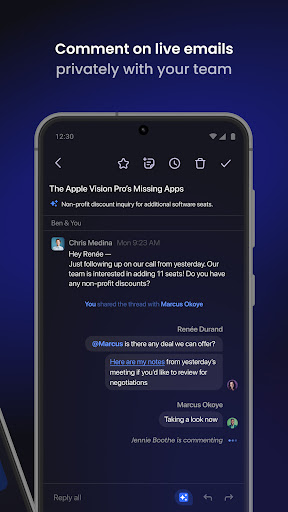
👫 SHARE & DISCUSS EMAILS WITH YOUR TEAM
Get the right people involved and bring everyone up to speed fast with private team comments and live thread sharing. Assign emails to teammates to delegate next steps.
✨ YOUR AI EMAIL ASSISTANT
You and your team can write emails, improve drafts, schedule meetings, analyze threads, translate text, and more using Shortwave’s powerful AI Assistant.
✍️ WRITE EMAILS WITH AI
Write personalized emails with AI in seconds, or use instant AI replies to get full drafts in just one tap. Shortwave learns your unique writing style and even facts about you from the emails you send.
📝 IMPROVE AND PROOFREAD DRAFTS
Complete your drafts, adjust length and tone, translate into other languages, and more with a built-in AI editor.
🔎 SEARCH AND FIND ANSWERS
Use AI-powered search to find emails fast, or to analyze your entire team's emails & attachments for the answers you need
📅 SCHEDULE MEETINGS WITH AI
Spend less time juggling calendars with AI-powered scheduling features. Create events, send AI-generated scheduling emails, accept calendar events with one click, and more.
📚 GET ORGANIZED WITH SPLITS AND BUNDLES
Focus your time & attention by dividing your inbox into tabs for important emails, specific senders, labels & even custom queries. Use bundles for fast triage of promotions, newsletters, updates, and other automated emails.
✅ TURN EMAILS INTO TODOS
Transform your overflowing inbox into an organized list of action items. Group, rename, prioritize, and add notes, right in your inbox.
⏰ SET DELIVERY SCHEDULES
Avoid interruptions by deferring when emails arrive in your inbox, so you only receive emails when you want them.
👀 VIEW READ STATUSES
See when people read your emails to get the context you need to prioritize your time and write effective follow-ups. Close more deals and collaborate better with your team.
🛑 SCREEN UNWANTED SENDERS
Guard your inbox from noise with one-click block and uns