Spectrum Analyzer: Audio FFT


Spectrum Analyzer: Audio FFT Summary
Spectrum Analyzer: Audio FFT is a free, ad-supported Android app in Tools by Global Utility App Maker. Released in May 2026 (4 months ago). It has about 1.8K+ installs and 24 ratings with a 3.00★ (mixed) average. Based on AppGoblin estimates, it reaches roughly 303 monthly active users and generates around $<10K monthly revenue (0% IAP / 100% ads). Store last updated Aug 31, 2026
Recent activity: 97 installs this week (557 over 4 weeks) showing steady growth , and 6.00 new ratings this week View trends →
Spectrum Analyzer: Audio FFT SDKs Summary
App not yet scanned for SDKs.
3★
Ratings: 24
Screenshots



App Description
Real-time FFT audio spectrum analyzer & oscilloscope with peak hold & dB SPL
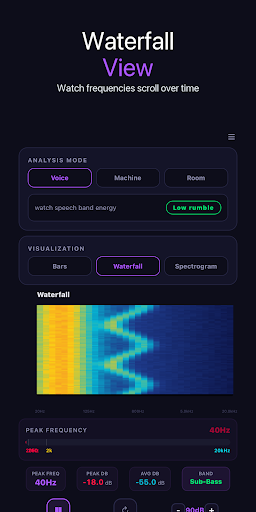
Spectrum Analyzer is a real-time audio FFT spectrum analyzer and oscilloscope for Android. Visualize sound frequencies from 20 Hz to 20 kHz with 2048-point FFT precision — see exactly what your ears hear, in real time, with studio-grade accuracy.
Whether you tune a live PA, check the harmonics of a guitar, debug an op-amp, hunt a rattle in a car, or chase a buzzing noise at home, Spectrum Analyzer turns your phone into a professional FFT analyzer and oscilloscope.
▶ MAIN FEATURES
• Real-time FFT spectrum (2048 bins, 20 Hz – 20 kHz)
• Live waveform / oscilloscope view
• Linear and logarithmic frequency scale
• Peak hold mode to catch transients
• Adjustable smoothing and FFT window (Hann / Hamming / Rectangular)
• dB SPL calibration scale
• Dominant frequency readout in real time
• Studio dark mode
• Works fully offline — no data plan needed
▶ HOW TO USE
1. Open the app and grant microphone access.
2. Point the mic at the sound source.
3. Watch the live FFT spectrum and waveform update instantly.
4. Switch between linear and logarithmic scale.
5. Enable peak hold to freeze the loudest peaks.
6. Pick the FFT window and smoothing that fit your signal.
▶ WHO USES IT
• Sound engineers checking PA, rooms and speakers
• Musicians analyzing tone and harmonics
• Electronics hobbyists debugging circuits
• HVAC technicians and mechanics hunting noise and vibration
• Acoustics and DSP students learning the FFT
Spectrum Analyzer needs microphone permission to capture audio. External USB and Bluetooth microphones are supported for higher accuracy. Turn your Android device into a real-time FFT spectrum analyzer and oscilloscope today.