Mountain Watch (M-Watch)

Mountain Watch (M-Watch) Summary
Mountain Watch (M-Watch) is a ad-supported Android app in Tools by SKYAPPS. Released in Aug 2014 (11 years ago). It has about 90.1K+ installs and 770 ratings with a 3.62★ (average) average. Based on AppGoblin estimates, it reaches roughly 389 monthly active users and generates around $<10K monthly revenue (0% IAP / 100% ads). Store metadata: updated Jul 16, 2025.
Recent activity: 7.00 installs this week (1.4K over 4 weeks) showing exceptional growth View trends →
Store info: Last updated on Google Play on Jul 16, 2025 .
3.62★
Ratings: 770
Screenshots

App Description
Please use the watch for mountain climbing on your device!
☆ ★ This app provides the functions of the watch, Compass, Barometer / altimeter, speedometer, flash, moon phase and a weather information.
# This application is made by reference to mountain climbing watch.
# The Main Function
1. Main Screen
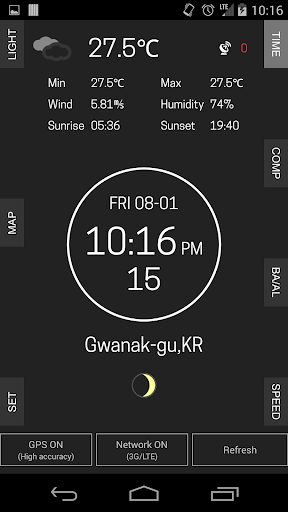
- You can see all the information on the main screen.
- The weather and temperature, humidity, wind speed, sunrise / sunset's time information is displayed on top screen.
- Current time / compass / barometer-altitude / speed information is displayed in the center core.
- Location and moon phase function is displayed in the lower area.
2. Current Time
- Displays the current time and date information.
3. Compass
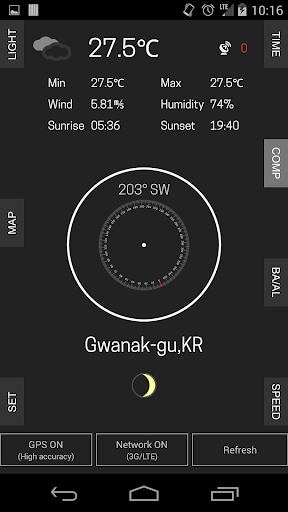
- Shows the compass and orientation information.
- If the compass is inaccurate, please wave your device in a figure 8-shaped. (Set -> User's Guide)
4. Barometer, Altimeter
- displays the this area's current barometric pressure and altitude information.
- You need using the GPS setting, if you want to the altitude information.
5. Speed
- When moving with the device, displays the current speed.
- You need to set a high accuracy GPS
- If you use for a long time, it can be consumed the battery quickly.
6. Flash
- You can use it like a flashlight.
7. Location
- The locations are marked on the map.
8. Settings
- You can choose to Celsius (℃) or Fahrenheit (℉) of displayed temperature.
- You can check the instruction manual.
※ Notes
This app does not exhibit the enough performance such as a professional climbing watch. And can not guarantee 100% accuracy of the data.
The device's GPS and network usage setting is required for more accurate display.
Because high-accuracy consumes a lot of the battery, does not recommend the use of a long time.
I hope use this app only when you need it.