Futurus Watch Face

Futurus Watch Face Summary
Futurus Watch Face is a ad-supported, with in-app purchases Android app in Personalization by Smart Art Studios. Released in Nov 2019 (6 years ago). It has about 180K+ installs and 792 ratings with a 3.60★ (average) average. Based on AppGoblin estimates, it reaches roughly 875 monthly active users and generates around $<10K monthly revenue (47% IAP / 53% ads). Store metadata: updated Feb 18, 2024, version 29.
Recent activity: 151 installs this week (560 over 4 weeks) showing steady growth , and 1.00 new ratings this week View trends →
Data tracking: SDKs and third-party integrations were last analyzed on Jun 1, 2026. The app's network data flows (API traffic to/from the app and its SDKs) were last crawled on Jan 5, 2026.
Store info: Last updated on Google Play on Feb 18, 2024 (version 29).
SDKs, Trackers & Permissions
Futurus Watch Face was last scanned for SDKs 2026-06-01. Below is the overview of third party companies detected in the app. The full list of raw SDKs, app permissions and unknown SDKs is available here.
AppGoblin saw Futurus Watch Face uses 6 Development Tools
 Square
 Kotlin
 Google
 JetBrains IntelliJ
AppGoblin saw Futurus Watch Face uses 2 Ad Networks
 One Signal
AppGoblin saw Futurus Watch Face uses 1 Mediation
 AdMob
AdMobAppGoblin saw Futurus Watch Face uses 1 Analytics: Product
 Firebase
App Details
App Store
Ads & App-Ads.txt
AppGoblin SDK Scans
3.6★
Ratings: 792
Screenshots

App Description
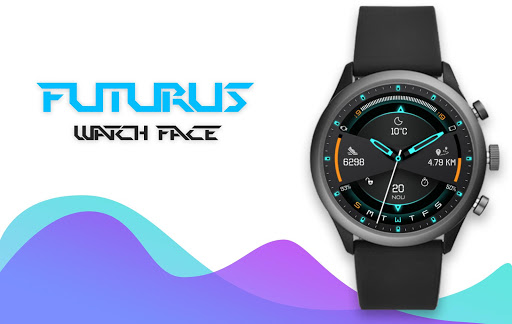
Futuristic Watch face for Wear OS 4.0 watches & Clock Live Wallpaper for Phones.
💡IMPORTANT - Not compatible with Samsung Smart Watches that use Tizen OS.
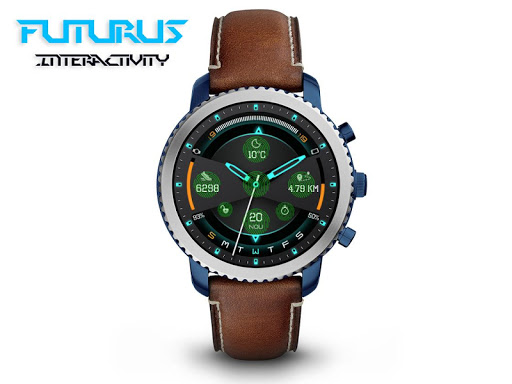
Futurus Watch Face a is Fully customizable Futuristic , Wear OS Watch Face and Clock Live Wallpaper for all Phones.
The watch face has 4 interactive tap targets on Watch face , which are fully customizable to be more informative which include number of data such as Weather, Steps, Battery level ,Date, etc..
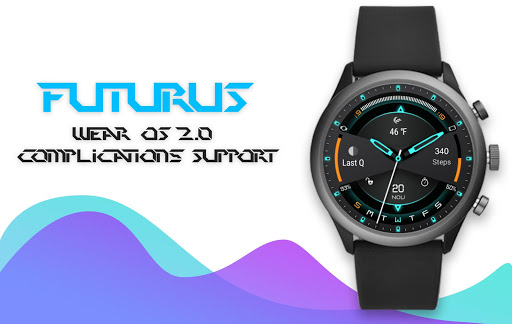
❖ Futurus Watch Face is fully compatible with Wear OS 4.0
❖ Wear OS 4.0 integrated Features:
• External complication support for indicators.
• Fully standalone
• iPhone and Android compatible
❖ Futurus Watch Face is fully Compatible with all Wear OS watches resolutions.
❖ Free Version
• Unique Style Watch Face.
• Wear OS 4.0 Fully supported.
• Standalone watch face for iPhone and Android users.
• Custom Colors According to your Style.
• Weather forecast for current day
• Black and White Ambient Mode.
• Watch Battery info.
• Translucent peek card
• Leading zero
❖ Premium Version Features
• All features from FREE version.
• Predefined Complications.
• External Wear OS 4.0 complications.
• Hourly Chime Sound effect and Vibration on every hour.
• Touch Sound Effect and Touch Vibration.
• 3 Watch Face Clock hands.
• Unique Clock Live Wallpaper
• 11 Live Wallpaper Backgrounds
• Phone Ram Info.
• Custom Colors According to your Style.
• 10 Predefined watch face colors, Changes on tap.
• 2 in 1 Watch Face, With Full or Minimal Watch Face Option.
• Fully Accurate Pedometer with Google Fit Integration.
• 4 Interactive Touch Data Points.(Watch Battery, Phone Battery,Weather, Steps,Digital Clock,Dual Batteries and Many More) .
• Full Colorful and Black and White Ambient Modes.
• Screen Awake Time Option.
• Live Dial Complications.
• Weather info and Forecast for Next 4 Days, High/Low Temp, Sunset/Sunrise info.
• Two Weather Providers.
• GPS or Manual Weather Location.
• Phone And Watch Battery info.
• Set smooth seconds.
• 24 hour format.
• Unique Style Date, Day, Month Name.
• Short Peek Cards Option.
• Peek Cards in Ambient Mode.
❖ Predefined complications:
• Weather
• Date
• Digital clock
• Watch battery
• Phone battery
• Steps
• Distance
• Calories
• Sunrise
• Sunset
• Stopwatch
★How To Use
1. You Can Enable or Disable Sound effects and Vibration from Companion app
2. Please Enable "Location" or "GPS" in Phone To get Weather Info
3. Select Manual Weather Location in Companion App Settings
4. You can change Watch Face Hands from companion App
5. Click on "SET WALLPAPER" Button to Apply Live Wallpaper.
★How do I install the watch face on Wear OS 1.0?
1. After install run 'Re-sync app' from the Wear OS app
2. Long press your watch and choose "Futurus Watch Face" as your watch face, or select the watch face using the Wear OS app
★How do I install the watch face on Wear OS 4.0?
1. Install it from Google Play Wear Store on your watch.
2. Install the companion app for fully customization (Android phone devices).
★Useful Tip
✔ Sometimes you need to wait longer for transfer to watch
✔I recommend a bit of patience .
✔This is not caused by the watch face, but rather Wear OS app.
✔ If the watch face is not shown on your watch after few minutes, to try re-sync or follow these steps:
1. Disconnect devices (watch and phone)
2. Uninstall the watch face
3. Restart watch and connect device again
4. Then finally install the watch face
★Visit Our Exclusive Wear face collection for Wear OS & Clock Live Wallpapers for Phones on the Play Store https://goo.gl/RxW9Cs
IMPORTANT NOTE: Your watch Must have speaker to get Hourly and touch Sound Effects.
NOTE: if you have any problem first email us before leaving a 1 star rating on play store, we will solve it.