(Rus) SMZ Knights Pro R2
ASO Keyword Dashboard
Tracking 83 keywords for (Rus) SMZ Knights Pro R2 in Google Play

(Rus) SMZ Knights Pro R2 tracks 83 keywords (no keywords rank yet; 83 need traction). Key metrics: opportunity 70.4, difficulty 48.5.
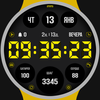
SMZ Digital Watchface for Wear OS
Tracked keywords
83
0 ranked • 83 not ranking yet
Top 10 coverage
—
Best rank — • Latest leader —
Avg opportunity
70.4
Top keyword: developer
Avg difficulty
48.5
Lower scores indicate easier wins
Opportunity leaders
- 65.9
developer
Opportunity: 74.0 • Difficulty: 41.1 • Rank —
Competitors: 564
- 61.1
zone
Opportunity: 74.0 • Difficulty: 43.2 • Rank —
Competitors: 420
- 65.9
effect
Opportunity: 74.0 • Difficulty: 45.7 • Rank —
Competitors: 1,317
- 61.8
measurement
Opportunity: 74.0 • Difficulty: 38.9 • Rank —
Competitors: 315
- 59.7
article
Opportunity: 74.0 • Difficulty: 38.1 • Rank —
Competitors: 213
Unranked opportunities
developer
Opportunity: 74.0 • Difficulty: 41.1 • Competitors: 564
zone
Opportunity: 74.0 • Difficulty: 43.2 • Competitors: 420
effect
Opportunity: 74.0 • Difficulty: 45.7 • Competitors: 1,317
measurement
Opportunity: 74.0 • Difficulty: 38.9 • Competitors: 315
article
Opportunity: 74.0 • Difficulty: 38.1 • Competitors: 213
High competition keywords
access
Total apps: 333,939 • Major competitors: 12,350
Latest rank: — • Difficulty: 58.5
like
Total apps: 286,408 • Major competitors: 22,383
Latest rank: — • Difficulty: 60.7
simple
Total apps: 250,021 • Major competitors: 12,073
Latest rank: — • Difficulty: 55.1
stay
Total apps: 178,915 • Major competitors: 5,927
Latest rank: — • Difficulty: 56.1
data
Total apps: 177,234 • Major competitors: 7,067
Latest rank: — • Difficulty: 56.6
All tracked keywords
Includes opportunity, difficulty, rankings and competitor benchmarks
| Major Competitors | |||||||
|---|---|---|---|---|---|---|---|
| health | 69 | 100 | 49 | 77 68,544 competing apps Median installs: 766 Avg rating: 2.1 | — | — | 1,946 major competitor apps |
| customization | 73 | 100 | 45 | 68 17,461 competing apps Median installs: 4,241 Avg rating: 2.7 | — | — | 1,214 major competitor apps |
| change | 68 | 100 | 52 | 79 89,606 competing apps Median installs: 4,862 Avg rating: 2.6 | — | — | 6,335 major competitor apps |
| order | 67 | 100 | 52 | 82 140,169 competing apps Median installs: 557 Avg rating: 2.3 | — | — | 4,296 major competitor apps |
| device | 68 | 100 | 60 | 80 106,281 competing apps Median installs: 3,370 Avg rating: 2.5 | — | — | 6,742 major competitor apps |
| phone | 67 | 100 | 60 | 83 150,638 competing apps Median installs: 3,555 Avg rating: 2.6 | — | — | 9,409 major competitor apps |
| connected | 69 | 100 | 50 | 77 72,728 competing apps Median installs: 624 Avg rating: 2.2 | — | — | 2,343 major competitor apps |
| digital | 68 | 100 | 51 | 81 121,889 competing apps Median installs: 869 Avg rating: 2.2 | — | — | 4,517 major competitor apps |
| heart | 71 | 100 | 47 | 74 41,870 competing apps Median installs: 1,003 Avg rating: 2.2 | — | — | 1,582 major competitor apps |
| wear | 71 | 100 | 61 | 72 32,222 competing apps Median installs: 374 Avg rating: 1.9 | — | — | 870 major competitor apps |
| date | 68 | 100 | 53 | 79 91,888 competing apps Median installs: 798 Avg rating: 2.2 | — | — | 2,897 major competitor apps |
| wear os | 72 | 100 | 60 | 70 23,991 competing apps Median installs: 285 Avg rating: 1.7 | — | — | 297 major competitor apps |
| management | 68 | 100 | 50 | 80 109,412 competing apps Median installs: 566 Avg rating: 2.0 | — | — | 2,581 major competitor apps |
| control | 67 | 100 | 54 | 82 133,281 competing apps Median installs: 1,824 Avg rating: 2.4 | — | — | 7,401 major competitor apps |
| rate | 70 | 100 | 47 | 75 49,650 competing apps Median installs: 3,218 Avg rating: 2.2 | — | — | 2,255 major competitor apps |
| touch | 69 | 100 | 52 | 76 62,424 competing apps Median installs: 1,870 Avg rating: 2.6 | — | — | 3,722 major competitor apps |
| video | 69 | 100 | 58 | 79 85,045 competing apps Median installs: 5,197 Avg rating: 2.6 | — | — | 6,792 major competitor apps |
| install | 70 | 100 | 49 | 76 58,580 competing apps Median installs: 3,206 Avg rating: 2.5 | — | — | 2,834 major competitor apps |
| store | 69 | 100 | 54 | 78 80,381 competing apps Median installs: 1,666 Avg rating: 2.4 | — | — | 4,205 major competitor apps |
| watch | 68 | 100 | 57 | 80 102,248 competing apps Median installs: 1,186 Avg rating: 2.3 | — | — | 5,667 major competitor apps |
| galaxy | 73 | 100 | 50 | 68 18,029 competing apps Median installs: 799 Avg rating: 2.4 | — | — | 673 major competitor apps |
| path | 72 | 100 | 44 | 69 22,219 competing apps Median installs: 1,924 Avg rating: 2.5 | — | — | 1,067 major competitor apps |
| access | 65 | 100 | 59 | 88 333,939 competing apps Median installs: 1,156 Avg rating: 2.4 | — | — | 12,350 major competitor apps |
| stay | 67 | 100 | 56 | 84 178,915 competing apps Median installs: 502 Avg rating: 2.3 | — | — | 5,927 major competitor apps |
| hour | 73 | 100 | 42 | 67 15,058 competing apps Median installs: 1,291 Avg rating: 2.3 | — | — | 695 major competitor apps |
App Description
SMZ Digital Watchface for Wear OS
!!! Please Watch the VIDEO for usage !!!
This is a Digital Watch face providing useful informations for your health, various watchface theme and colors.
You can customize various themes and colors according to your taste, clothes color and strap of the watch.
[NOTICE]
This app has a simple companion application for supporting this watchface. Deleting it from your phone has no effect on the watchface installed on your watch. You can uncheck this app in the Install checkbox. However, make sure your watch is selected.
[Install on your watch]
Installing the app on your watch may take a while or it may just have a 'Install on device soon' message and the installation will stay on standby.
This issue has nothing to do with the app and the developer has no control over Google Store downloads.
Here are some suggestions for resolving this issue.
Please check the article at the URL below.
*How to install the watchface on the watch - https://cafe.naver.com/smzwatch/28
[24-hour format]
If you want to change the time format, you can set it in the path below on the phone connected to the watch.
*The connected phone - Settings - General management - Date and time - Use 24-hour format.
If checked, the watch will also be in 24-hour format, and if unchecked, the watch will be in 12-hour format.
[MENUAL OF MEASURING HEART RATE]
You have to put on the real device and tap the heart rate measurement button.
Then the heart rate measurement icon will appear, and if you wait for a while, the measured heart rate will be updated and displayed.
Just remember that heart rate measurement won't work unless you're wearing the actual watch device.
- Operating sequence of measuring heart rate.
1. Wear the real Galaxy Watch 4 on your wrist.
2. Tap the heart rate zone once and wait for the measurement to complete.
* The heart rate shortcut does not open the measuring heart rate app.
* If your Galaxy Watch 4 is syncing other data with the connected phone, the measurement may be delayed for a while.
3. Then the heart rate measurement icon appears and the measurement is taken.
4. When the measurement is completed, the result value is updated and displayed on your watch face.
* It is also automatically measured once an hour.
[PERMISSIONS]
In order for this watch face to display health informations proberly, you must allow all sense access permissions.
( Watch - Settings - Apps - Permissons - This watchface - Allow all permissions)
[CUSTOMIZE]
For customization of watchface, touch and hold the screen and touch on [Coustomize] button.
*Please edit these selections in coustomize field.
[FIXED SHORTCUT]
You can use this shortcut immediately by tapping on the area.
*Please refer to the last photo among the registered photos for these pars.
[EDITABLE SHORTCUTS]
You can select the app you want to use as a shortcut by tapping that area, or you can select the app in Customize field.
Then you can use the shortcut with one tap.
*Please refer to the last photo among the registered photos for these pars.
[SMZ Instagram]
http://www.instagram.com/smz.watch.tech
[SMZ Facebook]
https://www.facebook.com/smz.watchface
[SMZ Homepage]
https://www.smzwatch.com
[E-mail is always welcome]
smz.watch.tech@gmail.com
