Custom AOD – OLED Wallpapers


Custom AOD – OLED Wallpapers Summary
Custom AOD – OLED Wallpapers is a ad-supported, with in-app purchases Android app in Personalization by Dhwani developer. Released in Jul 2017 (8 years ago). It has about 480.9K+ installs and 2.5K ratings with a 3.29★ (mixed) average. Based on AppGoblin estimates, it reaches roughly 1.4K monthly active users and generates around $<10K monthly revenue (46% IAP / 54% ads). Store metadata: updated Apr 26, 2026.
Recent activity: 152 installs this week (594 over 4 weeks) showing steady growth , and 1.00 new ratings this week View trends →
Data tracking: SDKs and third-party integrations were last analyzed on Dec 17, 2025. The app's network data flows (API traffic to/from the app and its SDKs) were last crawled on Oct 21, 2025.
Store info: Last updated on Google Play on Apr 26, 2026 .
SDKs, Trackers & Permissions
Custom AOD – OLED Wallpapers was last scanned for SDKs 2025-12-17. Below is the overview of third party companies detected in the app. The full list of raw SDKs, app permissions and unknown SDKs is available here.
AppGoblin saw Custom AOD – OLED Wallpapers uses 4 Development Tools
 Bumptech
 Kotlin
 Square
 Google
AppGoblin saw Custom AOD – OLED Wallpapers uses 1 Mediation
 AdMob
AdMobAppGoblin saw Custom AOD – OLED Wallpapers uses 1 Analytics: Product
 Firebase
AppGoblin saw Custom AOD – OLED Wallpapers uses 1 Ad Networks
App Details
App Store
Ads & App-Ads.txt
AppGoblin SDK Scans
3.29★
Ratings: 2.5K
Screenshots

App Description
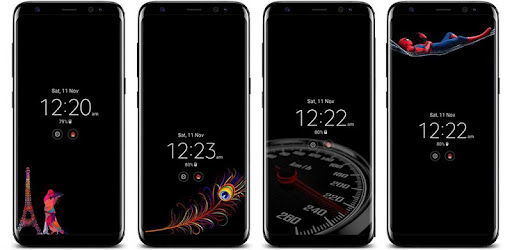
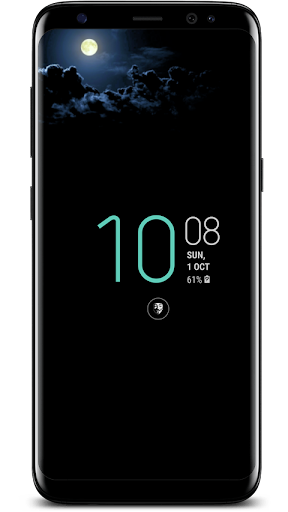
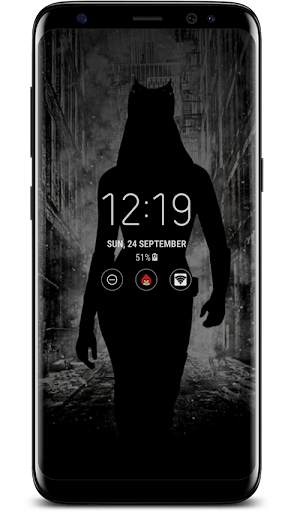
Images, text on OLED Always On/Ambient Display. Burn-in safe. 1000+ designs.
🖼️ Custom AOD — Set Any Image on Your Always On Display
Turn your boring default AOD into something personal. Custom AOD lets you
set any image, wallpaper, or photo on your OLED Always On Display screen —
with built-in burn-in protection so your screen stays safe.
Works on Samsung Galaxy, Google Pixel, OnePlus, and all Android phones with
Always On Display or Ambient Display.
━━━━━━━━━━━━━━━━━━━━━━
🔥 WHY CUSTOM AOD?
━━━━━━━━━━━━━━━━━━━━━━
✅ Burn-In Safe Technology
Every image is converted to a checkerboard (half-pixel) pattern that
protects your OLED screen from burn-in. Images also shift position
automatically so no single pixel stays lit too long.
✅ 1000+ Ready-Made AOD Images
Browse a growing collection of images designed specifically for OLED
Always On Displays — optimized for low battery usage and screen safety.
✅ Set Your Own Photo as AOD
Pick any image from your gallery. The app automatically converts it to
a burn-in safe half-pixel format.
✅ Auto Image Rotation
Set a timer and let your AOD shuffle through your favorite images
automatically — so your screen always looks fresh.
✅ Custom Text & Emoji on AOD
Add your own text, quotes, or mood emoji directly on your AOD screen.
Change font color. Text shifts position automatically to prevent burn-in.
✅ Free to Use
Watch a short, rewarded video to unlock any Prime image — completely free.
No purchase required to enjoy the app.
✅ No Data Collected
This app collects zero user data and shares nothing with third parties.
Your privacy is fully protected.
━━━━━━━━━━━━━━━━━━━━━━
📱 SUPPORTED DEVICES
━━━━━━━━━━━━━━━━━━━━━━
- Samsung Galaxy S series (S21, S22, S23, S24, S25 and beyond)
- Samsung Galaxy Z Fold & Z Flip series
- Samsung Galaxy A series (OLED models)
- Google Pixel (Ambient Display)
- OnePlus (Ambient Display)
- Any Android phone with Always On Display or Ambient Display
━━━━━━━━━━━━━━━━━━━━━━
👑 PRIME MEMBERSHIP
━━━━━━━━━━━━━━━━━━━━━━
Upgrade to Prime to remove all ads and get instant access to all images
without watching videos. One-time or subscription — your choice.
Free users can unlock any Prime image by watching a short rewarded video.
━━━━━━━━━━━━━━━━━━━━━━
⚙️ HOW IT WORKS
━━━━━━━━━━━━━━━━━━━━━━
Custom AOD uses Android's Accessibility Service to display your chosen
image on the Always On Display screen. This is the only way any third-party
app can draw on the AOD layer — no root required.
This app uses Accessibility Service only to display AOD overlays.
It does not read your screen content, keystrokes, or any personal data.
━━━━━━━━━━━━━━━━━━━━━━
📩 SUPPORT
━━━━━━━━━━━━━━━━━━━━━━
Having trouble? We respond to every email.
📧 dhvani303@gmail.com
🌐 dhwani.tech
Maintained since 2017 — 7 years of continuous updates.