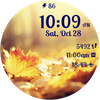

Autumn Magic
ASO Keyword Dashboard
Tracking 180 keywords for Autumn Magic in Google Play
Autumn Magic tracks 180 keywords (no keywords rank yet; 180 need traction). Key metrics: opportunity 70.6, difficulty 46.9.
Embrace the breathtaking beauty of autumn with our Autumn Magic watchface!
Tracked keywords
180
0 ranked • 180 not ranking yet
Top 10 coverage
—
Best rank — • Latest leader —
Avg opportunity
70.6
Top keyword: breathtaking
Avg difficulty
46.9
Lower scores indicate easier wins
Opportunity leaders
- 61.7
breathtaking
Opportunity: 74.0 • Difficulty: 43.4 • Rank —
Competitors: 718
- 59.6
listing
Opportunity: 74.0 • Difficulty: 37.2 • Rank —
Competitors: 193
- 60.5
enchanting
Opportunity: 74.0 • Difficulty: 39.2 • Rank —
Competitors: 442
- 60.5
every moment
Opportunity: 74.0 • Difficulty: 39.9 • Rank —
Competitors: 351
- 65.4
chosen
Opportunity: 74.0 • Difficulty: 41.3 • Rank —
Competitors: 637
Unranked opportunities
breathtaking
Opportunity: 74.0 • Difficulty: 43.4 • Competitors: 718
listing
Opportunity: 74.0 • Difficulty: 37.2 • Competitors: 193
enchanting
Opportunity: 74.0 • Difficulty: 39.2 • Competitors: 442
every moment
Opportunity: 74.0 • Difficulty: 39.9 • Competitors: 351
chosen
Opportunity: 74.0 • Difficulty: 41.3 • Competitors: 637
High competition keywords
time
Total apps: 391,306 • Major competitors: 18,130
Latest rank: — • Difficulty: 57.9
access
Total apps: 333,742 • Major competitors: 12,335
Latest rank: — • Difficulty: 58.5
make
Total apps: 330,586 • Major competitors: 20,510
Latest rank: — • Difficulty: 57.9
like
Total apps: 286,261 • Major competitors: 22,369
Latest rank: — • Difficulty: 60.7
enjoy
Total apps: 274,495 • Major competitors: 19,860
Latest rank: — • Difficulty: 57.4
All tracked keywords
Includes opportunity, difficulty, rankings and competitor benchmarks
| Major Competitors | |||||||
|---|---|---|---|---|---|---|---|
| best | 66 | 100 | 57 | 86 250,478 competing apps Median installs: 4,209 Avg rating: 2.6 | — | — | 18,391 major competitor apps |
| top | 68 | 100 | 56 | 79 89,080 competing apps Median installs: 3,154 Avg rating: 2.6 | — | — | 6,429 major competitor apps |
| messaging | 73 | 100 | 55 | 68 19,090 competing apps Median installs: 849 Avg rating: 2.5 | — | — | 817 major competitor apps |
| fitness | 71 | 100 | 46 | 73 39,293 competing apps Median installs: 230 Avg rating: 2.0 | — | — | 795 major competitor apps |
| health | 69 | 100 | 49 | 77 68,507 competing apps Median installs: 768 Avg rating: 2.1 | — | — | 1,947 major competitor apps |
| music | 69 | 100 | 56 | 78 73,653 competing apps Median installs: 2,642 Avg rating: 2.6 | — | — | 4,725 major competitor apps |
| customization | 73 | 100 | 45 | 68 17,451 competing apps Median installs: 4,248 Avg rating: 2.7 | — | — | 1,211 major competitor apps |
| themes | 72 | 100 | 48 | 70 26,294 competing apps Median installs: 8,578 Avg rating: 3.0 | — | — | 2,161 major competitor apps |
| change | 68 | 100 | 52 | 79 89,576 competing apps Median installs: 4,867 Avg rating: 2.6 | — | — | 6,335 major competitor apps |
| right | 67 | 100 | 57 | 83 156,910 competing apps Median installs: 1,928 Avg rating: 2.5 | — | — | 8,733 major competitor apps |
| single | 69 | 100 | 51 | 78 73,270 competing apps Median installs: 2,368 Avg rating: 2.5 | — | — | 4,213 major competitor apps |
| enjoy | 65 | 100 | 57 | 87 274,495 competing apps Median installs: 3,435 Avg rating: 2.6 | — | — | 19,860 major competitor apps |
| device | 68 | 100 | 60 | 80 106,226 competing apps Median installs: 3,374 Avg rating: 2.5 | — | — | 6,733 major competitor apps |
| make | 65 | 100 | 58 | 88 330,586 competing apps Median installs: 2,478 Avg rating: 2.5 | — | — | 20,510 major competitor apps |
| whether | 66 | 100 | 53 | 84 195,157 competing apps Median installs: 953 Avg rating: 2.3 | — | — | 7,857 major competitor apps |
| better | 69 | 100 | 52 | 78 83,231 competing apps Median installs: 2,108 Avg rating: 2.5 | — | — | 4,462 major competitor apps |
| step | 69 | 100 | 51 | 78 81,756 competing apps Median installs: 1,406 Avg rating: 2.4 | — | — | 4,035 major competitor apps |
| images | 69 | 100 | 52 | 78 72,817 competing apps Median installs: 2,867 Avg rating: 2.4 | — | — | 3,389 major competitor apps |
| range | 68 | 100 | 50 | 79 89,595 competing apps Median installs: 1,447 Avg rating: 2.3 | — | — | 4,541 major competitor apps |
| language | 69 | 100 | 53 | 76 61,102 competing apps Median installs: 3,050 Avg rating: 2.4 | — | — | 2,660 major competitor apps |
| digital | 68 | 100 | 51 | 81 121,769 competing apps Median installs: 871 Avg rating: 2.2 | — | — | 4,512 major competitor apps |
| heart | 71 | 100 | 47 | 74 41,827 competing apps Median installs: 1,005 Avg rating: 2.2 | — | — | 1,581 major competitor apps |
| wear | 71 | 100 | 61 | 72 32,202 competing apps Median installs: 374 Avg rating: 1.9 | — | — | 870 major competitor apps |
| date | 68 | 100 | 53 | 79 91,844 competing apps Median installs: 798 Avg rating: 2.2 | — | — | 2,893 major competitor apps |
| wear os | 72 | 100 | 60 | 70 23,972 competing apps Median installs: 286 Avg rating: 1.7 | — | — | 297 major competitor apps |
App Description
Embrace the breathtaking beauty of autumn with our Autumn Magic watchface!
🍂 10 Autumn Nature Background Images 🍂
Immerse yourself in the mesmerizing colors of autumn with a collection of 10 stunning nature-inspired backgrounds. From fiery red leaves to golden forests and serene views, each background offers a unique and picturesque view of the season.
🍂 Customizable Color Themes 🍂
Tailor the appearance of your watchface to match your mood and outfit with over 20 color themes. Match the time, date, and complications text colors to seamlessly blend with the chosen background, creating a harmonious and stylish look.
🍂 Health Data Complications 🍂
Stay on top of your fitness goals with two customizable complications that can display a range of health data, including heart rate, calories burned, and more. Monitor your well-being right on your wrist, all while enjoying the beauty of autumn.
🍂 Shortcut Functionality 🍂
Effortlessly access your favorite apps with three customizable shortcuts. Whether it's your fitness tracker, music player, or messaging app, you can launch them with a single tap, saving you time and enhancing your smartwatch experience.
🍂 Time Format and Date in Device Language 🍂
The time can be displayed in 12-hour or 24-hour time format, based on your device settings and the date will be automatically displayed in your device's language, ensuring convenience and ease of use.
🍂 AOD Screen Optimization 🍂
Enjoy a watchface that's optimized for low battery usage, ensuring your smartwatch remains powered throughout the day. The Always-On Display (AOD) screen maintains the elegance of Autumn Magic while conserving battery life.
With Autumn Magic, your wrist becomes a canvas showcasing the unparalleled beauty of autumn, combined with the functionality and customization options you need for a seamless and personalized smartwatch experience. Step into the world of Autumn Magic and make every moment of the season truly enchanting!
To customize the watchface:
1. Press and hold on the display
2. Tap the Customize button to change the background image, the colors for time, date and stats, data for complications to display and the apps to launch with the custom shortcuts.
Customize the watchface as you wish: choose the background you like the most, choose the best looking color theme for time, date and stats, select the data you want for the 2 customizable complications, select your desired apps to launch using the 3 customizable shortcuts and enjoy using the watchface! Check the screenshots from the store listing to better understand where the shortcuts are placed.
If you have issues installing the watchface, Samsung provided a detailed tutorial here: https://developer.samsung.com/sdp/blog/en-us/2022/11/15/install-watch-faces-for-galaxy-watch5-and-one-ui-watch-45
The complications can display*:
- Weather
- Feels like temp
- Barometer
- Bixby
- Calendar
- Call History
- Reminder
- Steps
- Date and weather
- Sunrise/sunset
- Alarm
- Stopwatch
- World Clock
- Battery
- Unread notifications
To display the data you want, tap and hold on the display, then press the Customize button and choose the data you want for the 2 complications.
* these functions are device dependent and might not be available on all watches
To display the shortcut you want, tap and hold on the display, then press the Customize button and choose the shortcut you want for the 3 customizable shortcut slots.
For more watchfaces, visit our website.
Enjoy!
