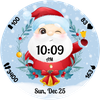

Santa Clock
ASO Keyword Dashboard
Tracking 117 keywords for Santa Clock in Google Play
Santa Clock tracks 117 keywords (no keywords rank yet; 117 need traction). Key metrics: opportunity 68.8, difficulty 52.1.
Cute animated Santa Claus on your wrist! Will make you smile everytime!
Tracked keywords
117
0 ranked • 117 not ranking yet
Top 10 coverage
—
Best rank — • Latest leader —
Avg opportunity
68.8
Top keyword: animated
Avg difficulty
52.1
Lower scores indicate easier wins
Opportunity leaders
- 67.5
animated
Opportunity: 73.0 • Difficulty: 57.5 • Rank —
Competitors: 1,298
- 68.0
featuring
Opportunity: 73.0 • Difficulty: 53.4 • Rank —
Competitors: 1,297
- 68.2
might
Opportunity: 73.0 • Difficulty: 58.7 • Rank —
Competitors: 1,378
- 68.5
steps
Opportunity: 73.0 • Difficulty: 46.7 • Rank —
Competitors: 1,066
- 67.2
exercise
Opportunity: 72.0 • Difficulty: 47.6 • Rank —
Competitors: 1,041
Unranked opportunities
animated
Opportunity: 73.0 • Difficulty: 57.5 • Competitors: 1,298
featuring
Opportunity: 73.0 • Difficulty: 53.4 • Competitors: 1,297
might
Opportunity: 73.0 • Difficulty: 58.7 • Competitors: 1,378
steps
Opportunity: 73.0 • Difficulty: 46.7 • Competitors: 1,066
exercise
Opportunity: 72.0 • Difficulty: 47.6 • Competitors: 1,041
High competition keywords
new
Total apps: 193,474 • Major competitors: 25,823
Latest rank: — • Difficulty: 65.7
time
Total apps: 170,577 • Major competitors: 19,592
Latest rank: — • Difficulty: 64.6
make
Total apps: 163,352 • Major competitors: 21,922
Latest rank: — • Difficulty: 65.0
find
Total apps: 143,808 • Major competitors: 16,874
Latest rank: — • Difficulty: 65.1
every
Total apps: 125,665 • Major competitors: 16,037
Latest rank: — • Difficulty: 62.3
All tracked keywords
Includes opportunity, difficulty, rankings and competitor benchmarks
| Major Competitors | |||||||
|---|---|---|---|---|---|---|---|
| play | 65 | 100 | 67 | 86 113,236 competing apps Median installs: 62,750 Avg rating: 3.2 | — | — | 19,366 major competitor apps |
| new | 64 | 100 | 66 | 90 193,474 competing apps Median installs: 42,470 Avg rating: 3.0 | — | — | 25,823 major competitor apps |
| themes | 71 | 100 | 54 | 72 16,568 competing apps Median installs: 47,542 Avg rating: 3.4 | — | — | 2,303 major competitor apps |
| exercise | 72 | 100 | 48 | 67 8,537 competing apps Median installs: 36,740 Avg rating: 3.0 | — | — | 1,041 major competitor apps |
| version | 69 | 100 | 61 | 77 30,986 competing apps Median installs: 38,306 Avg rating: 3.1 | — | — | 3,300 major competitor apps |
| device | 68 | 100 | 72 | 81 52,389 competing apps Median installs: 37,519 Avg rating: 3.0 | — | — | 6,390 major competitor apps |
| make | 64 | 100 | 65 | 89 163,352 competing apps Median installs: 42,108 Avg rating: 3.0 | — | — | 21,922 major competitor apps |
| phone | 67 | 100 | 69 | 83 75,756 competing apps Median installs: 37,780 Avg rating: 3.0 | — | — | 9,010 major competitor apps |
| step | 69 | 100 | 55 | 77 31,345 competing apps Median installs: 35,708 Avg rating: 2.9 | — | — | 3,571 major competitor apps |
| language | 69 | 100 | 59 | 76 29,667 competing apps Median installs: 31,657 Avg rating: 2.8 | — | — | 2,542 major competitor apps |
| digital | 68 | 100 | 55 | 79 42,168 competing apps Median installs: 26,988 Avg rating: 2.7 | — | — | 4,209 major competitor apps |
| heart | 71 | 100 | 50 | 71 15,090 competing apps Median installs: 29,042 Avg rating: 2.9 | — | — | 1,461 major competitor apps |
| wear | 72 | 100 | 80 | 66 7,173 competing apps Median installs: 24,222 Avg rating: 3.2 | — | — | 839 major competitor apps |
| wearos | 67 | 100 | 24 | 39 182 competing apps Median installs: 17,518 Avg rating: 3.4 | — | — | 10 major competitor apps |
| clock | 72 | 100 | 51 | 66 7,715 competing apps Median installs: 33,996 Avg rating: 3.3 | — | — | 796 major competitor apps |
| date | 69 | 100 | 60 | 77 31,688 competing apps Median installs: 26,732 Avg rating: 2.8 | — | — | 2,809 major competitor apps |
| design | 68 | 100 | 56 | 79 41,673 competing apps Median installs: 30,529 Avg rating: 2.9 | — | — | 4,566 major competitor apps |
| wear os | 71 | 100 | 76 | 60 3,443 competing apps Median installs: 13,088 Avg rating: 3.5 | — | — | 279 major competitor apps |
| designed | 66 | 100 | 57 | 85 96,808 competing apps Median installs: 27,484 Avg rating: 2.8 | — | — | 9,110 major competitor apps |
| choose | 66 | 100 | 62 | 85 100,655 competing apps Median installs: 46,844 Avg rating: 3.0 | — | — | 14,766 major competitor apps |
| find | 65 | 100 | 65 | 88 143,808 competing apps Median installs: 36,002 Avg rating: 3.0 | — | — | 16,874 major competitor apps |
| time | 64 | 100 | 65 | 89 170,577 competing apps Median installs: 33,133 Avg rating: 2.9 | — | — | 19,592 major competitor apps |
| available | 66 | 100 | 66 | 85 92,463 competing apps Median installs: 34,120 Avg rating: 2.9 | — | — | 9,952 major competitor apps |
| customizable | 71 | 100 | 54 | 72 16,056 competing apps Median installs: 38,582 Avg rating: 3.4 | — | — | 2,108 major competitor apps |
| launch | 72 | 100 | 52 | 66 7,749 competing apps Median installs: 41,076 Avg rating: 3.2 | — | — | 1,058 major competitor apps |
App Description
Cute animated Santa Claus on your wrist! Will make you smile everytime!
With over 20 color themes to choose from, 2 customizable app shortcuts, digital clock in 12 or 24H format, date in device language and custom designed AOD, Santa Clock is the cutest watchface to wear this season for your Galaxy Watch or any other WearOS based watch.
Issues installing the watchface on your watch? Check the companion phone app for step by step instructions!
To customize the watchface:
1. Press and hold on the display
2. Tap the Customize button to select color theme and the apps to launch with the custom shortcut.
Don't forget: use the companion app on your phone to discover other amazing watchfaces made by us!
With the release of One UI Watch version 4.5, there are new steps for installing Galaxy Watch4 and Galaxy Watch5 watch faces that are different from previous One UI versions.
If you have issues installing the watchface, Samsung provided a detailed tutorial here: https://developer.samsung.com/sdp/blog/en-us/2022/11/15/install-watch-faces-for-galaxy-watch5-and-one-ui-watch-45
For the customizable shortcuts you have these options*:
- App shortcut: Alarm, Bixby, Buds controller, Calculator, Calendar, Compass, Contacts, Find my phone, Gallery, Google Pay, Maps, Media Controller, Messages, Music, Outlook, Phone, Play Store, Recent apps, Reminder, Samsung Health, Settings, Stopwatch, Timer, Voice
Recorder, Weather, World Clock
- Recent apps
- Blood Oxygen
- Body Composition
- Breathe
- Consumed
- Daily Activity
- Heart rate
- Sleep
- Stress
- Together
- Water
- Woman’s health
- Contacts
- Google Pay
- Exercises: Circuit training, Cycling, Exercise bike, Hiking, Running, Swimming, Walking etc
To display the shortcut you want, tap and hold on the display, then press the Customize button and choose the shortcut you want for the bottom complication.
* these functions are device dependent and might not be available on all watches
For more watchfaces, visit our website.
Enjoy!
