Smart Tools Laser Level 📷🔦🔧


Smart Tools Laser Level 📷🔦🔧 Summary
Smart Tools Laser Level 📷🔦🔧 is a free, ad-supported Android app in Tools by Smart Tool Factory. Released in Dec 2017 (8 years ago). It has about 626K+ installs and 957 ratings with a 4.28★ (good) average. Based on AppGoblin estimates, it reaches roughly 1.2K monthly active users and generates around $<10K monthly revenue (0% IAP / 100% ads). Store last updated Nov 24, 2018
Recent activity: 9.00 installs this week (44 over 4 weeks) showing steady growth , and -1 new ratings this week View trends →
Smart Tools Laser Level 📷🔦🔧 SDKs Summary
App not yet scanned for SDKs.
4.28★
Ratings: 957
Screenshots



App Description
Laser Level app with records, gallery, charts and more features
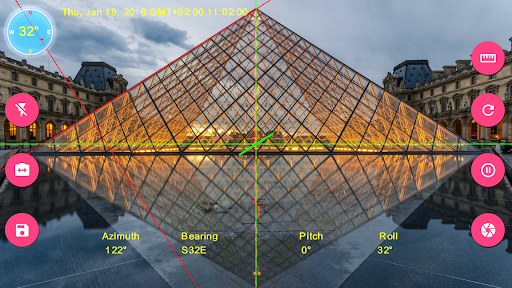
Smart Tools Laser Level is augmented reality app for computing inclination, slopes, angle, compass and elevation and rotation values using sensors and drawings on camera.
Features
•3 different measurement modes(Laser level, angle by dragging with your finger or drawing angle with your finger)
•Touch screen to set point of measurement or touch reset button to reset it to origin.
•Display azimuth, direction, inclination or rotation angles.(Magnetic Field Sensor is required)
•Fast and accurate calibration option.
•Freeze screen to have more precise and robust readings.
•Leveling option displays pitch and roll angles as line, square or circle which makes it easier to align your device and results more accurate measurements.
•Option to toggle between back and front(if available) camera.
•Flashlight for situations more light needed
•Option to visualize your progress using charts.
•Image gallery with details, Exif info(Some Exif data requires Android 7.0 and above), and other features such as image sharing and editing
•Highly customizable app settings and user interface
Instructions
Measurement Screen
Rotate your device on laser level measurement mode or align with object you want get readings from. To get more precise reading make sure that leveling line is aligned with laser level. You can freeze preview and measure any slope or angle easily.
Swipe your screen right to open Navigation Menu