Sunset Photography

Sunset Photography Summary
Sunset Photography is a mobile Android app in Photo And Video by Kiarash Ahi. Released in Apr 2019 (7 years ago). It has about 2.1K+ installs Based on AppGoblin estimates, it reaches roughly 36 monthly active users . Store metadata: updated Nov 15, 2023.
Recent activity: 8.00 installs this week (43 over 4 weeks) showing steady growth View trends →
Store info: Last updated on Google Play on Nov 15, 2023 .
0★
Ratings: 0
Screenshots

App Description
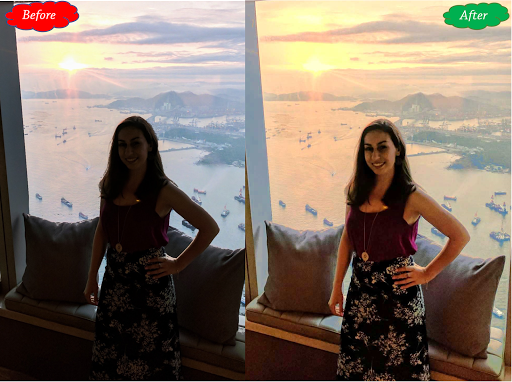
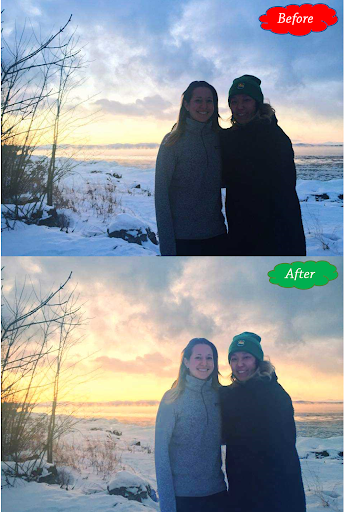
Retrieves the Pictures as Seen in the Nature! Algorithm Based on Ph.D. research!
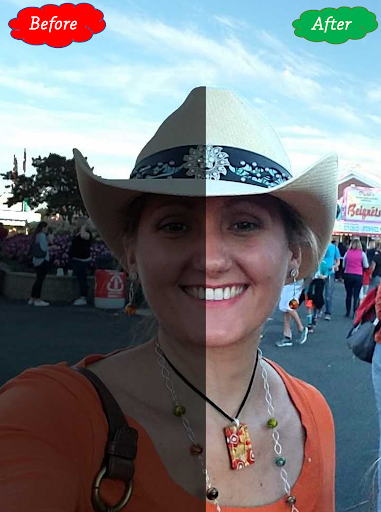
Enhancing the brightness of the foreground without alternating the background! Fixing the problem of dull white skies.
This app solves a very common problem in phone photography: dark foreground due to bright background.
It also enhance the color of the sunlight, sky and Sunset. It is free and has no ads or annoying notifications.
Problem Statement: You cannot take perfect image of both passive foreground and bright background in one picture. If you increase the sensitivity of the camera by tapping on the foreground, the bright background goes saturated and if you tab on the bright background the foreground will be captured dark. The only solution would be a compromise and capture an image that has mediocre foreground and background. But this app solves the problem and retrieve an image with both perfect foreground and perfect background.
For achieving the best results, when taking the image, tap on the sunset, or bright background, so that the foreground will be captured dark. The app will retrieve the dark foreground without degrading the background.
The algorithm works best for the images that are captured dark due to a bright background.
(1) In one sentence, for enhancing your image just find the best locations for the three sliders (Foreground, Brightness, and Vertical sliders).
(2) If it is difficult for you to find the best adjustments, just move the blue slider all the way to the right (where it is written background), and then adjust the brightness by moving the green slider:
(3) For more advanced usage, please refer to the user-guide that is accessible through pushing the help button in the app.