Tamil lexicon


Tamil lexicon Summary
Tamil lexicon is a mobile Android app in Books And Reference by Digital South Asia Library, University of Chicago. Released in Aug 2019 (6 years ago). It has about 2.7K+ installs Based on AppGoblin estimates, it reaches roughly 263 monthly active users . Store metadata: updated Dec 22, 2025.
Recent activity: 9.00 installs this week (176 over 4 weeks) showing exceptional growth View trends →
Store info: Last updated on Google Play on Dec 22, 2025 .
0★
Ratings: 0
Screenshots


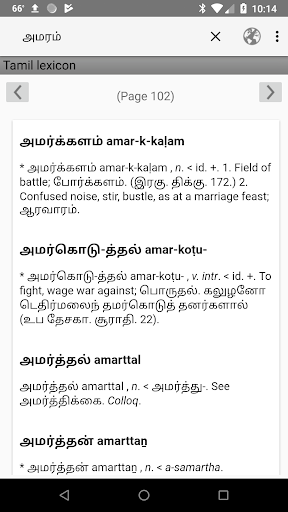
App Description
Tamil lexicon is a fulltext searchable dictionary.
The Tamil lexicon app is a product of the Digital South Asia Library program (https://dsal.uchicago.edu) at the University of Chicago. The app offers a searchable version of the University of Madras's "Tamil lexicon," [Madras], University of Madras, 1924-1936.
The Tamil lexicon app can be used both online and offline. The online version interacts with a database that runs remotely on a server at the University of Chicago. The offline version uses a database that is created on the device upon first download.
By default, the app operates in the online mode.
The app allows users to conduct both headword and fulltext queries.
The default mode for this app is to search headwords. To search for a headword, touch the search box at the top (magnifying glass icon) to expose the on-screen keyboard and begin searching. Headwords can be entered in Tamil, accented Latin characters, and unaccented Latin characters. For example, headword searches for புள்ளுவம், puḷḷuvam, and pulluvam all yield the definition "Cry of birds."
After entering three characters in the search box, a scrollable list of search suggestions will pop up. Touch the word to search for and it will automatically fill in the search field. Or ignore suggestions and enter the search term completely. To execute the search, touch the return button on the keyboard.
By default, headword searches expand off the end of the search term. In other words, searching for "mann" will generate results for headwords that begin with "mann" and have any number of trailing characters, like "maññai" (மஞ்ஞை) "maṇṇavar" (மண்ணவர்), etc. To expand the front of a query, users can enter the "%" character at the beginning of search term. For example, "%mann" will find "appiramaṇṇiyam" (அப்பிரமண்ணியம்), "ulaka-maṉṉavaṉ" (உலகமன்னவன்), etc. The wildcard character at the front of a word also expands search suggestions.
For fulltext searching and advanced search options, select the "Search Options" sub-menu in the overflow menu (usually the three vertical dots icon at the top right corner of the screen).
For fulltext searching, check the "Search all text" box then enter a term in the search field.
Fulltext searching supports multiword searching. For example, the search "ceremonial bath" returns 30 resul