One Finance: Money Manager


One Finance: Money Manager Summary
One Finance: Money Manager is a with in-app purchases Android app in Finance by Tashila Pathum. Released in Oct 2021 (4 years ago). It has about 13.3K+ installs and 144 ratings with a 5.00★ (excellent) average. Based on AppGoblin estimates, it reaches roughly 2K monthly active users and generates around $<10K monthly revenue (100% IAP / 0% ads). Store metadata: updated Feb 4, 2025.
Recent activity: 38 installs this week (157 over 4 weeks) showing steady growth View trends →
Store info: Last updated on Google Play on Feb 4, 2025 .
5★
Ratings: 144
Screenshots


App Description
One app to manage them all - Money, bills, bank accounts, loans, investments
One Finance is a personal finance app designed to use on-the-go. You can add your daily incomes, expenses and other transactions with just a few clicks. One Finance app is a feature-rich offline logger for your daily transactions.
The features of One Finance are designed to match with your real life experiences. Download and see if it really is!
Or just read the features:
💵 Wallet
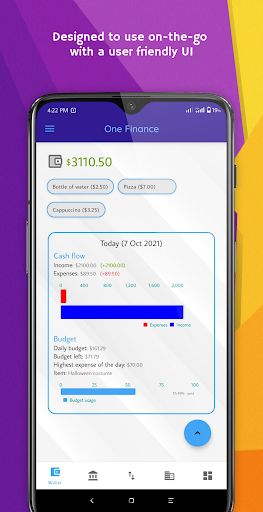
This is the main page of the app. The wallet's purpose is to show the balance of your physical wallet so you don't have to check it all the time. You have only one actual wallet so there are no multiple wallet in this app unlike some apps. Instead there are multiple accounts. Using Wallet page you can:
🔹Add transactions with 2 taps
🔹Add incomes
🔹Add expenses with categories
🔹Optionally choose a category
🔹Transfer money to your accounts
🔹Add expenses with just 1 tap from the Quick List
🔹See 'Today', 'This week' and 'This month' reports
🔹Tap the balance to edit manually
🏦 Account Manager
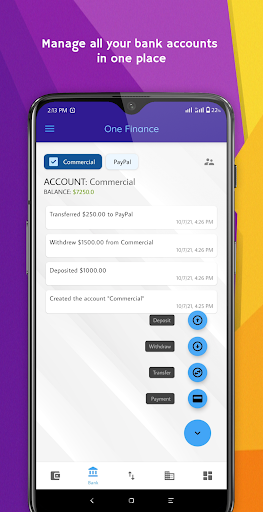
You can add multiple accounts to the app and switch between them. The accounts can be your real-life bank accounts or just to manage different kinds of expenses and incomes. You can:
🔹Switch between accounts with 1 tap
🔹See all transaction of each account right away
🔹Add payments directly from accounts
🔹Transfer money between the accounts
📃 Transaction History
There's a transaction history page with all your incomes, expenses, deposits and withdrawals. In this page you can:
🔹Search and edit transaction amount, description, category or date
🔹Filter by date: Today, yesterday, this week or last week
🔹Filter by type: Income or expense
🔹Filter by the category
🔹Sort by date or amount
📈 Investments
You can use Investments feature to manage and monitor all your investments in one place, with the following features:
🔹Add invested amounts and return values
🔹Calculate profit automatically
🔹Add special notes
🔹See investment history
🔹Group similar investments by tags
🔹Sort investments by most profitable, return value, invested amount or longest time period
❇️ Categories
Categories are completely optional because it's a bit of a hassle to decide a category for some people. Or maybe it's just me. However the point is to make it as quick as possible when adding an expense. You can choose the category later as well. From Categories page:
🔹Add as many as categories you want
🔹Choose any color for the categories
🔹Even choose the transparency level of the color!
🔹Use the built-in color picker to pick a color easily
🔹See the spendings of each category in a pie chart
📊 Reports
You can access Daily, Weekly and Monthly reports containing the following information:
🔹Total income and expenses with a chart
🔹The difference of income and expenses compared to the previous period
🔹Total budget and the budget left on a simple chart
🔹Item with the highest expense
🔹See reports from a specific day
⚒️ Tools
One Finance has some extra tools to make your life easier:
🔹Shopping cart to jot down your shopping list. No need to write down lists, lose them and buy the stuff with memory anymore!
🔹Bills page to paid and due bills. You can add them to your device calendar at the same time, too. You will never forget to pay bills on time again!
🔹Loans page to add borrowed or lent loans. It's rude not to pay back bills on time, isn't it?
🔹Calculator to do basic math because "YoU WoN't HaVe A cALcuLaToR wiTh yOu aLL tHe TiMe"
🔹Quick List to keep the common expenses saved, to add them with just one tap from the Wallet page.
⚙️ Customization
You can personalize One Finance app with the following features:
🔹Dark and light modes
🔹Set a PIN
🔹Change home page
🔹Allow or restrict negative balance
If you read this far, why not download the app and check it out yourself :)