TEAC HR Streamer


TEAC HR Streamer Summary
TEAC HR Streamer is a mobile Android app in Music And Audio by TEAC CORPORATION. Released in Aug 2018 (7 years ago). It has about 12.4K+ installs and 104 ratings with a 2.33★ (poor) average. Based on AppGoblin estimates, it reaches roughly 929 monthly active users . Store metadata: updated Feb 9, 2026.
Recent activity: 16 installs this week (90 over 4 weeks) showing steady growth View trends →
Store info: Last updated on Google Play on Feb 9, 2026 .
2.33★
Ratings: 104
Screenshots



App Description
TEAC HR Streamer is an application for TEAC Network Audio Players.
TEAC HR Streamer is a high-definition audio player application for the Android tablet/smartphone, designed to work with TEAC Network Audio Players.
TEAC HR Streamer allows Android tablet/smartphone users to conveniently manage network audio playback on their devices, enriching the experience by displaying cover art and allowing the creation of custom playlists etc.
【Main features】
◆Fast response
・ The system automatically reads tagged information in advance and pre-fetches album art images, allowing users to quickly browse through libraries.
・When adding a new music file to the library, the process of retrieving associated data is consequently very quick.
◆Straightforward onscreen browsing
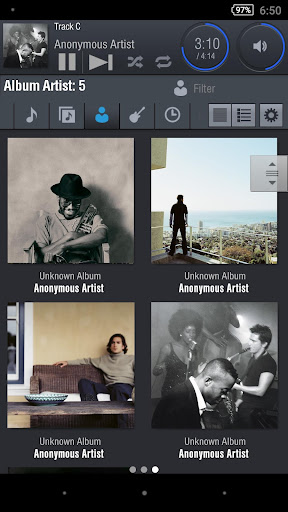
・The easy-to-read screen is divided into three panels: playlist, music selection and playback operation.
・Album art is neatly tiled.
・Album art uses high resolution imagery which can be enlarged or reduced for viewing.
・System functionality includes a powerful search and sort by filter/category facility.
Content can be searched by keyword and also can be sorted by song name, album title, artist, composer, genre, and year of recording.
・Easier operation of high resolution streaming services such as Tidal and Qobuz, thanks to the use of a browsing screen that’s similar to that used for accessing local content.
◆Flexible in operation
・Powerful playlist-editing function.
・Intuitive onscreen operation.
The most common playback operations - pause, skip, seek, play time, and shuffle/random play - are grouped together at the top of the screen in one panel.
・Volume control adjustment.
・Settings function allows high customization ability.
・Multilingual.