Graph Craftsman: Build Diagram


Graph Craftsman: Build Diagram Summary
Graph Craftsman: Build Diagram is a free, ad-supported, with in-app purchases Android app in Tools by İbrahim Karagoz. Released in Nov 2023 (2 years ago). Store last updated Nov 26, 2023
Graph Craftsman: Build Diagram SDKs Summary
App not yet scanned for SDKs.
0★
Ratings:
Screenshots



App Description
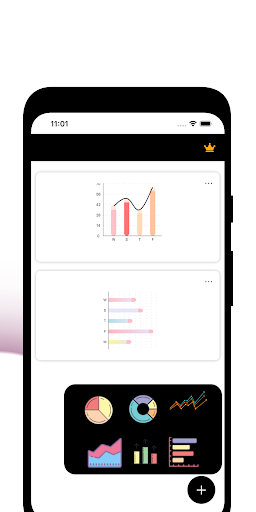
Basic Chart Builder: 3D Common
Graph Craftsman: Build Diagram
Graph Craftsman: Build Diagram is the go-to solution for anyone seeking a powerful and versatile tool to create stunning visualizations. Whether you're a data enthusiast, a business professional, or a creative mind, Graph Craftsman: Build Diagram empowers you to turn your raw data into compelling charts with ease. Packed with a robust set of features and an intuitive interface, Graph Craftsman: Build Diagram is the ideal chart maker app for all your visualization needs.
Key Features:
Graphs Galore: Explore a plethora of graph types including 3D line graphs, bar charts, area charts, and more. With Graph Craftsman: Build Diagram, you have the flexibility to choose the perfect graph style to showcase your data effectively.
Pie and Donut Delight: Easily create eye-catching pie and donut charts to represent proportions and percentages. Customize colors, labels, and explode slices to add that extra flair to your visualizations.
Build Your Vision: Graph Craftsman: Build Diagram provides a user-friendly interface that allows you to build and customize charts effortlessly. The drag-and-drop functionality ensures that even beginners can craft professional-looking visuals.
Craftsman's Touch: Channel your inner craftsman with our advanced customization options. Fine-tune every element of your chart, from axes and grids to legends and annotations, giving you complete control over the look and feel.
Designer's Paradise: Immerse yourself in a designer's paradise with a vast array of color schemes, fonts, and themes. Create charts that not only convey data effectively but also captivate your audience with a visually pleasing design.
Versatile Plots: Dive into the world of versatile plots, combining line and bar charts or experimenting with horizontal and vertical orientations. Graph Craftsman: Build Diagram gives you the freedom to express your data in innovative ways.
Creator's Playground: Whether you're a seasoned data scientist or a casual user, Graph Craftsman: Build Diagram caters to all levels of expertise. Become the creator of insightful and visually appealing charts that tell your unique data story.
Builders' Haven: For those who appreciate the art of building, Graph Craftsman: Build Diagram is your haven. Construct complex visualizations with multiple data sets and layers, transforming raw data into meaningful insights.
Why Graph Craftsman: Build Diagram?
Efficiency: Save time and effort with Graph Craftsman: Build Diagram streamlined interface and quick chart generation.
Precision: Achieve pr