TKS 28 Hex Watch Face

TKS 28 Hex Watch Face Summary
TKS 28 Hex Watch Face is a mobile Android app in Personalization by Tiny Kitchen Studios. Released in Jun 2025 (9 months ago). It has about 386+ installs Based on AppGoblin estimates, it reaches roughly 24 monthly active users . Store metadata: updated Mar 23, 2026.
Recent activity: 18 installs this week (29 over 4 weeks) showing exceptional growth View trends →
Store info: Last updated on Google Play on Mar 23, 2026 .
0★
Ratings: 0
Screenshots



App Description
Wear OS Watch Face With Hex Shaped Complications and a Subtle Animation,
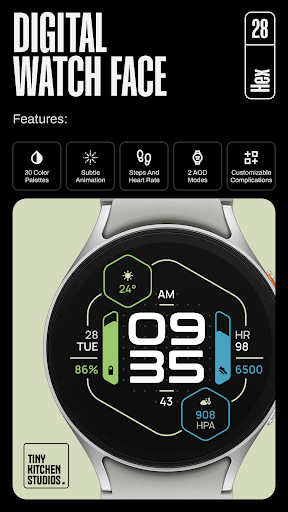
Hex: A Customizable, Wear OS Watch Face With Hex Shaped Complications and Design. Featuring A Subtle Animation, 4 Customizable Complications, and 30 Color Palettes.
Key Features:
- Subtle Background Animation.
- 30 Color Palettes: Vibrant and Muted Colors. With AMOLED-friendly True Black Backgrounds.
- 2 AOD Modes: Minimal and Informative.
- 12/24 Hour Time Format Support.
- Steps, Heart Rate, and Date Built-in.
- 4 Customizable Complications
How to Install and Apply the Watch Face:
1. Ensure your smartwatch is selected during purchase.
2. Install the optional companion app on your phone (if desired).
3. Long press your watch display, swipe through available faces, tap "+", and select "TKS 28 Hex Watch Face"
Note for Pixel Watch Users:
If steps or heart rate counters freeze after customization, switch to another watch face and back to reset the counters.
Ran into any issues or need a hand? We're happy to help! Just send us an email at dev.tinykitchenstudios@gmail.com