Android TV Remote Control

Android TV Remote Control Summary
Android TV Remote Control is a ad-supported, with in-app purchases Android app in Tools by ToolsLab. Released in Oct 2024 (1 year ago). It has about 58.6K+ installs and 469 ratings with a 4.35★ (good) average. Based on AppGoblin estimates, it reaches roughly 3.3K monthly active users and generates around $<10K monthly revenue (46% IAP / 54% ads). Store metadata: updated May 28, 2026.
Recent activity: 416 installs this week (1.7K over 4 weeks) showing steady growth , and 2.00 new ratings this week View trends →
Store info: Last updated on Google Play on May 28, 2026 .
4.35★
Ratings: 469
Screenshots


App Description
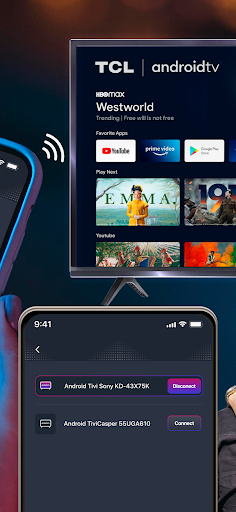
Control your Android TV with your phone via WiFi. No physical remote needed.
Control Your Android TV With Your Phone
Android TV Remote Control lets you control your Android TV or Google TV directly from your smartphone using WiFi.
No physical remote needed — turn your phone into a powerful and smart TV remote in seconds.
Whether your TV remote is lost, broken, or out of battery, this app gives you full control right from your phone.
🚀 Key Features
• Android TV remote control via WiFi
• Voice commands for fast navigation and search
• Built-in keyboard for easy text input
• Touchpad mode for smooth scrolling
• Quick launch installed TV applications
• Volume control with real-time status
• Save your last connected TV for quick access
Control your TV just like a physical remote — but smarter and more convenient.
📺 Supported Devices & Brands
This app works with all TVs and devices running Android TV or Google TV, including:
• Xiaomi Android TV
• Sony Bravia
• TCL Android TV
• Skyworth
• Changhong
• Haier
• Chromecast with Google TV
• Android TV boxes & Android TV sticks
And many other Android TV–powered devices.
🔗 How to Connect
1. Make sure your phone/tablet and Android TV are connected to the same WiFi network
2. Open the app and select your TV
3. Start controlling your Android TV instantly
No cables. No setup hassle.
💡 Why Choose This Android TV Remote App?
✔ Simple & fast connection
✔ No physical remote required
✔ Works with most Android TV brands
✔ Lightweight & easy to use
✔ Ideal replacement remote for Android TV
⚠️ Disclaimer
This application is not affiliated with or endorsed by Google.
Terms of Use: https://toolslab.top/terms-of-use
Privacy Policy: https://toolslab.top/privacy-policy