Russian Explanatory Dictionary

Russian Explanatory Dictionary Summary
Russian Explanatory Dictionary is a ad-supported, with in-app purchases Android app in Books And Reference by TTdictionary Offline. Released in May 2014 (12 years ago). It has about 1.3M+ installs and 10.8K ratings with a 4.69★ (excellent) average. Based on AppGoblin estimates, it reaches roughly 18.3K monthly active users and generates around $<10K monthly revenue (31% IAP / 69% ads). Store metadata: updated May 29, 2026, version 82.
Data tracking: SDKs and third-party integrations were last analyzed on May 18, 2026. The app's network data flows (API traffic to/from the app and its SDKs) were last crawled on May 12, 2026.
Store info: Last updated on Google Play on May 29, 2026 (version 82).
SDKs, Trackers & Permissions
Russian Explanatory Dictionary was last scanned for SDKs 2026-05-18. Below is the overview of third party companies detected in the app. The full list of raw SDKs, app permissions and unknown SDKs is available here.
AppGoblin saw Russian Explanatory Dictionary uses 3 Mediation
 AdMob
AdMob AppLovin
 Unity
UnityAppGoblin saw Russian Explanatory Dictionary uses 12 Development Tools
 Kotlin
 Bumptech
AppGoblin saw Russian Explanatory Dictionary uses 31 Ad Networks
 MobileFuse
 Smaato
 Moloco
 Google
AppGoblin saw Russian Explanatory Dictionary uses 4 Analytics: Attribution
 Yandex Metrica
 AppsFlyer
 AppMetrica
 Adjust
AppGoblin saw Russian Explanatory Dictionary uses 3 Business Tools
 RevenueCat
 PayPal
AppGoblin saw Russian Explanatory Dictionary uses 2 Analytics: Product
 Firebase
 LinkedIn
App Details
App Store
Ads & App-Ads.txt
AppGoblin SDK Scans
4.69★
Ratings: 10.8K
Screenshots



App Description
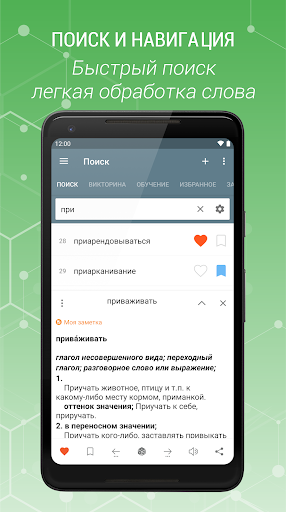
Russian offline dictionary with easy and functional interface.
Russian Explanatory Dictionary is a free offline dictionary (vocabulary) with easy and functional user interface, covers over 151.000 words.
★ Features:
• Favorite words
• Bookmark
- Rename a bookmark
- Sorting a bookmark
• Adding notes to word
• History( as day,month ...)
• Adding new words
• Editing words
• Random word button
• Search filters
- suffix (starts with)
- prefix (ends with)
• Text-to-speech (TTS) (word or selected text)
• Voice recognition
• Night mode
• Backup/Restore (File & Dropbox )
• Tabs visibility - you can show or hide tabs (in settings).
✓ Supports Android N
✓ Tablet UI Support
• Changing text size on the description window
• Sharing in other apps
• The option of searching, sounding and sharing of marked word in the description window.
* Description window is opened as clicking on the word. You can minimize and maximize the description window with swipe function.
- Setting
• Changing option of text size
• Changing option of UI color
• Clearing option of Bookmark, Favorite, Note, History list
TTdictionary dictionaries are offline dictionary, offline dictionary needs memory.
You can give suggestions, comments and legal questions related to dictionary to this address. ttdicpro@gmail.com