UsA Circle Bubble - USA118

1.8K installs
Ratings not yet available
+6.00 weekly installs
trend steady
+18 monthly installs
trend steady
UsA Circle Bubble - USA118 icon

ASO Keyword Dashboard

Tracking 118 keywords for UsA Circle Bubble - USA118 in Google Play

Developer: USA Design Watch Face Category: personalization

UsA Circle Bubble - USA118 tracks 118 keywords (no keywords rank yet; 118 need traction). Key metrics: opportunity 70.4, difficulty 48.2.

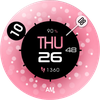
Unique colorful circle bubble watch face for Wear OS

Tracked keywords

118

0  ranked •  118  not ranking yet

Top 10 coverage

Best rank — • Latest leader —

Avg opportunity

70.4

Top keyword: analog

Avg difficulty

48.2

Lower scores indicate easier wins

Opportunity leaders

  • analog

    Opportunity: 74.0 • Difficulty: 38.5 • Rank —

    Competitors: 188

    62.5
  • api

    Opportunity: 74.0 • Difficulty: 42.5 • Rank —

    Competitors: 395

    66.0
  • motion

    Opportunity: 74.0 • Difficulty: 44.4 • Rank —

    Competitors: 681

    62.3
  • scroll

    Opportunity: 74.0 • Difficulty: 46.4 • Rank —

    Competitors: 420

    61.7
  • normal

    Opportunity: 74.0 • Difficulty: 41.0 • Rank —

    Competitors: 671

    63.7

Unranked opportunities

  • analog

    Opportunity: 74.0 • Difficulty: 38.5 • Competitors: 188

  • api

    Opportunity: 74.0 • Difficulty: 42.5 • Competitors: 395

  • motion

    Opportunity: 74.0 • Difficulty: 44.4 • Competitors: 681

  • scroll

    Opportunity: 74.0 • Difficulty: 46.4 • Competitors: 420

  • normal

    Opportunity: 74.0 • Difficulty: 41.0 • Competitors: 671

High competition keywords

  • time

    Total apps: 391,524 • Major competitors: 18,148

    Latest rank: — • Difficulty: 57.9

  • new

    Total apps: 375,600 • Major competitors: 24,009

    Latest rank: — • Difficulty: 58.8

  • easy

    Total apps: 331,478 • Major competitors: 16,442

    Latest rank: — • Difficulty: 56.5

  • make

    Total apps: 330,788 • Major competitors: 20,542

    Latest rank: — • Difficulty: 57.9

  • find

    Total apps: 301,513 • Major competitors: 17,522

    Latest rank: — • Difficulty: 58.5

All tracked keywords

Includes opportunity, difficulty, rankings and competitor benchmarks

Major Competitors
new641005989

375,600 competing apps

Median installs: 2,986

Avg rating: 2.6

24,009

major competitor apps

mode691005677

67,179 competing apps

Median installs: 5,484

Avg rating: 2.7

5,716

major competitor apps

change681005279

89,233 competing apps

Median installs: 4,930

Avg rating: 2.6

6,322

major competitor apps

right671005783

156,152 competing apps

Median installs: 1,946

Avg rating: 2.5

8,714

major competitor apps

single691005178

72,754 competing apps

Median installs: 2,418

Avg rating: 2.5

4,202

major competitor apps

easy651005788

331,478 competing apps

Median installs: 2,447

Avg rating: 2.4

16,442

major competitor apps

make651005888

330,788 competing apps

Median installs: 2,476

Avg rating: 2.5

20,542

major competitor apps

phone671006083

150,069 competing apps

Median installs: 3,592

Avg rating: 2.6

9,391

major competitor apps

step691005178

81,142 competing apps

Median installs: 1,416

Avg rating: 2.4

4,015

major competitor apps

support671005583

163,723 competing apps

Median installs: 1,631

Avg rating: 2.6

7,861

major competitor apps

live671005582

140,164 competing apps

Median installs: 1,574

Avg rating: 2.5

6,885

major competitor apps

wear711006172

32,059 competing apps

Median installs: 378

Avg rating: 1.9

868

major competitor apps

analog741003962

8,249 competing apps

Median installs: 500

Avg rating: 2.0

188

major competitor apps

date681005379

91,480 competing apps

Median installs: 798

Avg rating: 2.2

2,885

major competitor apps

wear os721006070

23,853 competing apps

Median installs: 288

Avg rating: 1.7

296

major competitor apps

designed651005486

264,374 competing apps

Median installs: 787

Avg rating: 2.2

8,558

major competitor apps

manage661005584

181,014 competing apps

Median installs: 746

Avg rating: 2.4

7,081

major competitor apps

list691005278

81,524 competing apps

Median installs: 2,583

Avg rating: 2.4

3,550

major competitor apps

choose661005684

198,304 competing apps

Median installs: 2,814

Avg rating: 2.6

13,714

major competitor apps

using661005785

224,833 competing apps

Median installs: 2,837

Avg rating: 2.5

12,384

major competitor apps

find651005887

301,513 competing apps

Median installs: 2,818

Avg rating: 2.6

17,522

major competitor apps

menu701005274

42,494 competing apps

Median installs: 544

Avg rating: 2.4

1,319

major competitor apps

option701004974

46,961 competing apps

Median installs: 3,060

Avg rating: 2.5

2,513

major competitor apps

time641005889

391,524 competing apps

Median installs: 1,406

Avg rating: 2.4

18,148

major competitor apps

available661005884

193,753 competing apps

Median installs: 2,798

Avg rating: 2.5

10,361

major competitor apps

118 keywords
1 of 5

App Description

Unique colorful circle bubble watch face for Wear OS

Now available for Wear OS watches! Unique pop color circular motion with animated bubbles watch face. The digit hour and minutes moving as in the analog watch position. Custom the looks to fit your style. Introducing dark mode for a seamless experience.

This watch face requires Wear OS API 33+ (Wear OS 4 or newer). Compatible with Galaxy Watch 4/5/6/7/8 Series and newer, Pixel Watch series and other watch face with Wear OS 4 or newer.

Make sure you are purchasing using the same Google account registered on your watch. The installation should begin automatically on the watch after a few moments.

After the installation is completed on your watch, do these steps to open the watch face on your watch :
1. Open the watch face list on your watch (tap and hold the current watch face)
2. Scroll to the right and tap "add watch face"
3. Scroll down and find new installed watch face in the "downloaded" section

Features:
- 12/24 hour mode with seconds
- Battery and step Information
- Customize menu for easy styling
- 6 Single color and 5 gradient color backgrounds. Set the gradient color to the first position to customize the single color background.
- Dark Mode, make the watch face seamless
- Bubbles adjustment (Default, less, or no bubbles)
- Hour digit color customization
- Custom app shortcuts
- Special Designed AOD, color synced with normal mode

Tap and hold the watch face and go to the "customize" menu (or settings icon under the watch face) to change the styles and also manage the custom shortcut complication.

You can select 6 "single color" backgrounds from the menu. To extend the background you can select 5 "gradient" backgrounds on the next menu. To choose a "single color" background, please set the "gradient" background to the first position (default). Then you can change the "single color" background through the "single color" menu.

To change between 12 or 24-hour mode, go to your phone date and time settings and there is an option to use 24-hour mode or 12-hour mode. The watch will sync with your new settings after a few moments.

Special designed Always On Display ambient mode. Turn on the Always On Display mode on your watch settings to show a low power display on idle. Please be aware, this feature will use more batteries.

Join our Telegram group for live support and discussion
https://t.me/usadesignwatchface