ELM327 Test

ELM327 Test Summary
ELM327 Test is a ad-supported Android app in Auto And Vehicles by Radarbot Company. Released in Jun 2018 (7 years ago). It has about 623.8K+ installs and 1.4K ratings with a 3.52★ (average) average. Based on AppGoblin estimates, it reaches roughly 9K monthly active users and generates around $<10K monthly revenue (0% IAP / 100% ads). Store metadata: updated Oct 6, 2023.
Recent activity: 639 installs this week (2.5K over 4 weeks) showing steady growth , and 2.00 new ratings this week View trends →
Advertising: AppGoblin detected 1.00 monetized ad creatives shown inside the app.
Data tracking: SDKs and third-party integrations were last analyzed on Apr 7, 2026. The app's network data flows (API traffic to/from the app and its SDKs) were last crawled on Mar 11, 2026.
Store info: Last updated on Google Play on Oct 6, 2023 .
SDKs, Trackers & Permissions
ELM327 Test was last scanned for SDKs 2026-04-07. Below is the overview of third party companies detected in the app. The full list of raw SDKs, app permissions and unknown SDKs is available here.
AppGoblin saw ELM327 Test uses 1 Business Tools
 Didomi
AppGoblin saw ELM327 Test uses 5 Development Tools
 JetBrains
 Google
 Unity
Unity Kotlin
AppGoblin saw ELM327 Test uses 1 Analytics: Product
 Firebase
AppGoblin saw ELM327 Test uses 1 Mediation
 AdMob
AdMobAppGoblin saw ELM327 Test uses 2 Ad Networks
AppGoblin saw ELM327 Test uses 1 Analytics: Attribution
 AppsFlyer
App Details
App Store
Ads & App-Ads.txt
AppGoblin SDK Scans
3.52★
Ratings: 1.4K
Screenshots
App Description
Check your ELM327 device, identify the current version and supported PIDs
"ELM327 Test" is used to check the operation of devices with an ELM327 diagnosis. If you have a, ELM327 device, with this application you can:
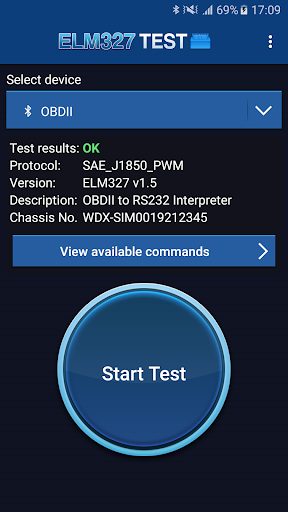
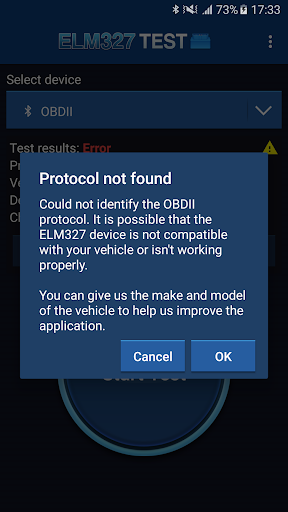
* Check the correct operation of your device or possible connection problems, protocol problems or hardware failures in the device.
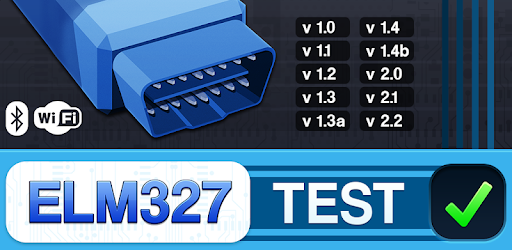
* Identify the current version of the device. (ELM327 v1.0, v1.1, v1.2, v1.3, v1.3a, v1.4, v1.4b, v2.0, v2.1, v2.2).
* Detect OBD2 protocol compatible with your vehicle:
- ISO 9141-2
- ISO 14230-4 KWP 2000
- ISO 14230-4 KWP 2000 (FAST)
- ISO 15765-4 CAN-BUS
- SAE J1939 CAN
- SAE J1850 PWM
- SAE J1850 VPW
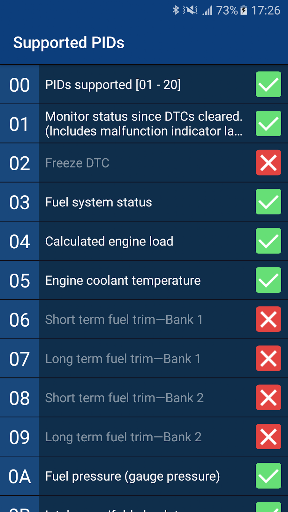
* Show all PID commands supported by the vehicle.
* Display the chassis number of your vehicle.
HOW TO USE THE APPLICATION
1. Connect the ELM327 adapter to your car using the OBD2 socket.
2. Link the adapter from the Bluetooth settings on your Android device or connect your Android device to the device's WiFi.
3. Start the application and select the paired device (Bluetooth or WiFi).
4. Press the "Start Test" button.
5. Wait until the end of the test and check the results.
6. Press the button "View available commands" to show all PIDs commands supported by your vehicle.
For inquiries please email us at support@iteration-mobile.com