Cello Vista: Learn & Practice


Cello Vista: Learn & Practice Summary
Cello Vista: Learn & Practice is a mobile Android app in Music And Audio by Vista8 Studio Ltd. Released in Mar 2026 (2 months ago). It has about 344+ installs Based on AppGoblin estimates, it reaches roughly 124 monthly active users . Store metadata: updated May 8, 2026.
Recent activity: 70 installs this week (210 over 4 weeks) showing strong growth View trends →
Store info: Last updated on Google Play on May 8, 2026 .
0★
Ratings: 0
Screenshots


App Description
Master scales and fingerboard. Improve in tune with a real-time feedback tuner.
Cello Vista is a pocket cello reference and also can help improve your sight reading and intonation skills.
Whether you are a beginner or an expert, you will find useful features and exercises to improve your intonation and sight reading skills. Cello Vista is more than just an app, it's a virtual teacher that guides you through the essential aspects of cello playing. Cello Vista is designed to help you learn faster and have more fun with your instrument.
Three Core Study Modes:
1. Fingerboard Explorer
Explore the relationship between the fingerboard and the music staff.
Tap notes on either view to see the corresponding position highlighted and hear the pitch.
2. Sight Reading Trainer
Build confidence reading music by identifying notes on the fingerboard.
A note appears on the staff, and you select the correct position.
Each session includes 10 notes for focused, structured practice.
3. Live Pitch Tracker
Play your cello and receive real-time visual feedback.
The app detects your pitch, displays the note on the staff and fingerboard, and shows string-based indicators to support accurate finger placement and intonation development.
System Settings
Reset to Defaults - Reset all settings to the recommended default configuration with a single tap.
This allows quick lesson preparation before class and helps both teachers and students focus on learning and instruction rather than setup.
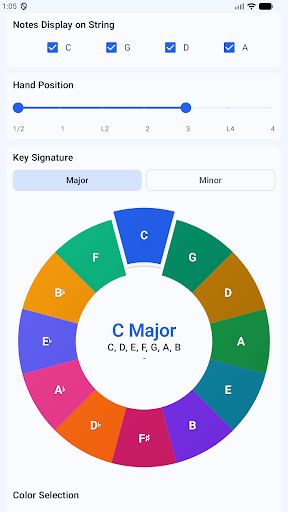
String Visibility Control - Quickly enable or disable individual strings.
This allows lessons and practice sessions to focus on a specific string or technique without visual distraction.
Hand Position Adjustment
Select hand positions 1/2 - 7, with all the positions displayed at the same time on tablet, up to 3 positions for phone.
This helps illustrate fingerboard depth and supports progressive position training.
Visual Scale Selection - Choose scales using an interactive Circle of Fifths.
Selected scales update the fingerboard and staff automatically, reinforcing key signatures and tonal relationships.
Light / Dark Theme
Switch between Light and Dark themes for comfortable use in different environments.
Additional Advanced Settings
-Scale-only or all-note display
-Sharp or flat enharmonic preference
-Microphone sensitivity control (1–10)
-Note naming systems: C D E, Do Re Mi, or 1 2 3
-Adjustable tuning reference (A = 440–445 Hz)
Cello Vista combines interactive reference, guided practice, and real-instrument feedback in one place—making it suitable for beginners, advancing students, self-learners, and instructors alike.