Clicker Presentation Control


Clicker Presentation Control Summary
Clicker Presentation Control is a ad-supported, with in-app purchases Android app in Productivity by Viktor Kifer. Released in Mar 2018 (8 years ago). It has about 333.2K+ installs and 1.3K ratings with a 4.12★ (good) average. Based on AppGoblin estimates, it reaches roughly 23.4K monthly active users and generates around $<10K monthly revenue (75% IAP / 25% ads). Store metadata: updated Jul 28, 2022, version 108.
Recent activity: 19.7K installs this week (29.7K over 4 weeks) showing exceptional growth View trends →
Data tracking: SDKs and third-party integrations were last analyzed on Mar 29, 2026. The app's network data flows (API traffic to/from the app and its SDKs) were last crawled on Mar 29, 2026.
Store info: Last updated on Google Play on Jul 28, 2022 (version 108).
Clicker Presentation Control was last scanned for SDKs 2026-03-29. Below is the overview of third party companies detected in the app. The full list of raw SDKs, app permissions and unknown SDKs is available here.
 Kotlin
 Flutter
 Google
 Firebase
 AdMob
AdMob4.12★
Ratings: 1.3K
Screenshots


App Description
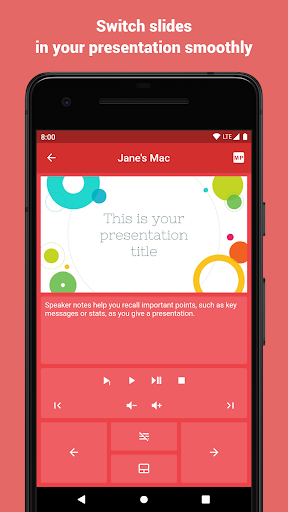
Clicker turns your phone into a wireless presenter
Clicker turns your phone or tablet into a remote presentation controller.
We support all popular desktop operating systems and presentation software.
GETTING STARTED
1. Download and run the Clicker Desktop app (https://bit.ly/clicker-desktop) on your computer.
2. Connect your computer and your phone to the same WiFi network.
3. Run the app on your phone. Your computer will be discovered automatically.
FEATURES
- automatically finds available computers in the local network
- connect manually to computer in the remote network
- works all popular desktop operating systems
- lightweight protocol makes sure there are no lags when you click
- play videos with mouse click support (remote trackpad)
- point on important stuff with mouse (remote trackpad)
- remote volume control (presentations with audio and video)
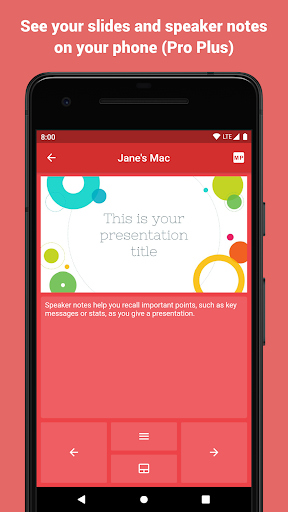
- slides preview
- speaker notes
- use S Pen to control presentations (requires S Pen 2018 or newer, with bluetooth support)
- and additions actions supported by the presentation software you use
QUESTIONS
If you have any questions or face any issues, please feel free to write to the developer email.
FEEDBACK
Your feedback is what helps us improve the app with every update. So we kindly ask you to share with us what you think about the app either here or via email.