WiFi Analyzer (open-source)


WiFi Analyzer (open-source) Summary
WiFi Analyzer (open-source) is a mobile Android app in Tools by VREM Software Development. Released in Mar 2016 (10 years ago). It has about 14.9M+ installs and 28.6K ratings with a 4.06★ (good) average. Based on AppGoblin estimates, it reaches roughly 1.7M monthly active users . Store metadata: updated Jan 10, 2026, version 71.
Recent activity: 22.3K installs this week (108.8K over 4 weeks) showing below average growth , and 27 new ratings this week View trends →
Data tracking: SDKs and third-party integrations were last analyzed on May 29, 2026.
Store info: Last updated on Google Play on Jan 10, 2026 (version 71).
4.06★
Ratings: 28.6K
Screenshots
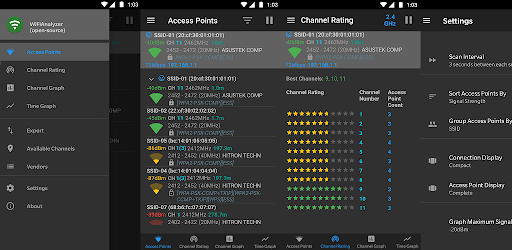

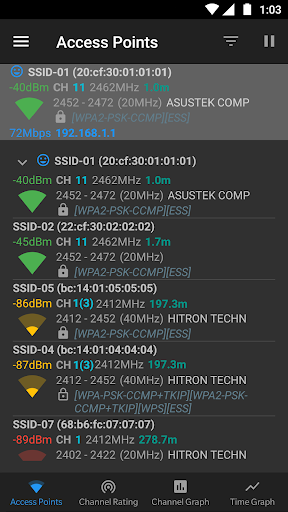

App Description
Optimize your WiFi network using WiFi Analyzer (open-source)
Optimize your WiFi network using WiFi Analyzer (open-source) by examining surrounding WiFi networks, measuring their signal strength as well as identifying crowded channels.
Users' privacy and security is a huge concern these days and WiFi Analyzer (open-source) is designed to use as few permissions as possible. It asks for just enough to perform the analysis. Plus, it is all open source so nothing is hidden! Most notably, this application does not require access to internet, so you can be sure it does not send any personal/device information to any other source and it does not receive any information from other sources.
WiFi Analyzer is under active development by volunteers.
WiFi Analyzer is free, has no-ads and does not collect any personal information.
WiFi Analyzer is not a Wi-Fi password cracking or phishing tool.
Features:
- Identify nearby Access Points
- Graph channels signal strength
- Graph Access Point signal strength over time
- Analyze Wi-Fi networks to rate channels
- HT/VHT Detection - 40/80/160/320 MHz (Requires hardware/software support)
- 2.4 GHz, 5 GHz and 6 GHz Wi-Fi bands (Requires hardware/software support)
- Access Point view: complete or compact
- Estimated Distance to the Access Points
- Export access points details
- Dark, Light and System theme available
- Pause/Resume scanning
- Available filters: Wi-Fi band, Signal strength, Security and SSID
- Vendor/OUI Database Lookup
- The application has too many features to mention them all
Please visit our website for more helpful information:
https://vremsoftwaredevelopment.github.io/WiFiAnalyzer
Notes:
- Android 9 introduced Wi-Fi scan throttling. Android 10 has a new developer option to toggle the throttling off under (Settings > Developer Options > Networking > Wi-Fi scan throttling).
- Android 9.0+ requires location permission and location services to perform a Wi-Fi scan.
Features:
https://vremsoftwaredevelopment.github.io/WiFiAnalyzer/#features
Usage Tips:
https://vremsoftwaredevelopment.github.io/WiFiAnalyzer/#usage-tips
How-to:
https://vremsoftwaredevelopment.github.io/WiFiAnalyzer/#how-to
FAQ:
https://vremsoftwaredevelopment.github.io/WiFiAnalyzer/#faq
GitHub is the place to go for bug reports and code contributions:
https://vremsoftwaredevelopment.github.io/WiFiAnalyzer/#feedback