VR Mobile - Vibration Tools


VR Mobile - Vibration Tools Summary
VR Mobile - Vibration Tools is a mobile Android app in Tools by Vibration Research Corporation. Released in Sep 2011 (14 years ago). It has about 65.2K+ installs and 205 ratings with a 3.79★ (average) average. Based on AppGoblin estimates, it reaches roughly 2.8K monthly active users . Store metadata: updated Jan 29, 2026.
Recent activity: 10 installs this week (79 over 4 weeks) showing steady growth , and -1 new ratings this week View trends →
Store info: Last updated on Google Play on Jan 29, 2026 .
3.79★
Ratings: 205
Screenshots



App Description
A tool for vibration test and measurement professionals
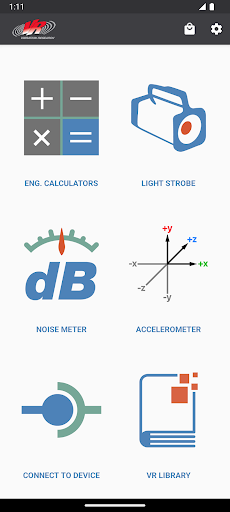
VR Mobile connects to an ObserVR1000 dynamic signal analyzer or VibrationVIEW for live vibration test monitoring using a phone or tablet. It also contains engineering calculators, a light strobe, a noise SPL meter, and accelerometer. All of this from your mobile device!
INCLUDED FEATURES:
Connect to nearby ObserVR1000 Dynamic Signal Analyzer & DAQ
- Setup inputs, record and monitor data.
- Live FFT Analysis
Record video in sync with ObserVR1000 recordings
- Record video with phone camera
- Record video with GoPro®️ Hero 5 and up cameras via bluetooth
Remotely control VibrationVIEW from within the VR Mobile App (while on the same network).
- Start/Stop tests
- View graphs
- Adjust amplitude and frequency
VR Library
- Complete courses, take quizzes and earn certificates on VR University
- Browse articles, case studies, engineering tools, research papers, and more
- Watch video tips and tech talks
- Gain access to VR product manuals
Max Acceleration Calculator:
- Calculate the maximum amount of acceleration that a shaker (from a database) can output based on the mass added to the system.
Unit Converter:
- Convert Acceleration, Force, Mass, Velocity, and Displacement units to and from common units.
Sine Calculator:
- Based on sinusoidal motion, calculate Acceleration, Frequency, Velocity, and Displacement by inputting any two of these values.
Shock Calculator:
- Pick between two impact types: Plastic or Elastic, and the pulse type. Shock Calculator will find the remaining two values given two inputs: Acceleration, Impact Time, Velocity Change, and Height Change.
Noise Meter:
- Measure minimum, current, and maximum dB from your mobile device's microphone.
Accelerometer:
- Measure minimum, current, and maximum acceleration in each of your mobile device's accelerometer axes.
- Zero out acceleration to calibrate for an uneven surface.
Strobe Light and Flashlight
- Strobe your device's screen and/or flash LED from 1 - 30 Hz. Strobing helps one to see objects vibrating too fast for the eye to see.
- Turn your device's screen and/or flash LED into a flashlight; this makes a convenient flashlight during test setups.
- NOTE: Not all device's LED flash can be controlled by the VR Mobile app.
Contact VR:
- Watch YouTube videos from VR.
- Visit VR's website.
VR Products:
- View our VR9700 and VR10500 Vibration Test Controllers, and the ObserVR1000 Dynamic Signal Analyzer.
Permissions Explanation:
android.permission.ACCESS_NETWORK_STATE: used for Remote Interface option.
android.permission.ACCESS_WIFI_STATE: used for Remote Interface option.
android.permission.CAMERA: used for LED Flash/Strobe option (does not take pictures) and Camera Sync (images and video stored locally on user's device).
android.permission.CHANGE_WIFI_MULTICAST_STATE: used for detecting VibrationVIEW servers for Remote Interface option.
android.permission.FLASHLIGHT: used for LED Flash/Strobe option.
android.permission.INTERNET: used for Google Analytics (disable in app settings) and fetching of VR Library content.
android.permission.RECORD_AUDIO: used for Noise Meter and Camera Sync options.
android.permission.VIBRATE: used for error message.
android.permission.BLUETOOTH: used for Camera Sync feature in order to connect to GoPro® devices.
Note: This application uses Google Analytics to anonymously track usage data within the application, which can be disabled in app settings.
Note: Camera Permission is for camera LED flash control and the Camera Sync feature. Images and video captured by the Camera Sync feature are only stored locally on the user's device.