Days Since in Status Bar


Days Since in Status Bar Summary
Days Since in Status Bar is a ad-supported Android app in Productivity by Wagwan Apps. Released in Jan 2019 (7 years ago). It has about 1.5K+ installs Based on AppGoblin estimates, it reaches roughly 31 monthly active users and generates around $<10K monthly revenue (0% IAP / 100% ads). Store metadata: updated Aug 30, 2023.
Recent activity: 1.00 installs this week (3.00 over 4 weeks) showing below average growth View trends →
Store info: Last updated on Google Play on Aug 30, 2023 .
0★
Ratings: 0
Screenshots


App Description
Count the days since an event happened using "Days Since" in the status bar
Count the days since a special event occurred using using "Days Since". The Days since are displayed in the status bar
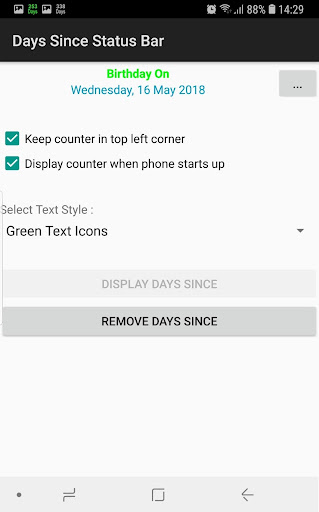
Count the days since your special event using "Days Since". The Days Since are shown in the status bar and and are always visible even when your phone is locked unlike widgets and can run up to 2 simultaneous events in your status bar.
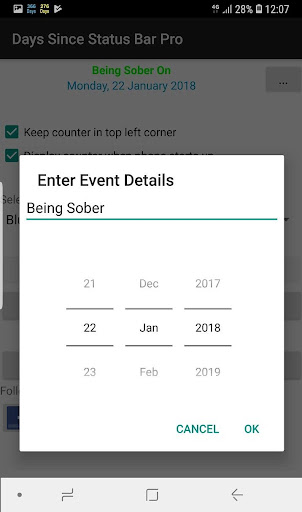
"Days Since" In Status bar you can enter the date and title of an event to count the days from.
PLEASE CONTACT US IF YOU HAVE ANY PROBLEMS OR QUESTIONS
wagwanapps@gmail.com
Facebook - https://www.facebook.com/WagwanApps
Twitter - https://twitter.com/WagwanApps
YouTube : https://www.youtube.com/user/WagwanApps
Features:
- Run up to 2 Simultaneous counters
- Count up to 500 days since the past.
- Simple User interface with easy to understand options. Remember Less is More.
- App auto start when phone is rebooted.
- Choose from a 2 colours to identify and differentiate your countdowns or even match your status bar colour so the date blends in well. (ONLY WHITE IS AVAILABLE ON GOOGLE PIXEL DEVICES)
- Displays the title and number of days since in the notification drop down
- Very small app with a small footprint. Virtually no battery drain
- Supports Android tablets.
If you have a request please email us and we will do what we can to help
Limitations:
- In Android 4.0 or above, the Android OS has "automatic shrinking and dimming" for status bar notifications to focus on the main activity. The icons do remain at their full size and at full intensity in the notification area when selected
- On some Android devices only WHITE is available as a colour. ESPECIALLY GOOGLE PIXEL DEVICES
Please contact us to report any issues or to request a feature.