My Photo Circle Watch Face

My Photo Circle Watch Face Summary
My Photo Circle Watch Face is a mobile Android app in Entertainment by watch-go.com. Released in Dec 2025 (6 months ago). It has about 208+ installs Based on AppGoblin estimates, it reaches roughly 30 monthly active users . Store metadata: updated Feb 4, 2026.
Recent activity: 11 installs this week (42 over 4 weeks) showing below average growth View trends →
Store info: Last updated on Google Play on Feb 4, 2026 .
0★
Ratings: 0
Screenshots


App Description
Maximize your photo. Move the clock to reveal the face. For Wear OS.
[Make Your Memories the Hero of Your Wrist]
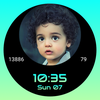
Tired of the clock covering the faces in your favorite photos? My Photo Circle Watch Face is a custom photo watch face designed to display your images perfectly on Wear OS.
With a massive image area covering 70% of the screen and a smart adjustable layout, you never have to sacrifice the view for the time again.
✨ Key Features
1. 🖼️ Maximized Circular Photo
- Fills 70% of your watch screen with a large image complication.
- Show off your family, pets, or favorite scenery in high quality directly from your gallery.
2. ↕️ Smart Adjustable Layout (Key Feature)
- Is the subject at the top? Move the digital clock to the bottom.
- Is the subject at the bottom? Move the clock to the top.
- Switch positions instantly to ensure faces or key details are never obstructed.
3. 🛠️ Essential Complications
- Includes 2 small circle complications on the sides.
- Keep track of battery life, weather, steps, date, and more while enjoying your photo.
4. ⚡ Battery Efficient (Watch Face Format)
- Built with the latest Watch Face Format (WFF) by Google.
- Optimized for performance and low battery consumption.
How to Use:
- Apply the watch face and tap "Customize".
- Select the large central circle to choose your photo.
- Change the "Clock Position" option to fit your image perfectly.
Download My Photo Circle Watch Face now and create the perfect frame for your moments!