EVR101 Digital Watch Face

EVR101 Digital Watch Face Summary
EVR101 Digital Watch Face is a mobile Android app in Personalization by Elvoro - Watch Faces. Released in Aug 2025 (7 months ago). It has about 235+ installs Based on AppGoblin estimates, it reaches roughly 14 monthly active users . Store metadata: updated Aug 21, 2025.
Recent activity: 10 installs this week (19 over 4 weeks) showing exceptional growth View trends →
Store info: Last updated on Google Play on Aug 21, 2025 .
0★
Ratings: 0
Screenshots


App Description
Customizable digital watch face for Wear OS with HR, weather and color themes
Elvoro EVR101 – Digital Watch Face for Wear OS
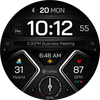
EVR101 is a highly customizable digital watch face designed for Wear OS users who want a clean, modern display with powerful features. Optimized for AMOLED screens and built for Samsung Galaxy Watch and Pixel Watch, it offers excellent readability, performance, and battery efficiency.
📌 Main Features:
• 12/24-hour time format
• Dynamic moon phase
• Heart rate (BPM) monitoring
• Current weather & temperature
• Battery level indicator
• Day of the week & date
• 4 complications + 2 custom shortcuts
• 10 container color themes (HR & weather)
• 20 accent color options (time/date)
• AOD mode with dark theme for power saving
• Optimized for AMOLED displays
🎨 Customization:
Long press the watch face → tap the ⚙️ icon
Customize colors, shortcuts, complications and more.
📱 Installation Instructions:
Ensure your watch is connected to your phone.
Install via the Play Store or tap "Install on Watch".
If needed, reinstall directly from your watch Play Store.
✅ Compatibility:
• Wear OS 3.0 and up
• Samsung Galaxy Watch 4/5/6 and Google Pixel Watch
• Not supported on Tizen or phones alone
🌐 www.elvorostudio.com
📧 support@elvorostudio.com
📸 Instagram: @elvorostudio
▶ YouTube: @ElvoroWatchFaces