Astro: Digital Watch Face
ASO Keyword Dashboard
Tracking 94 keywords for Astro: Digital Watch Face in Google Play

Astro: Digital Watch Face tracks 94 keywords (no keywords rank yet; 94 need traction). Key metrics: opportunity 69.6, difficulty 53.8.
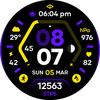
Futuristic digital watch face with smart data and bold design.
Tracked keywords
94
0 ranked • 94 not ranking yet
Top 10 coverage
—
Best rank — • Latest leader —
Avg opportunity
69.6
Top keyword: info
Avg difficulty
53.8
Lower scores indicate easier wins
Opportunity leaders
- 68.2
info
Opportunity: 73.0 • Difficulty: 49.9 • Rank —
Competitors: 939
- 68.7
edge
Opportunity: 73.0 • Difficulty: 49.2 • Rank —
Competitors: 1,393
- 68.3
eye
Opportunity: 73.0 • Difficulty: 50.3 • Rank —
Competitors: 1,515
- 68.5
organized
Opportunity: 73.0 • Difficulty: 63.7 • Rank —
Competitors: 763
- 68.5
steps
Opportunity: 73.0 • Difficulty: 46.7 • Rank —
Competitors: 1,066
Unranked opportunities
info
Opportunity: 73.0 • Difficulty: 49.9 • Competitors: 939
edge
Opportunity: 73.0 • Difficulty: 49.2 • Competitors: 1,393
eye
Opportunity: 73.0 • Difficulty: 50.3 • Competitors: 1,515
organized
Opportunity: 73.0 • Difficulty: 63.7 • Competitors: 763
steps
Opportunity: 73.0 • Difficulty: 46.7 • Competitors: 1,066
High competition keywords
time
Total apps: 170,577 • Major competitors: 19,592
Latest rank: — • Difficulty: 64.6
enjoy
Total apps: 131,386 • Major competitors: 18,531
Latest rank: — • Difficulty: 63.0
experience
Total apps: 118,077 • Major competitors: 15,561
Latest rank: — • Difficulty: 62.8
using
Total apps: 114,758 • Major competitors: 13,323
Latest rank: — • Difficulty: 64.0
want
Total apps: 103,224 • Major competitors: 12,476
Latest rank: — • Difficulty: 58.5
All tracked keywords
Includes opportunity, difficulty, rankings and competitor benchmarks
| Major Competitors | |||||||
|---|---|---|---|---|---|---|---|
| level | 68 | 100 | 60 | 80 47,860 competing apps Median installs: 42,032 Avg rating: 3.1 | — | — | 6,533 major competitor apps |
| themes | 71 | 100 | 54 | 72 16,568 competing apps Median installs: 47,542 Avg rating: 3.4 | — | — | 2,303 major competitor apps |
| single | 69 | 100 | 56 | 77 32,754 competing apps Median installs: 37,118 Avg rating: 2.9 | — | — | 3,952 major competitor apps |
| enjoy | 65 | 100 | 63 | 87 131,386 competing apps Median installs: 45,784 Avg rating: 3.0 | — | — | 18,531 major competitor apps |
| better | 69 | 100 | 57 | 79 39,640 competing apps Median installs: 36,260 Avg rating: 3.0 | — | — | 4,807 major competitor apps |
| experience | 65 | 100 | 63 | 87 118,077 competing apps Median installs: 39,819 Avg rating: 2.9 | — | — | 15,561 major competitor apps |
| active | 72 | 100 | 52 | 70 13,334 competing apps Median installs: 30,112 Avg rating: 2.9 | — | — | 1,388 major competitor apps |
| digital | 68 | 100 | 55 | 79 42,168 competing apps Median installs: 26,988 Avg rating: 2.7 | — | — | 4,209 major competitor apps |
| heart | 71 | 100 | 50 | 71 15,090 competing apps Median installs: 29,042 Avg rating: 2.9 | — | — | 1,461 major competitor apps |
| wear | 72 | 100 | 80 | 66 7,173 competing apps Median installs: 24,222 Avg rating: 3.2 | — | — | 839 major competitor apps |
| date | 69 | 100 | 60 | 77 31,688 competing apps Median installs: 26,732 Avg rating: 2.8 | — | — | 2,809 major competitor apps |
| design | 68 | 100 | 56 | 79 41,673 competing apps Median installs: 30,529 Avg rating: 2.9 | — | — | 4,566 major competitor apps |
| designed | 66 | 100 | 57 | 85 96,808 competing apps Median installs: 27,484 Avg rating: 2.8 | — | — | 9,110 major competitor apps |
| modern | 70 | 100 | 52 | 76 27,345 competing apps Median installs: 33,314 Avg rating: 2.8 | — | — | 3,186 major competitor apps |
| using | 65 | 100 | 64 | 86 114,758 competing apps Median installs: 37,480 Avg rating: 2.8 | — | — | 13,323 major competitor apps |
| built | 71 | 100 | 64 | 71 15,037 competing apps Median installs: 30,161 Avg rating: 3.0 | — | — | 1,552 major competitor apps |
| time | 64 | 100 | 65 | 89 170,577 competing apps Median installs: 33,133 Avg rating: 2.9 | — | — | 19,592 major competitor apps |
| key | 68 | 100 | 57 | 79 40,681 competing apps Median installs: 35,653 Avg rating: 3.0 | — | — | 4,828 major competitor apps |
| rate | 70 | 100 | 50 | 75 24,148 competing apps Median installs: 33,875 Avg rating: 2.7 | — | — | 2,128 major competitor apps |
| launch | 72 | 100 | 52 | 66 7,749 competing apps Median installs: 41,076 Avg rating: 3.2 | — | — | 1,058 major competitor apps |
| multiple | 67 | 100 | 62 | 82 58,884 competing apps Median installs: 44,428 Avg rating: 3.0 | — | — | 8,314 major competitor apps |
| watch | 69 | 100 | 69 | 78 38,532 competing apps Median installs: 39,176 Avg rating: 3.0 | — | — | 5,315 major competitor apps |
| dynamic | 71 | 100 | 54 | 73 18,485 competing apps Median installs: 37,329 Avg rating: 3.0 | — | — | 2,447 major competitor apps |
| track | 67 | 100 | 57 | 81 58,055 competing apps Median installs: 25,840 Avg rating: 2.9 | — | — | 5,673 major competitor apps |
| stay | 68 | 100 | 67 | 81 51,579 competing apps Median installs: 26,352 Avg rating: 3.0 | — | — | 5,332 major competitor apps |
App Description
Futuristic digital watch face with smart data and bold design.
Step into the future with Astro, a high-tech digital watch face crafted for clarity, precision, and bold visual impact. With its sleek hexagonal layout and vibrant gradient styling, Astro brings a futuristic aesthetic packed with the essential stats you rely on every day.
KEY FEATURES
• Dynamic hexagonal interface for modern, futuristic visibility
• Vibrant gradient themes and multiple color combinations
• Optimized for Galaxy Watch, Pixel Watch, and all Wear OS devices
• Steps counter*
• Heart rate monitoring*
• Battery indicator
• Date + weekday
• Sunrise & sunset times
• Automatic 12h / 24h time format
• 2x custom complications for personalized info
• 3x custom app shortcuts for fast access
• Battery-friendly Always-On Display (AOD) mode
• Clean, easy-to-read AOD layout designed for AMOLED screens
• Lightweight, smooth, and power-efficient performance
• Perfect for fans of futuristic, tech-inspired digital designs
HOW TO USE
1. Install Astro from Google Play.
2. Ensure your smartwatch is running Wear OS 5 or later.
3. On your watch, touch and hold your current watch face, then scroll and select Astro by Active Design.
NOTE
• Health and activity data (steps, heart rate, etc.) is provided by your watch sensors and system services.*
• Grant all required permissions for full feature support.
ABOUT ACTIVE DESIGN
Active Design creates premium digital, analog, and hybrid watch faces focused on clarity, customization, and modern aesthetics. Discover more by searching "Active Design Watch Face" on Google Play.
Activate Astro today and bring a futuristic look to your wrist.
