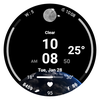

AWD Weather 3D Gif

90 installs
ratings
AWD Weather 3D Gif icon

ASO Keyword Dashboard

Tracking 85 keywords for AWD Weather 3D Gif in Google Play

Developer: AIwatch Category: weather

AWD Weather 3D Gif tracks 85 keywords (no keywords rank yet; 85 need traction). Key metrics: opportunity 70.7, difficulty 47.6.

3D Animation Weather Icon

Tracked keywords

85

0  ranked •  85  not ranking yet

Top 10 coverage

Best rank — • Latest leader —

Avg opportunity

70.7

Top keyword: api

Avg difficulty

47.6

Lower scores indicate easier wins

Opportunity leaders

  • api

    Opportunity: 74.0 • Difficulty: 42.6 • Rank —

    Competitors: 398

    66.0
  • square

    Opportunity: 74.0 • Difficulty: 41.1 • Rank —

    Competitors: 561

    63.7
  • animation

    Opportunity: 74.0 • Difficulty: 43.5 • Rank —

    Competitors: 906

    63.7
  • pixel

    Opportunity: 74.0 • Difficulty: 46.9 • Rank —

    Competitors: 709

    65.3
  • watch faces

    Opportunity: 74.0 • Difficulty: 36.5 • Rank —

    Competitors: 37

    60.3

Unranked opportunities

  • api

    Opportunity: 74.0 • Difficulty: 42.6 • Competitors: 398

  • square

    Opportunity: 74.0 • Difficulty: 41.1 • Competitors: 561

  • animation

    Opportunity: 74.0 • Difficulty: 43.5 • Competitors: 906

  • pixel

    Opportunity: 74.0 • Difficulty: 46.9 • Competitors: 709

  • watch faces

    Opportunity: 74.0 • Difficulty: 36.5 • Competitors: 37

High competition keywords

  • access

    Total apps: 334,940 • Major competitors: 12,402

    Latest rank: — • Difficulty: 58.6

  • mobile

    Total apps: 280,903 • Major competitors: 11,070

    Latest rank: — • Difficulty: 55.7

  • information

    Total apps: 265,070 • Major competitors: 8,170

    Latest rank: — • Difficulty: 54.8

  • every

    Total apps: 261,911 • Major competitors: 14,604

    Latest rank: — • Difficulty: 56.0

  • us

    Total apps: 190,433 • Major competitors: 9,513

    Latest rank: — • Difficulty: 55.3

All tracked keywords

Includes opportunity, difficulty, rankings and competitor benchmarks

Major Competitors
weather721005570

23,337 competing apps

Median installs: 3,389

Avg rating: 2.7

1,527

major competitor apps

follow691005278

81,280 competing apps

Median installs: 1,602

Avg rating: 2.5

4,358

major competitor apps

mode691005677

67,882 competing apps

Median installs: 5,418

Avg rating: 2.7

5,731

major competitor apps

phone671006083

150,978 competing apps

Median installs: 3,586

Avg rating: 2.6

9,427

major competitor apps

via681005381

117,049 competing apps

Median installs: 1,767

Avg rating: 2.4

4,629

major competitor apps

connected691005078

72,937 competing apps

Median installs: 622

Avg rating: 2.2

2,364

major competitor apps

step691005178

82,235 competing apps

Median installs: 1,396

Avg rating: 2.4

4,078

major competitor apps

support671005583

165,484 competing apps

Median installs: 1,599

Avg rating: 2.6

7,918

major competitor apps

digital681005181

122,336 competing apps

Median installs: 864

Avg rating: 2.2

4,539

major competitor apps

wear711006172

32,280 competing apps

Median installs: 372

Avg rating: 1.9

872

major competitor apps

wear os721006070

24,041 competing apps

Median installs: 285

Avg rating: 1.7

298

major competitor apps

information651005586

265,070 competing apps

Median installs: 1,190

Avg rating: 2.2

8,170

major competitor apps

mobile651005687

280,903 competing apps

Median installs: 1,387

Avg rating: 2.4

11,070

major competitor apps

api741004366

13,834 competing apps

Median installs: 458

Avg rating: 2.2

398

major competitor apps

complication731006458

4,398 competing apps

Median installs: 363

Avg rating: 1.8

34

major competitor apps

delete721005669

20,703 competing apps

Median installs: 4,654

Avg rating: 2.6

1,514

major competitor apps

install701004976

58,663 competing apps

Median installs: 3,220

Avg rating: 2.5

2,824

major competitor apps

watch681005780

102,641 competing apps

Median installs: 1,178

Avg rating: 2.3

5,694

major competitor apps

update701005575

51,563 competing apps

Median installs: 1,846

Avg rating: 2.5

2,607

major competitor apps

search671005882

130,019 competing apps

Median installs: 3,425

Avg rating: 2.5

6,849

major competitor apps

directly671005281

129,291 competing apps

Median installs: 972

Avg rating: 2.3

4,498

major competitor apps

galaxy731005068

18,051 competing apps

Median installs: 796

Avg rating: 2.4

672

major competitor apps

access651005988

334,940 competing apps

Median installs: 1,150

Avg rating: 2.4

12,402

major competitor apps

face691005076

62,622 competing apps

Median installs: 1,291

Avg rating: 2.3

3,723

major competitor apps

apply701005074

43,668 competing apps

Median installs: 6,339

Avg rating: 2.7

3,247

major competitor apps

85 keywords
1 of 4

App Description

3D Animation Weather Icon

Digital watch face with animated weather icons.

+++ Wear OS 5 and later devices
(Samsung Galaxy Watch 4, 5, 6, 7, Ultra, Pixel Watch with OneUI 6.0 applied)

* 3D animation Weather icon *

Function

- Temperature (Celsius, Fahrenheit support)
- Pastel Color Image
- Temp(Low/High) ProgressBar
- Multilingual support
- 12h/24h Digital Time
- Week_in_Year
- Last UpdateTime (Weather)
- Step Count
- Battery Percent

(The weather is automatically updated about every 30 minutes. Manual update method: Access the weather or UV complication and press the update button at the bottom.)

When you restart the watch, weather information may not be displayed.
In this case, apply the default watch face and then reapply the weather watch face.
Weather information is displayed normally.

Weather information is based on the API provided by Samsung.
There may be differences from other companies’ weather information.

Customizing

- 13 x ProgressBar Color Style
- 1 x Appshortcut
- 2 x Complication

- Support wear OS
- Wear OS API 34+
- Square screen watch mode is not supported.
- Always On Display

***Installation Guide***

The mobile app is a guide app for installing the watch face.
Once the watch screen is installed properly, you can delete the mobile app.

1. The watch and mobile phone must be connected via Bluetooth.
2. Press the “Click” button on the mobile guide app.
3. Follow the watch faces to install the watch face in a few minutes.

You can also search for and install watch faces directly from the Google app on your watch.
You can search and install it in your mobile web browser.

Contact us : aiwatchdesign@gmail.com