TRON Dark: Watch face

TRON Dark: Watch face Summary
TRON Dark: Watch face is a mobile Android app in Personalization by amoledwatchfaces™. Released in Dec 2021 (4 years ago). It has about 4.9K+ installs and 151 ratings with a 4.61★ (excellent) average. Based on AppGoblin estimates, it reaches roughly 41 monthly active users . Store metadata: updated Dec 3, 2025.
Recent activity: 4.00 installs this week (19 over 4 weeks) showing steady growth View trends →
Store info: Last updated on Google Play on Dec 3, 2025 .
4.61★
Ratings: 151
Screenshots



App Description
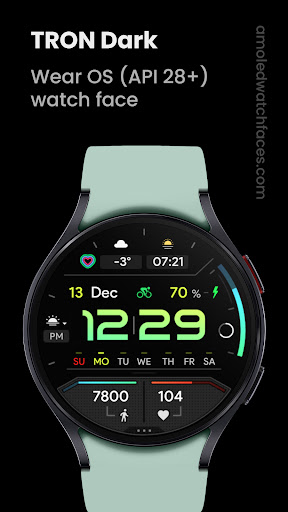
True black background TRON inspired digital watch face for Wear OS
Only for Wear OS API 28+ devices
Powered by Watch Face Format
amoledwatchfaces.com
BUY ONE GET ONE OFFER!
amoledwatchfaces.com/bogo
CUSTOM COMPLICATION APPS
amoledwatchfaces.com/apps
FEATURES
• Watch Face Format 1 / 2
• true black background
• progress circle seconds indicator
• charging / critical battery indicator
• high resolution
• day of week indicator
• moon phase indicator: https://bit.ly/3yuRwr1
• phone battery complication: https://bit.ly/3c31hoz
• many gradient color customization options
• colors editable in customization menu (savable color settings)
• PNGQuant optimized layers > battery friendly
• custom shortcut for preferable health app (steps)
• simple ambient mode with low OPR & adaptive colors
• 4x custom complication
BAR INDICATORS
• battery - % - 0 >> 100
• steps goal %
• heart rate - 50 >> 150 BPM
APP SHORTCUTS
• heart rate - tap to measure HR (watch needs to be on wrist)
• steps - open steps app
• am/pm - open alarm
• battery % - open battery status
• date - open calendar
USER CONFIGURATIONS
• Digital Gradient (10x Gradient, Tint, White)
• Steps Bar (10x Gradient, Tint, White)
• Battery Bar (10x Gradient, Tint, White)
• Sec Indicator (Progress, Digital, Off)
• AOD Style (Dimmed, Time only)
• Color (20x)
• Custom complications (app shortcuts too)
Installation and troubleshooting guide
amoledwatchfaces.com/guide
Please send any issues reports or help requests to our support address
support@amoledwatchfaces.com
Join our Telegram group for live support and discussion
t.me/amoledwatchfaces
Newsletter
amoledwatchfaces.com/contact#newsletter
amoledwatchfaces™ - Awf