CELEST5594 Sport Watch

CELEST5594 Sport Watch Summary
CELEST5594 Sport Watch is a mobile Android app in Personalization by CELEST Watches. Released in Nov 2025 (7 months ago). It has about 1.1K+ installs and 14 ratings with a 4.44★ (good) average. Based on AppGoblin estimates, it reaches roughly 26 monthly active users . Store metadata: updated May 4, 2026.
Recent activity: 4.00 installs this week (17 over 4 weeks) showing below average growth View trends →
Store info: Last updated on Google Play on May 4, 2026 .
4.44★
Ratings: 14
Screenshots


App Description
Vibrant digital watch face with 30 color styles and clear daily stats
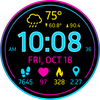
Bright, bold, and easy to read — this digital watch face brings vibrant energy to your wrist. The clean layout shows all your essential stats at a glance: time, date, weather, steps, heart rate, estimated calories, and distance. Everything you need is displayed clearly with a striking combination of neon cyan, magenta, and yellow tones that pop against the deep black background.
Choose your perfect look from 30 vivid color variations, each giving the design a different mood — from cool and calm to bold and electric. This face doesn’t use customizable complications, keeping the layout consistent and perfectly balanced for quick readability.
⚡ KEY FEATURES
· Multilingual display
· 30 color variations
· No customizable complications to keep visual consistency
· Be aware that calories and distance is estimated from steps data as the watch face has no access these values.
📱 COMPATIBILITY
✅ Wear OS 5+ required (for weather functions)
✅ Works with Galaxy Watch, Pixel Watch, and all Wear OS 5+ devices
🔧 INSTALLATION HELP
Having trouble? We've got you covered:
- Use the dropdown menu next to "Install" on your phone to select your watch model or install directly from your watch's Play Store app
- Updating weather data may take time after installation but switching to another watch face and switching back or restarting both the watch and phone usually helps
- Check out our installation and troubleshooting guide: https://celest-watches.com/installation-troubleshooting/
- Contact us at info@celest-watches.com for quick support
🏪 DISCOVER MORE
Browse our full collection of premium Wear OS watch faces:
🔗 https://celest-watches.com
💰 Exclusive discounts available
📞 SUPPORT & COMMUNITY
📧 Support: info@celest-watches.com
📱 Follow @celestwatches on Instagram or sign up to our newsletter!