CELEST5629 Artistic Watch


CELEST5629 Artistic Watch Summary
CELEST5629 Artistic Watch is a mobile Android app in Personalization by CELEST Watches. Released in Jan 2026 (4 months ago). It has about 136+ installs Based on AppGoblin estimates, it reaches roughly 10 monthly active users . Store metadata: updated May 4, 2026.
Recent activity: 1.00 installs this week (20 over 4 weeks) showing below average growth View trends →
Store info: Last updated on Google Play on May 4, 2026 .
0★
Ratings: 0
Screenshots


App Description
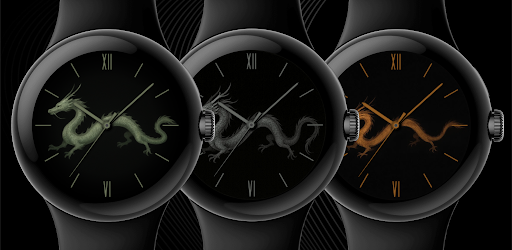
Elegant Chinese dragon design. 10 colors + 2 data complications.
Embrace the power and wisdom of the East with this meticulously crafted watch face. At its heart lies a stunning Chinese-style dragon, rendered in a soft jade texture that contrasts beautifully against a deep, obsidian-black background. Its fluid form winds across the dial as a symbol of strength and good fortune, paired with elegant Roman numerals for a sophisticated, timeless look.
Tailor the experience to your personal style with 10 distinct color variations and two optional circular complications for your essential data. Whether you want to track your fitness or keep an eye on your battery, this design seamlessly blends ancient mythology with modern utility for your everyday timekeeping.
🎨 PERSONALIZATION OPTIONS
· 10 background image options
· 10 color options for the hour hand
· 10 color options for the minute hand
· 10 color options for the seconds hand
· 2 optional circular complications
📱 COMPATIBILITY
✅ Works with Galaxy Watch, Pixel Watch, and all Wear OS 5+ devices
🔧 INSTALLATION HELP
Having trouble? We've got you covered:
- Use the dropdown menu next to "Install" on your phone to select your watch model or install directly from your watch's Play Store app
- Updating weather data may take time after installation but switching to another watch face and switching back or restarting both the watch and phone usually helps
- Check out our installation and troubleshooting guide: https://celest-watches.com/installation-troubleshooting/
- Contact us at info@celest-watches.com for quick support
🏪 DISCOVER MORE
Browse our full collection of premium Wear OS watch faces:
🔗 https://celest-watches.com
💰 Exclusive discounts available
📞 SUPPORT & COMMUNITY
📧 Support: info@celest-watches.com
📱 Follow @celestwatches on Instagram or sign up to our newsletter!