it-M005: Hybrid Watch Face
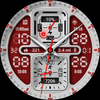

it-M005: Hybrid Watch Face Summary
it-M005: Hybrid Watch Face is a mobile Android app in Personalization by it-master27. Released in Feb 2026 (4 months ago). It has about 303+ installs Based on AppGoblin estimates, it reaches roughly 8.00 monthly active users . Store metadata: updated Feb 6, 2026.
Recent activity: 1.00 installs this week (3.00 over 4 weeks) showing below average growth View trends →
Store info: Last updated on Google Play on Feb 6, 2026 .
0★
Ratings: 0
Screenshots


App Description
Hybrid watch face: rugged design, health stats, battery & custom colors.
it-M005: Hybrid Watch Face
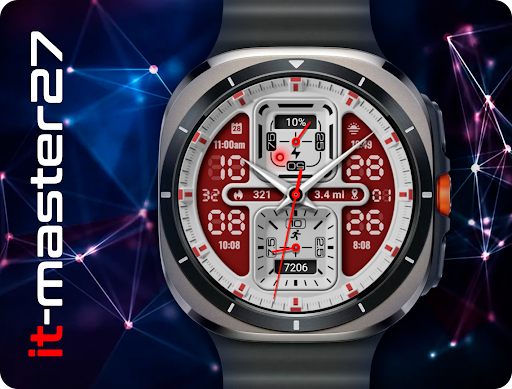
Upgrade your smartwatch with the it-M005, a rugged and tactical hybrid watch face designed for those who demand both style and functionality. Featuring a bold, dashboard-inspired layout, this face combines the precision of analog hands with the readability of digital data.
Perfect for sports enthusiasts, military style fans, and anyone who wants a data-rich display on their wrist.
Features:
Hybrid Display: Clear analog hands for traditional timekeeping overlaying large, bold digital numbers.
Dashboard Gauges: Two distinct square gauges in the center. The top gauge displays your Battery level (with percentage and charging indicator), while the bottom gauge tracks your Steps goal progress and total step count.
Health & Fitness Data: Keep track of your daily activity with dedicated indicators for Calories Burned (Flame icon) and Distance Traveled (Map marker icon).
Essential Information: Includes complications for Date, Sunrise/Sunset times, and Next Event/World Clock indicators (depending on user configuration).
Color Customization: Choose from a variety of rugged and sporty color themes to match your outfit or mood, including Tactical Camo, Black/Grey, Sporty Red, Orange, Blue, Purple, and White.
Always On Display (AOD): Optimized for low power consumption while keeping essential time visible.
Watch Face Layout:
Top Center: Battery Meter & %
Bottom Center: Step Counter & Goal Meter
Middle Left: Calories
Middle Right: Distance
Background: Large Digital Time (Hour/Minute)
Installation Notes:
Ensure your watch is properly connected to your phone.
Select your watch device from the "Install" dropdown menu in the Play Store.
After a few minutes, check the watch face on your watch. You may need to long-press the current screen and swipe to find the newly installed face.
Designed for Wear OS.