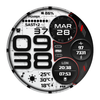

JND0070
ASO Keyword Dashboard
Tracking 118 keywords for JND0070 in Google Play
JND0070 tracks 118 keywords (no keywords rank yet; 118 need traction). Key metrics: opportunity 69.2, difficulty 53.8.
The JND0070 is a High Quality Detailed Digital Watch face for Wear OS.
Tracked keywords
118
0 ranked • 118 not ranking yet
Top 10 coverage
—
Best rank — • Latest leader —
Avg opportunity
69.2
Top keyword: make sure
Avg difficulty
53.8
Lower scores indicate easier wins
Opportunity leaders
- 68.5
make sure
Opportunity: 73.0 • Difficulty: 55.3 • Rank —
Competitors: 1,710
- 67.9
similar
Opportunity: 73.0 • Difficulty: 65.4 • Rank —
Competitors: 1,267
- 68.1
drop
Opportunity: 73.0 • Difficulty: 57.9 • Rank —
Competitors: 1,534
- 68.7
installed
Opportunity: 73.0 • Difficulty: 61.6 • Rank —
Competitors: 1,076
- 68.5
steps
Opportunity: 73.0 • Difficulty: 46.7 • Rank —
Competitors: 1,066
Unranked opportunities
make sure
Opportunity: 73.0 • Difficulty: 55.3 • Competitors: 1,710
similar
Opportunity: 73.0 • Difficulty: 65.4 • Competitors: 1,267
drop
Opportunity: 73.0 • Difficulty: 57.9 • Competitors: 1,534
installed
Opportunity: 73.0 • Difficulty: 61.6 • Competitors: 1,076
steps
Opportunity: 73.0 • Difficulty: 46.7 • Competitors: 1,066
High competition keywords
new
Total apps: 193,474 • Major competitors: 25,823
Latest rank: — • Difficulty: 65.7
time
Total apps: 170,577 • Major competitors: 19,592
Latest rank: — • Difficulty: 64.6
make
Total apps: 163,352 • Major competitors: 21,922
Latest rank: — • Difficulty: 65.0
every
Total apps: 125,665 • Major competitors: 16,037
Latest rank: — • Difficulty: 62.3
features
Total apps: 116,743 • Major competitors: 14,116
Latest rank: — • Difficulty: 64.6
All tracked keywords
Includes opportunity, difficulty, rankings and competitor benchmarks
| Major Competitors | |||||||
|---|---|---|---|---|---|---|---|
| play | 65 | 100 | 67 | 86 113,236 competing apps Median installs: 62,750 Avg rating: 3.2 | — | — | 19,366 major competitor apps |
| new | 64 | 100 | 66 | 90 193,474 competing apps Median installs: 42,470 Avg rating: 3.0 | — | — | 25,823 major competitor apps |
| level | 68 | 100 | 60 | 80 47,860 competing apps Median installs: 42,032 Avg rating: 3.1 | — | — | 6,533 major competitor apps |
| weather | 72 | 100 | 67 | 69 11,564 competing apps Median installs: 46,184 Avg rating: 3.2 | — | — | 1,474 major competitor apps |
| customization | 72 | 100 | 49 | 67 8,723 competing apps Median installs: 46,389 Avg rating: 3.1 | — | — | 1,137 major competitor apps |
| follow | 69 | 100 | 58 | 77 33,026 competing apps Median installs: 35,928 Avg rating: 2.9 | — | — | 3,898 major competitor apps |
| device | 68 | 100 | 72 | 81 52,389 competing apps Median installs: 37,519 Avg rating: 3.0 | — | — | 6,390 major competitor apps |
| make | 64 | 100 | 65 | 89 163,352 competing apps Median installs: 42,108 Avg rating: 3.0 | — | — | 21,922 major competitor apps |
| phone | 67 | 100 | 69 | 83 75,756 competing apps Median installs: 37,780 Avg rating: 3.0 | — | — | 9,010 major competitor apps |
| digital | 68 | 100 | 55 | 79 42,168 competing apps Median installs: 26,988 Avg rating: 2.7 | — | — | 4,209 major competitor apps |
| heart | 71 | 100 | 50 | 71 15,090 competing apps Median installs: 29,042 Avg rating: 2.9 | — | — | 1,461 major competitor apps |
| wear | 72 | 100 | 80 | 66 7,173 competing apps Median installs: 24,222 Avg rating: 3.2 | — | — | 839 major competitor apps |
| date | 69 | 100 | 60 | 77 31,688 competing apps Median installs: 26,732 Avg rating: 2.8 | — | — | 2,809 major competitor apps |
| dial | 70 | 100 | 38 | 54 1,531 competing apps Median installs: 36,087 Avg rating: 3.1 | — | — | 188 major competitor apps |
| wear os | 71 | 100 | 76 | 60 3,443 competing apps Median installs: 13,088 Avg rating: 3.5 | — | — | 279 major competitor apps |
| time | 64 | 100 | 65 | 89 170,577 competing apps Median installs: 33,133 Avg rating: 2.9 | — | — | 19,592 major competitor apps |
| available | 66 | 100 | 66 | 85 92,463 competing apps Median installs: 34,120 Avg rating: 2.9 | — | — | 9,952 major competitor apps |
| api | 71 | 100 | 46 | 61 3,812 competing apps Median installs: 21,435 Avg rating: 3.3 | — | — | 360 major competitor apps |
| customizable | 71 | 100 | 54 | 72 16,056 competing apps Median installs: 38,582 Avg rating: 3.4 | — | — | 2,108 major competitor apps |
| rate | 70 | 100 | 50 | 75 24,148 competing apps Median installs: 33,875 Avg rating: 2.7 | — | — | 2,128 major competitor apps |
| including | 67 | 100 | 64 | 82 66,643 competing apps Median installs: 40,188 Avg rating: 3.0 | — | — | 8,693 major competitor apps |
| store | 69 | 100 | 60 | 78 34,411 competing apps Median installs: 36,549 Avg rating: 2.9 | — | — | 4,003 major competitor apps |
| watch | 69 | 100 | 69 | 78 38,532 competing apps Median installs: 39,176 Avg rating: 3.0 | — | — | 5,315 major competitor apps |
| galaxy | 72 | 100 | 65 | 65 6,329 competing apps Median installs: 34,132 Avg rating: 3.5 | — | — | 656 major competitor apps |
| assistance | 72 | 100 | 48 | 64 5,314 competing apps Median installs: 29,345 Avg rating: 2.7 | — | — | 524 major competitor apps |
App Description
The JND0070 is a High Quality Detailed Digital Watch face for Wear OS.
The JND0070 is a high quality detailed digital watch face with large digits beautiful iconic colors. Lots of customization options as well. Features include, 5x Color Options, 4x Shortcuts, 2x Customizable shortcuts, 2x Customizable complications, Battery, Date, Time Zone, Weather Type, Current Temperature, High and Low Temperature, Steps & Heart rate.
A dark always on display ensures great style and battery life.
Some features may not be available on all watches and this dial is not suitable for square or rectangular watches.
FEATURES
- 12/24hr Format: Syncs with your phone settings.
- Celsius and Fahrenheit Syncs with your phone location settings.
- Date and Month.
- Time Zone.
- Battery Information.
- Steps and Heart Rate Monitoring.
- Weather Type.
- Current, High and Low Temperature.
- 5x Different Color Options.
- 2x Customizable Shortcuts.
- 2x Customizable Complications.
- Similar Always On Display Mode.
- 4x Preset App Shortcuts:
Calendar
Battery Info
Music Player
Alarms
INSTALLATION NOTES:
1 - Make sure the watch and phone is properly connected.
2 - Select target device from drop down in Play Store and select both Watch and Phone.
3. On your phone you can open up the Companion App and follow the instructions.
After a few minutes the watch face will transferred on watch : check the watch faces installed by the Wearable app on the phone.
IMPORTANT NOTE:
Please Make sure you have enabled all permissions from settings > applications. And also when prompted after installing face and when long pressing to customize complication.
INFORMATION ON HEART RATE:
The first time you use the face or put on the watch the heart rate is measured. After the first measurement, the watch face will automatically measure your heart rate every 10 minutes.
For any assistance please reach out to us at support@jaconaudedesign.com
Reach out to me on my other channels for ideas and promotions plus new releases.
WEB: www.jaconaudedesign.com
INSTAGRAM: https://www.instagram.com/jaconaude2020/
Thank you and enjoy.
