MIMIX Digital Sp02 Watchface


MIMIX Digital Sp02 Watchface Summary
MIMIX Digital Sp02 Watchface is a mobile Android app in Personalization by MIMIX. Released in Mar 2023 (3 years ago). It has about 3.1K+ installs and 68 ratings with a 3.75★ (average) average. Based on AppGoblin estimates, it reaches roughly 34 monthly active users . Store metadata: updated Oct 30, 2025.
Recent activity: 4.00 installs this week (15 over 4 weeks) showing below average growth View trends →
Store info: Last updated on Google Play on Oct 30, 2025 .
3.75★
Ratings: 68
Screenshots

App Description
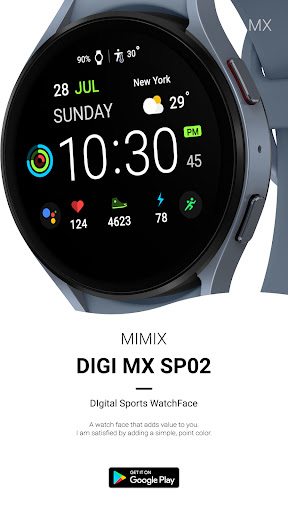
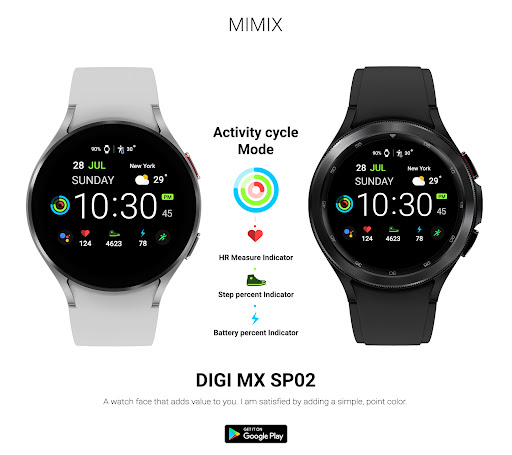
Simple & Sporty Points Digital Watch Face
Advanced watchface that supports Wear 2.0 and higher smartwatches.
Simple & Sporty Digital Watch Face
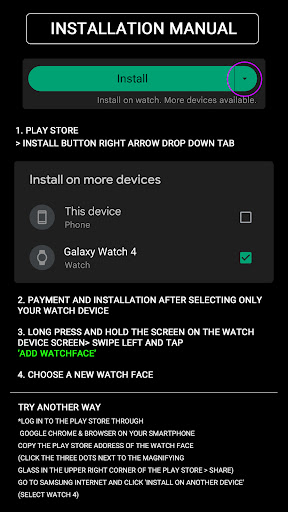
*How to install
Payment and installation of the Play Store app on the smartphone (touch the right arrow and install the smart watch)
> Need to check the connection between watch device and mobile phone
Find installed watchfaces
1. Press and hold the watch face > 2. Click ‘Add watch face’ on the last right > 3. Confirm the purchased watch face
*Resolved to be installed display
Copy the play store address of the watch face (click the three dots next to the magnifying glass in the upper right corner of the play store > share)
Go to Samsung Internet and click 'Install on another device' (select watch 4)
* In order to use all functions, consent to use the sensor is required.
*If the Play Store app is shown as incompatible, please install it using a web web browser on your PC/laptop in addition to the app on your phone.
*Supports Wear OS devices.
Mobile phone battery complication app
After installing the additional app from the link below to your watch and smartphone, set the complication.
Search for the 'Phone Battery Complication' app and install it.
https://play.google.com/store/apps/details?id=com.weartools.phonebattcomp
All credits go to original app creator.
amoledwatchfaces - https://play.google.com/store/apps/dev?id=5591589606735981545
How to set up Customize
1. Press and hold the watch face > 2. Click the Decorate button > 3. Tap each complication area to set the corresponding information > 4. Click OK
For new watch face news, please visit the link below
https://play.google.com/store/apps/developer?id=MIMIXWatch
For inquiries about the app, please contact us at the email below.
mimixjh@gmail.com