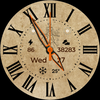

Pars Vintage Analog

48 installs
ratings
+1.00 weekly installs
trend steady
+2.00 monthly installs
Pars Vintage Analog icon

ASO Keyword Dashboard

Tracking 129 keywords for Pars Vintage Analog in Google Play

Developer: Pars Watch Faces Category: personalization

Pars Vintage Analog tracks 129 keywords (no keywords rank yet; 129 need traction). Key metrics: opportunity 70.6, difficulty 47.1.

A well-designed analog watch face with a vintage screen

Tracked keywords

129

0  ranked •  129  not ranking yet

Top 10 coverage

Best rank — • Latest leader —

Avg opportunity

70.6

Top keyword: analog

Avg difficulty

47.1

Lower scores indicate easier wins

Opportunity leaders

  • analog

    Opportunity: 74.0 • Difficulty: 38.5 • Rank —

    Competitors: 188

    62.5
  • api

    Opportunity: 74.0 • Difficulty: 42.5 • Rank —

    Competitors: 397

    66.0
  • developer

    Opportunity: 74.0 • Difficulty: 41.1 • Rank —

    Competitors: 564

    65.9
  • notice

    Opportunity: 74.0 • Difficulty: 45.9 • Rank —

    Competitors: 489

    62.8
  • sit

    Opportunity: 74.0 • Difficulty: 42.2 • Rank —

    Competitors: 385

    59.8

Unranked opportunities

  • analog

    Opportunity: 74.0 • Difficulty: 38.5 • Competitors: 188

  • api

    Opportunity: 74.0 • Difficulty: 42.5 • Competitors: 397

  • developer

    Opportunity: 74.0 • Difficulty: 41.1 • Competitors: 564

  • notice

    Opportunity: 74.0 • Difficulty: 45.9 • Competitors: 489

  • sit

    Opportunity: 74.0 • Difficulty: 42.2 • Competitors: 385

High competition keywords

  • access

    Total apps: 333,757 • Major competitors: 12,342

    Latest rank: — • Difficulty: 58.5

  • easy

    Total apps: 331,174 • Major competitors: 16,412

    Latest rank: — • Difficulty: 56.5

  • make

    Total apps: 330,494 • Major competitors: 20,501

    Latest rank: — • Difficulty: 57.9

  • download

    Total apps: 325,311 • Major competitors: 16,920

    Latest rank: — • Difficulty: 56.2

  • find

    Total apps: 302,834 • Major competitors: 17,561

    Latest rank: — • Difficulty: 58.5

All tracked keywords

Includes opportunity, difficulty, rankings and competitor benchmarks

Major Competitors
download651005688

325,311 competing apps

Median installs: 2,129

Avg rating: 2.5

16,920

major competitor apps

play661006085

203,459 competing apps

Median installs: 7,332

Avg rating: 2.8

20,164

major competitor apps

follow691005278

80,947 competing apps

Median installs: 1,611

Avg rating: 2.5

4,331

major competitor apps

try691005578

78,976 competing apps

Median installs: 7,141

Avg rating: 2.8

7,849

major competitor apps

device681006080

106,231 competing apps

Median installs: 3,375

Avg rating: 2.5

6,738

major competitor apps

easy651005688

331,174 competing apps

Median installs: 2,447

Avg rating: 2.4

16,412

major competitor apps

make651005888

330,494 competing apps

Median installs: 2,474

Avg rating: 2.5

20,501

major competitor apps

phone671006083

150,575 competing apps

Median installs: 3,560

Avg rating: 2.6

9,405

major competitor apps

via681005381

117,345 competing apps

Median installs: 1,788

Avg rating: 2.4

4,677

major competitor apps

connected691005077

72,687 competing apps

Median installs: 625

Avg rating: 2.2

2,341

major competitor apps

contact671005482

136,462 competing apps

Median installs: 1,819

Avg rating: 2.4

6,221

major competitor apps

heart711004774

41,838 competing apps

Median installs: 1,006

Avg rating: 2.2

1,581

major competitor apps

wear711006172

32,202 competing apps

Median installs: 374

Avg rating: 1.9

870

major competitor apps

wearos721003253

2,032 competing apps

Median installs: 151

Avg rating: 1.4

12

major competitor apps

analog741003962

8,273 competing apps

Median installs: 497

Avg rating: 2.0

188

major competitor apps

date681005379

91,840 competing apps

Median installs: 798

Avg rating: 2.2

2,895

major competitor apps

wear os721006070

23,972 competing apps

Median installs: 286

Avg rating: 1.7

297

major competitor apps

designed651005486

264,190 competing apps

Median installs: 798

Avg rating: 2.2

8,559

major competitor apps

control671005482

133,166 competing apps

Median installs: 1,827

Avg rating: 2.4

7,394

major competitor apps

payment691005078

80,275 competing apps

Median installs: 989

Avg rating: 2.2

3,428

major competitor apps

choose661005684

198,126 competing apps

Median installs: 2,815

Avg rating: 2.6

13,702

major competitor apps

find651005887

302,834 competing apps

Median installs: 2,786

Avg rating: 2.6

17,561

major competitor apps

api741004366

13,767 competing apps

Median installs: 461

Avg rating: 2.2

397

major competitor apps

rate701004775

49,611 competing apps

Median installs: 3,222

Avg rating: 2.2

2,253

major competitor apps

pay691005077

70,373 competing apps

Median installs: 1,705

Avg rating: 2.6

4,028

major competitor apps

129 keywords
1 of 6

App Description

A well-designed analog watch face with a vintage screen

Pars Vintage Analog Watch Face
The perfect looks and easy to read Analog watch face, by Pars for Wear OS.

Pars Vintage Watch Analog Face is designed for WearOs devices and compitable with Wearos Api 34+ devices.

FEATURES
Analog watch face
* Day of the week (Multi-languages).
* Date of the month.
* Battery status.
* Steps counter.
* Alarm & Battery Status App shortcuts.
* Always on view.

ISTALLING NOTES:

1 - Make sure the watch is properly connected to the phone, open the Phone App on the phone and tap "DOWNLOAD TO WATCH" and follow the instructions on the watch.

A few minutes after tapping the set watch button, the watch face will be installed. You can choose the installed watch face.

The Phone app just acts as a placeholder to make it easy to set up and find the watch face on your Wear OS watch

Note: If you get stuck in the payment cycle, don't worry, only one payment will be made even if you are asked to pay a second time. Wait 5 minutes or restart your watch and try again.
There may be a synchronization issue between your device and Google servers.

or

2 - Alternatively, try to install the watch face from the web browser on your PC.


NOTE: While installing the watch face, the developer has no any control about the installation.
Before writing a negative comment or giving 1 star rating please read the Installation Guide carefully in the link below and please contact us via e-mail if you get any other problem.
Thank you.


https://www.parswatchfaces.com/installation-guide/


MY WATCH FACES CATALOG
https://play.google.com/store/apps/dev?id=7655501335678734997

NOTE : If you get the message "Your devices are not compatible" instead of app on phone, please use Play Store in WEB browser from PC or Laptop.

NOTE :Make sure you have allowed the access sensor.

IMPORTANT NOTICE :
After installation, the watch face can load the last heart rate measurement result, but it doesn't have to.
The watch face does not automatically measure and does not automatically display the heart rate result.
To view your current heart rate score, you'll need to take a manual measurement.
To do this, sit still, wait a few minutes and click on the heart rate display area.
Wait a few seconds. The watch face will take a measurement and display the current result.
Do this whenever you want to see your current heart rate.


FOLLOW US :
FACEBOOK
https://www.facebook.com/profile.php?id=100078915463662
INSTAGRAM
https://www.instagram.com/parswf/
TELEGRAM
https://t.me/parswatchfaces

if you have any question, please contact with me: wfpars@gmail.com
I would be very grateful for the rate and review in the Store.
Thanks.