Project Q - Field Agent


Project Q - Field Agent Summary
Project Q - Field Agent is a mobile Android app in Personalization by Enkei Design. Released in Jul 2026 (recently released ago). Store last updated Jul 28, 2026
Project Q - Field Agent SDKs Summary
App not yet scanned for SDKs.
0★
Ratings: 0
Screenshots


App Description
Mission-ready digital watch face with useful health & weather indicators!
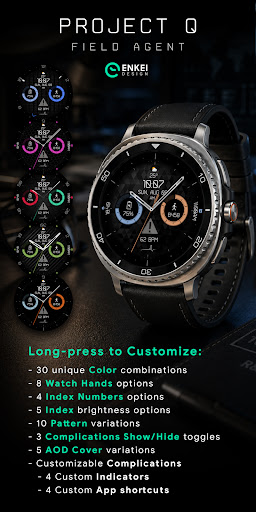
Project Q - Field Agent is a simple digital watch face with subtle BPM animation and useful health & weather indicators.
Mission-ready digital layout features all the indicators you’ll need at a quick glance, along with customizable indicators, app shortcuts, colors and more!
This an independent and unaffiliated work, inspired by a clean and simple UI from a spy-themed secret agent video game.
Powered by Watch Face Format
Made only for devices running Wear OS 6.0 and newer versions (API 34+)
Please install directly to your watch device (not phone).
Phone companion app serves only to help direct installation to your watch device, if needed.
Buy-One-Get-One PROMOTION
https://www.enkeidesignstudio.com/bogo-promotion
FEATURES:
- Digital clock - Supports 12h/24h
- Weekday, Month & Date - Multi-language
- TAP to open Calendar app
- Weather - Temperature & icon
- TAP to open Weather
- Watch battery % + slider - Customizable
- TAP to open Battery info
- Daily steps + daily steps goal % slider - Customizable
- TAP to open Steps info
- BPM indicator + dynamic animation & icon
- TAP to open Heart rate
- 2 Customizable short-text indicators
- Next event by default
- Sunrise/sunset by default
- 2 Customizable range indicators
- Steps by default
- Watch battery by default
- 4 Customizable app shortcuts (icons)
- At "1", "5", "7" and "11" o’clock
- Battery efficient, customizable AOD
- Uses just 1% - 5% active pixels
- Choose to show or hide certain indicators
- Long-press to access Customize menu:
- Color - 30 unique color combinations
- Watch Hands - 8 options
- Index Numbers - 4 options
- Index - 5 brightness options
- Pattern - 10 variations
- Complications Show/Hide - 3 toggles
- AOD Cover - 5 options
- Complication
- 4 Customizable indicators
- 4 Custom app shortcuts (hideable icons)
INSTALLATION TIPS:
https://www.enkeidesignstudio.com/how-to-install
CONTACT:
info@enkeidesignstudio.com
E-mail us for any questions, issues or general feedback. We're here for you!
Customer satisfaction is our main priority, making sure to respond to each e-mail within 24 hours.
More watch faces:
https://play.google.com/store/apps/dev?id=5744222018477253424
Website:
https://www.enkeidesignstudio.com
Social media:
https://www.facebook.com/enkei.design.studio
https://www.instagram.com/enkeidesign
Thank you for using our watch faces.
Have a great day!