Tancha S84 Dashboard WatchFace

19 installs
Ratings not yet available
MAU not available
Revenue not available
Tancha S84 Dashboard WatchFace icon

ASO Keyword Dashboard

Tracking 84 keywords for Tancha S84 Dashboard WatchFace in Google Play

Developer: Tancha Watch Faces Category: personalization

Tancha S84 Dashboard WatchFace tracks 84 keywords (no keywords rank yet; 84 need traction). Key metrics: opportunity 70.4, difficulty 46.9.

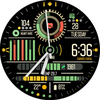
This watc face mimics a dashboard offering compact, comprehensive data displays

Tracked keywords

84

0  ranked •  84  not ranking yet

Top 10 coverage

Best rank — • Latest leader —

Avg opportunity

70.4

Top keyword: faces

Avg difficulty

46.9

Lower scores indicate easier wins

Opportunity leaders

  • faces

    Opportunity: 75.0 • Difficulty: 40.5 • Rank —

    Competitors: 392

    63.6
  • purchased

    Opportunity: 74.0 • Difficulty: 42.5 • Rank —

    Competitors: 636

    62.0
  • watch faces

    Opportunity: 74.0 • Difficulty: 36.4 • Rank —

    Competitors: 37

    60.2
  • displaying

    Opportunity: 74.0 • Difficulty: 37.8 • Rank —

    Competitors: 201

    60.5
  • hesitate

    Opportunity: 74.0 • Difficulty: 41.1 • Rank —

    Competitors: 579

    64.4

Unranked opportunities

  • faces

    Opportunity: 75.0 • Difficulty: 40.5 • Competitors: 392

  • purchased

    Opportunity: 74.0 • Difficulty: 42.5 • Competitors: 636

  • watch faces

    Opportunity: 74.0 • Difficulty: 36.4 • Competitors: 37

  • displaying

    Opportunity: 74.0 • Difficulty: 37.8 • Competitors: 201

  • hesitate

    Opportunity: 74.0 • Difficulty: 41.1 • Competitors: 579

High competition keywords

  • time

    Total apps: 383,027 • Major competitors: 17,709

    Latest rank: — • Difficulty: 57.6

  • like

    Total apps: 290,494 • Major competitors: 22,573

    Latest rank: — • Difficulty: 60.6

  • features

    Total apps: 255,212 • Major competitors: 15,215

    Latest rank: — • Difficulty: 58.0

  • play

    Total apps: 208,292 • Major competitors: 20,375

    Latest rank: — • Difficulty: 59.9

  • data

    Total apps: 182,626 • Major competitors: 7,206

    Latest rank: — • Difficulty: 56.5

All tracked keywords

Includes opportunity, difficulty, rankings and competitor benchmarks

Major Competitors
play661006085

208,292 competing apps

Median installs: 7,199

Avg rating: 4.0

20,375

major competitor apps

customization731004568

17,800 competing apps

Median installs: 4,204

Avg rating: 4.1

1,240

major competitor apps

follow691005278

83,321 competing apps

Median installs: 1,613

Avg rating: 4.1

4,453

major competitor apps

right671005783

160,130 competing apps

Median installs: 1,940

Avg rating: 4.0

8,862

major competitor apps

phone671006083

152,995 competing apps

Median installs: 3,556

Avg rating: 4.0

9,507

major competitor apps

connected691005078

74,490 competing apps

Median installs: 637

Avg rating: 4.0

2,408

major competitor apps

step691005178

84,659 competing apps

Median installs: 1,455

Avg rating: 4.0

4,173

major competitor apps

digital681005181

125,373 competing apps

Median installs: 878

Avg rating: 4.0

4,621

major competitor apps

heart711004774

42,841 competing apps

Median installs: 1,013

Avg rating: 4.1

1,618

major competitor apps

wear711006172

32,741 competing apps

Median installs: 379

Avg rating: 4.1

868

major competitor apps

date681005379

93,615 competing apps

Median installs: 797

Avg rating: 4.1

2,927

major competitor apps

wear os721006070

24,400 competing apps

Median installs: 292

Avg rating: 4.2

300

major competitor apps

list691005278

82,864 competing apps

Median installs: 2,554

Avg rating: 4.1

3,582

major competitor apps

time641005889

383,027 competing apps

Median installs: 1,492

Avg rating: 4.0

17,709

major competitor apps

key681005281

122,334 competing apps

Median installs: 1,375

Avg rating: 4.0

5,893

major competitor apps

rate701004775

50,469 competing apps

Median installs: 3,193

Avg rating: 4.1

2,288

major competitor apps

touch691005276

63,345 competing apps

Median installs: 1,850

Avg rating: 4.0

3,744

major competitor apps

install701004976

59,328 competing apps

Median installs: 3,188

Avg rating: 4.1

2,857

major competitor apps

store691005478

81,806 competing apps

Median installs: 1,653

Avg rating: 4.1

4,257

major competitor apps

watch681005780

105,087 competing apps

Median installs: 1,213

Avg rating: 4.0

5,780

major competitor apps

tracking691004877

69,370 competing apps

Median installs: 424

Avg rating: 4.0

1,700

major competitor apps

text691005778

77,965 competing apps

Median installs: 4,532

Avg rating: 4.1

4,675

major competitor apps

comprehensive691004878

84,972 competing apps

Median installs: 756

Avg rating: 4.1

2,156

major competitor apps

open681005479

97,008 competing apps

Median installs: 4,251

Avg rating: 4.0

7,355

major competitor apps

face691005076

63,721 competing apps

Median installs: 1,310

Avg rating: 4.0

3,770

major competitor apps

84 keywords
1 of 4

App Description

This watc face mimics a dashboard offering compact, comprehensive data displays

Tancha S84 Dashboard Watch Face
This watch face replicates an advanced dashboard, packing comprehensive data displays into a compact design.

This watch face is developed by Tancha Watch Faces for use on Wear OS devices.

FEATURES
Tancha S84 Dashboard Watch Face
Analog/Digital time display
Date
Color customizations
Custom complications
Heart rate
Battery temperature
Step tracking
Always-on display

This feature list concisely highlights the key capabilities of the watch face.
It covers the essentials like time/date display, customization options,
fitness tracking features like heart rate and step counting,
as well as useful extras like battery temperature monitoring and always-on mode.

FAQ :
1- The watch face is installed on your watch but does not appear in the catalog?

FOLLOW THESE STEPS:

Press and hold your watch screen.
Swipe right until you see the text 'Add watch face.'
Press the '+ Add watch face' button.
Find and activate the watch face you installed.


2- If the companion app is installed but the watch face is not, follow the steps below:

FOLLOW THESE STEPS:

Open the companion app on your phone (ensure that your smartwatch is connected to your phone).
Next, tap the 'INSTALL WATCH FACE ON WATCH' button at the bottom of the app.
This will open the Play Store on your WEAR OS smartwatch, displaying the purchased watch face and allowing you to install it directly.


If you have any questions or requests, please don't hesitate to get in touch with me at tanchawatch@gmail.com.

Thank you sincerely for your support.

Best regards,
Tancha Watch Faces