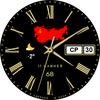

Back in USSR (B)
ASO Keyword Dashboard
Tracking 94 keywords for Back in USSR (B) in Google Play
Back in USSR (B) tracks 94 keywords (no keywords rank yet; 94 need traction). Key metrics: opportunity 70.1, difficulty 52.2.
"Back in USSR" watch face for Wear OS smartwatches
Tracked keywords
94
0 ranked • 94 not ranking yet
Top 10 coverage
—
Best rank — • Latest leader —
Avg opportunity
70.1
Top keyword: charge
Avg difficulty
52.2
Lower scores indicate easier wins
Opportunity leaders
- 67.9
charge
Opportunity: 73.0 • Difficulty: 46.3 • Rank —
Competitors: 1,120
- 68.6
icon
Opportunity: 73.0 • Difficulty: 55.3 • Rank —
Competitors: 1,128
- 68.3
changing
Opportunity: 73.0 • Difficulty: 48.6 • Rank —
Competitors: 1,233
- 67.9
similar
Opportunity: 73.0 • Difficulty: 65.4 • Rank —
Competitors: 1,267
- 68.7
translation
Opportunity: 73.0 • Difficulty: 49.8 • Rank —
Competitors: 844
Unranked opportunities
charge
Opportunity: 73.0 • Difficulty: 46.3 • Competitors: 1,120
icon
Opportunity: 73.0 • Difficulty: 55.3 • Competitors: 1,128
changing
Opportunity: 73.0 • Difficulty: 48.6 • Competitors: 1,233
similar
Opportunity: 73.0 • Difficulty: 65.4 • Competitors: 1,267
translation
Opportunity: 73.0 • Difficulty: 49.8 • Competitors: 844
High competition keywords
want
Total apps: 103,224 • Major competitors: 12,476
Latest rank: — • Difficulty: 58.5
information
Total apps: 101,893 • Major competitors: 7,805
Latest rank: — • Difficulty: 58.6
us
Total apps: 96,924 • Major competitors: 10,444
Latest rank: — • Difficulty: 61.6
take
Total apps: 93,453 • Major competitors: 12,676
Latest rank: — • Difficulty: 62.9
please
Total apps: 75,311 • Major competitors: 7,632
Latest rank: — • Difficulty: 58.3
All tracked keywords
Includes opportunity, difficulty, rankings and competitor benchmarks
| Major Competitors | |||||||
|---|---|---|---|---|---|---|---|
| mode | 69 | 100 | 65 | 78 35,564 competing apps Median installs: 53,723 Avg rating: 3.1 | — | — | 5,505 major competitor apps |
| change | 68 | 100 | 55 | 80 48,309 competing apps Median installs: 42,177 Avg rating: 3.0 | — | — | 6,101 major competitor apps |
| support | 67 | 100 | 60 | 83 68,575 competing apps Median installs: 34,249 Avg rating: 3.0 | — | — | 7,371 major competitor apps |
| language | 69 | 100 | 59 | 76 29,667 competing apps Median installs: 31,657 Avg rating: 2.8 | — | — | 2,542 major competitor apps |
| classic | 70 | 100 | 56 | 76 28,140 competing apps Median installs: 50,800 Avg rating: 3.3 | — | — | 4,499 major competitor apps |
| wear | 72 | 100 | 80 | 66 7,173 competing apps Median installs: 24,222 Avg rating: 3.2 | — | — | 839 major competitor apps |
| date | 69 | 100 | 60 | 77 31,688 competing apps Median installs: 26,732 Avg rating: 2.8 | — | — | 2,809 major competitor apps |
| wear os | 71 | 100 | 76 | 60 3,443 competing apps Median installs: 13,088 Avg rating: 3.5 | — | — | 279 major competitor apps |
| simply | 69 | 100 | 53 | 78 38,369 competing apps Median installs: 33,095 Avg rating: 3.0 | — | — | 4,197 major competitor apps |
| information | 66 | 100 | 59 | 86 101,893 competing apps Median installs: 23,675 Avg rating: 2.6 | — | — | 7,805 major competitor apps |
| call | 70 | 100 | 64 | 76 26,309 competing apps Median installs: 41,916 Avg rating: 2.9 | — | — | 3,361 major competitor apps |
| menu | 72 | 100 | 65 | 71 13,685 competing apps Median installs: 28,103 Avg rating: 3.0 | — | — | 1,278 major competitor apps |
| note | 71 | 100 | 53 | 72 16,600 competing apps Median installs: 34,914 Avg rating: 3.2 | — | — | 1,579 major competitor apps |
| write | 71 | 100 | 53 | 73 19,516 competing apps Median installs: 41,559 Avg rating: 2.8 | — | — | 2,115 major competitor apps |
| account | 68 | 100 | 60 | 79 41,533 competing apps Median installs: 33,567 Avg rating: 3.0 | — | — | 4,686 major competitor apps |
| watch | 69 | 100 | 69 | 78 38,532 competing apps Median installs: 39,176 Avg rating: 3.0 | — | — | 5,315 major competitor apps |
| operation | 72 | 100 | 47 | 67 8,140 competing apps Median installs: 28,702 Avg rating: 2.5 | — | — | 724 major competitor apps |
| picture | 71 | 100 | 58 | 74 20,076 competing apps Median installs: 43,590 Avg rating: 3.1 | — | — | 2,597 major competitor apps |
| take | 66 | 100 | 63 | 85 93,453 competing apps Median installs: 41,741 Avg rating: 2.9 | — | — | 12,676 major competitor apps |
| hand | 72 | 100 | 47 | 71 13,821 competing apps Median installs: 31,490 Avg rating: 2.9 | — | — | 1,571 major competitor apps |
| social | 68 | 100 | 57 | 81 56,380 competing apps Median installs: 35,671 Avg rating: 2.9 | — | — | 6,322 major competitor apps |
| face | 70 | 100 | 55 | 75 24,650 competing apps Median installs: 46,450 Avg rating: 3.1 | — | — | 3,493 major competitor apps |
| want | 66 | 100 | 59 | 86 103,224 competing apps Median installs: 39,982 Avg rating: 2.9 | — | — | 12,476 major competitor apps |
| second | 72 | 100 | 48 | 69 10,831 competing apps Median installs: 33,608 Avg rating: 2.8 | — | — | 1,135 major competitor apps |
| charge | 73 | 100 | 46 | 68 9,398 competing apps Median installs: 38,196 Avg rating: 2.8 | — | — | 1,120 major competitor apps |
App Description
"Back in USSR" watch face for Wear OS smartwatches
- Multilingual display of date and day of the week. The watch face language is synchronized with the one installed on your smartphone. If the font does not support your language, the watch face will automatically display the day of the week in English.
- The second hand imitates the work of classic mechanical watches with a slight twitching at a frequency of 5 Hz
- At the bottom of the dial, under the inscription "17 stones", the numbers indicate the battery charge. I deliberately did not add percentages or a battery icon so that the watch had a classic look.
- You can change the appearance of the watch face by turning on or off the battery charge display (then the watch face becomes similar to a mechanical watch) or by changing the icons on a conditional map of the USSR
- In the watch face menu settings, you can configure 3 tap zones to call up applications installed on your watch and one information zone to display data from any application.
Please note that not all watch applications can be optimized to work with the information zone and may not display data or display it incorrectly. If you want to remove the display of the information zone, then simply set it to "None" in the watch face menu (due to translation peculiarities in some countries, this menu item may be called differently)
Also, I can guarantee the setup and operation of tap zones only on watches from Samsung. If you have a watch from another manufacturer, the tap zones may not work correctly. Please take this into account when purchasing a watch face.
I made an original AOD mode for this watch face. To display it, you need to activate it in the menu of your watch. Please note that in AOD mode, the picture on the watch is redrawn once per minute. Therefore, the second hand is not displayed in this mode.
For comments and suggestions, please write to e-mail: eradzivill@mail.ru
Join us on social networks
https://vk.com/eradzivill
https://radzivill.com
https://t.me/eradzivill
https://www.facebook.com/groups/radzivill
Sincerely,
Eugeniy Radzivill
