VF Element Hybrid 2 Watch Face

VF Element Hybrid 2 Watch Face Summary
VF Element Hybrid 2 Watch Face is a mobile Android app in Personalization by VeselkaFace DESIGN. Released in Aug 2025 (9 months ago). It has about 555+ installs Based on AppGoblin estimates, it reaches roughly 9.00 monthly active users . Store metadata: updated Dec 13, 2025.
Recent activity: 1.00 installs this week (5.00 over 4 weeks) showing below average growth View trends →
Store info: Last updated on Google Play on Dec 13, 2025 .
0★
Ratings: 0
Screenshots


App Description
A stylish hybrid watch face for Wear OS with essential data and personalization
Elegance that works for you.
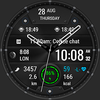
The hybrid watch face VF Element Hybrid 2 combines elegance and functionality in one design. A modern and stylish look filled with essential information and deep personalization options.
Designed for Wear OS (API 34+), this hybrid watch face blends classic analog beauty with digital precision. Whether at work, in the gym, or on the go, VF Element Hybrid 2 gives you instant access to everything you need - at a glance.
Created for those who value both style and performance, it delivers key data, an elegant visual experience, and intuitive features tailored to you.
✅ Key information at a glance: time, date, steps, heart rate, battery level
✅ Smart color indicators for heart rate and battery - change according to the current level
✅ Track your activity: distance (km/mi) and calories burned
✅ Optional leading zero off in 12-hour mode
🎨 Endless personalization options:
✅ 3 unique backgrounds
✅ 22 color themes
✅ 3 always-on display (AOD) styles
✅ 8 hand styles (with the option to turn them off)
✅ 8 bezel marker colors
📌 Customizable shortcuts and complications:
✅ 4 customizable complications
✅ 4 customizable app shortcuts, including 1 invisible at the 9 o’clock bezel zone
✅ Invisible "Alarm" button - tap the digital seconds
✅ Invisible "Calendar" button - tap the date
✅ Moon phases
🚶♀ Distance (km/mi)
Distance is calculated based on steps:
📏 1 km = 1312 steps
📏 1 mi = 2100 steps
Choose your distance unit in the watch face settings.
Heart rate zones are based on your average resting heart rate.
🕒Time format
12/24-hour mode is selected automatically based on your phone settings.
Leading zero option can be set in the watch face settings.
⚠ Requires Wear OS API 34+
🚫 Not compatible with rectangular watches
✉ Have questions? Contact me at veselka.face@gmail.com — I’ll be happy to help!
➡ Follow me for exclusive updates and new releases!
• Facebook -https://www.facebook.com/veselka.watchface/
• Telegram - https://t.me/VeselkaFace
• YouTube - https://www.youtube.com/@VeselkaFace