AdoraMúsica: Spanish Worship


AdoraMúsica: Spanish Worship Summary
AdoraMúsica: Spanish Worship is a with in-app purchases Android app in Music And Audio by XME Inc.. Released in May 2025 (10 months ago). It has about 81+ installs Based on AppGoblin estimates, it reaches roughly 10 monthly active users and generates around $<10K monthly revenue (100% IAP / 0% ads). Store metadata: updated Oct 24, 2025.
Recent activity: 3.00 installs this week (9.00 over 4 weeks) showing steady growth View trends →
Store info: Last updated on Google Play on Oct 24, 2025 .
0★
Ratings: 0
Screenshots

App Description
Spanish multitrack worship music app for teams with limited musicians.
If you need a drummer, keyboardist, bassist, guitarist, more vocalists in your band, etc., AdoraMúsica has you covered with HD multitrack music with vocals! Subscribe now!
AdoraMúsica is an easy-to-use multitrack music app. It’s ideal for churches with limited musician and team options. This app is designed for those seeking to raise the standard of excellence in the art of musical worship. It’s a serendipitous fusion of sound and quality—the perfect combination for a great worship experience.
• Access all current and future songs: Popular worship songs, praise moments, and more!
Features:
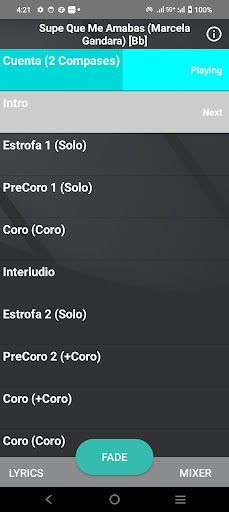
• Hold down a section during playback to instantly jump to it. This is useful when your worship leader suddenly changes the song arrangement live.
• Prearrange songs in advance. The song will play automatically in the order you set. Tap the info button on the song page (in playlists only).
• Auto-play from one song to the next in a playlist (Auto-play switch on the playlist page).
• Skip and loop between sections.
• Rearrange a song live during worship (e.g., jump from verse to bridge with just a tap).
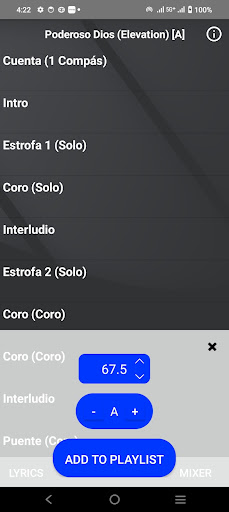
• Options to change key.
• Options to change tempo.
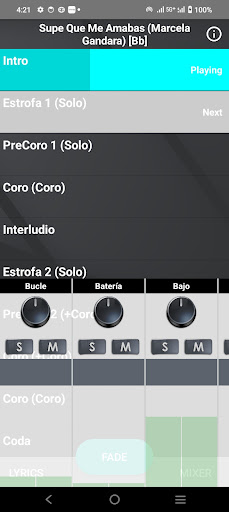
• Adjust the volume of instruments, vocals, and other tracks individually in real time.
• Switch from an acoustic version to a full band using the mixer. Mute or isolate tracks to fit the moment. Turn a full song into a prayer or altar moment by muting vocals and drums and adjusting volumes.
• Create and save playlists: Songs play automatically in order within a playlist.
• Share song lists with your team.
• Add lyrics to songs. Tap the info button on the song page and type in the lyrics at the moments you want them to appear. Once done, the lyrics will show on the lyrics page during playback on the main song screen.
• Share lyric files with other devices so you don’t have to retype them.
• Paste full lyrics and simply scroll through them during playback (if you don’t want to time the lyrics).
This subscription will automatically renew each month unless auto-renew is turned off at least 24 hours before the end of the subscription period. Payment will be charged to your iTunes account upon confirmation of purchase. You can manage your subscription and turn off auto-renewal by going to your account settings after purchase. Cancellation of the cur