Karnaugh Map Solver


Karnaugh Map Solver Summary
Karnaugh Map Solver is a free Android app in Education by Xortalius. Released in Dec 2024 (1 year ago). It has about 12K+ installs Based on AppGoblin estimates, it reaches roughly 681 monthly active users . Store last updated Mar 17, 2026
Recent activity: 224 installs this week (839 over 4 weeks) showing steady growth View trends →
Karnaugh Map Solver SDKs Summary
App not yet scanned for SDKs.
0★
Ratings: 0
Screenshots


App Description
Fast and intuitive tool to solve Karnaugh maps effectively.
The Karnaugh Map Solver app, also known as KMap Solver, is a comprehensive tool designed to simplify Karnaugh maps with up to 5 variables, streamline Boolean functions, and analyze their behavior in various representations. With its user-friendly interface, this app guides you step-by-step through the entire process.
How to Use Karnaugh Map Solver:
Select the canonical form: Choose how you want to represent the Boolean function:
Sum of Products (minterms): Highlights combinations where the output is 1.
Product of Sums (maxterms): Focuses on combinations where the output is 0.
Specify the number of variables: Define the number of variables in your Boolean function. The app supports Karnaugh maps from 2 to 5 variables.
Customize variable names: Assign custom names to your variables. By default, the variables are labeled [A, B, C, D, E], but you can personalize them as needed.
Configure values in the map: In the generated grid, click on the squares to toggle values between 0, 1, and X as required. Once you’ve set all the combinations, the simplified Boolean function will automatically display at the top.
Access the truth table: Use the "Truth Table" tab to view and edit all possible variable combinations. Changes made here will automatically update the Karnaugh map and the Boolean function.
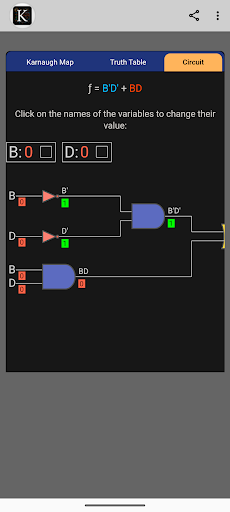
Generate the logic circuit: In the "Circuit" tab, visualize the digital circuit representing the simplified Boolean function. Adjust the input variable values and observe how the output changes in real-time.