Accident Reporter


Accident Reporter Summary
Accident Reporter is a mobile Android app in Maps And Navigation by YJOT-DEV. Released in Mar 2026 (recently released ago). It has about 1.00+ installs Based on AppGoblin estimates, it reaches roughly 1.00 monthly active users . Store metadata: updated Mar 26, 2026.
Recent activity: 1.00 installs this week (1.00 over 4 weeks) View trends →
Store info: Last updated on Google Play on Mar 26, 2026 .
0★
Ratings: 0
Screenshots



App Description
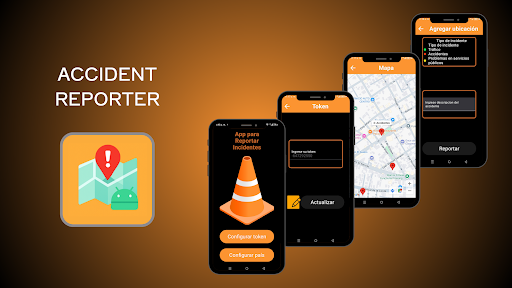
This app reports incidents on a Google map.
The application's user flow is designed to be straightforward and efficient, guiding the user through the following steps:
1. Simple Initial Setup: Upon launching the application for the first time, the user has two clear options:
- Configure Location: For new users, this is the starting point. They can define their country, state/province, and city. The application uses this information to obtain the exact geographic coordinates, customizing the map to their area of interest.
- Configure Token: For returning users, this feature allows them to re-enter a unique personal token. This gives them back control over the incidents they have previously reported, allowing them to edit or delete them.
2. Interactive Map View: Once the location is configured, the user accesses the main view: an interactive map. On this map, all incidents reported by the community are displayed with red markers. By selecting a marker, a preview with basic information about the incident can be obtained.
3. Incident Management: Clicking on an incident preview offers two options:
- Delete Report: If the user is the original "owner" of the report, they can delete it from the map.
- View/Edit Details: This option leads to a screen with all the incident information. For most users, the information is read-only. However, for the report owner, this screen becomes an editable form, allowing them to update the information as needed.
4. Creating a New Report: ARI's core feature is the ease of adding new incidents. The user simply clicks on any empty area of the map. This opens an "Add Location" form, where they can:
- Select the incident type from a predefined list (e.g., Traffic, Accidents, Utility Issues).
- Add a detailed description of the event.
Upon confirmation, the report is saved, the application automatically records the date, and the new incident appears on the map for the entire community to view.